
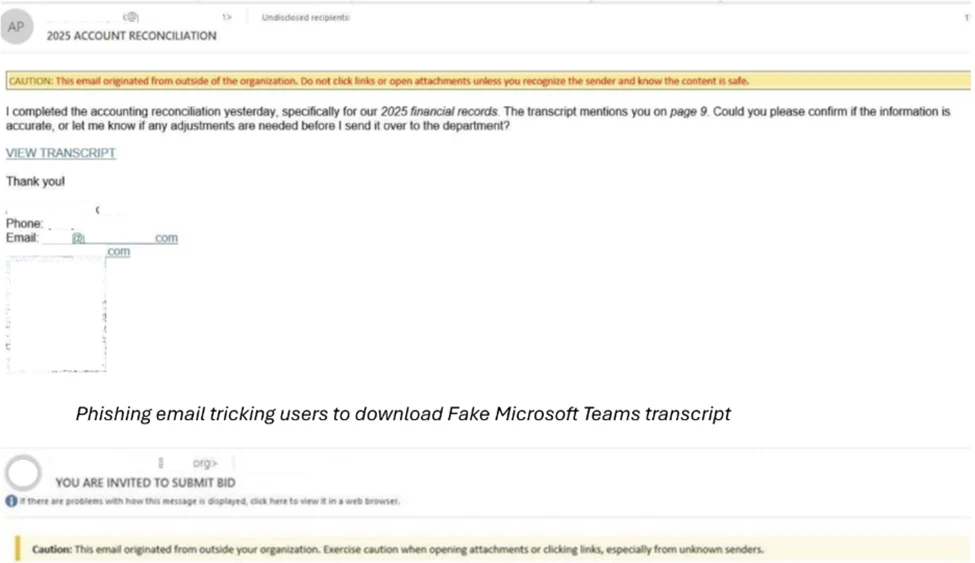
A clever new wave of phishing attacks is hitting office workers where they feel safest- their daily meeting invites. Instead of using obvious malware, hackers are now using stolen digital certificates to trick computers into trusting malicious files. According to researchers from the Microsoft Defender Security Research Team, these attacks involve highly convincing fake updates for apps like Zoom, Microsoft Teams, and Adobe Reader.
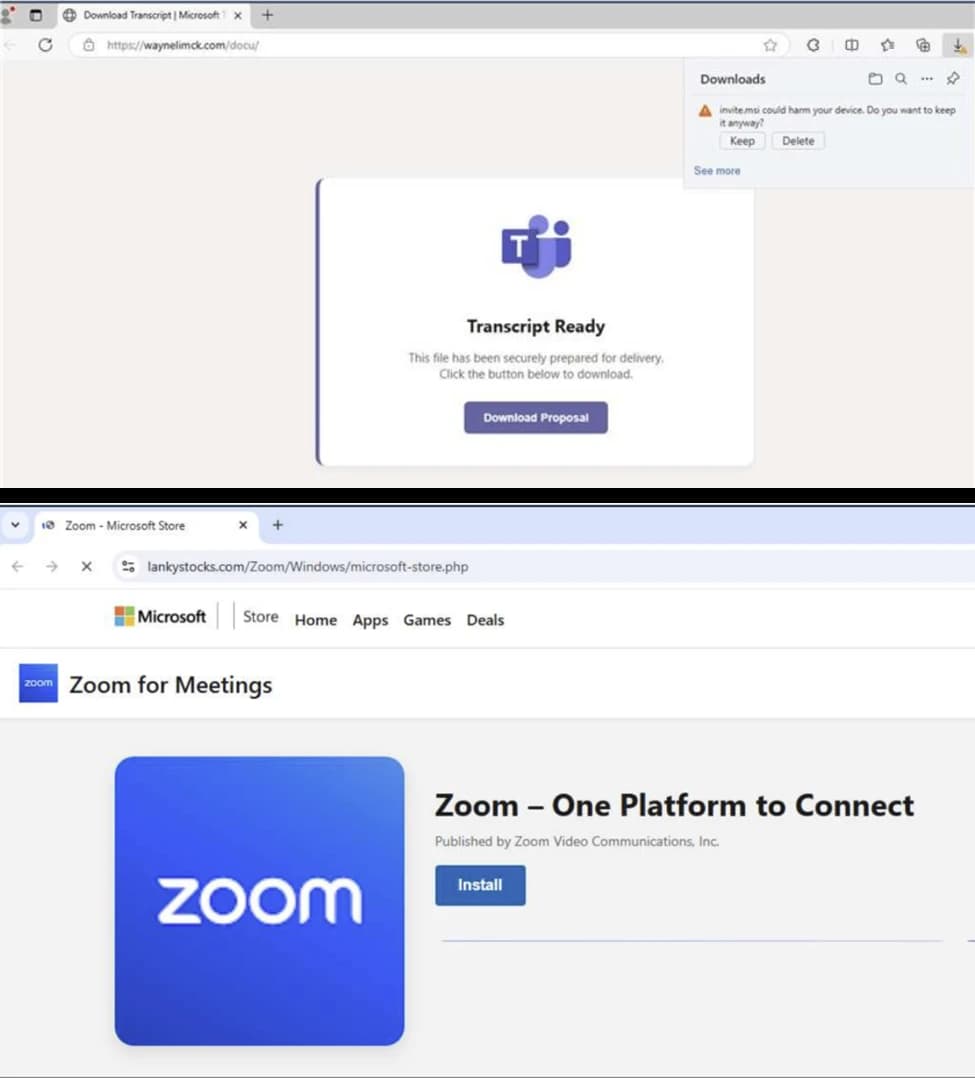
The campaign, which began around February 2026, relies on a psychological trick. When a user clicks a link in a fake meeting invite or a blurred PDF, they aren’t told they have a virus; they are directly sent to a fake website that looks like an official download centre. As per Microsoft’s research, these sites claim the user’s software is out of date, prompting a “required” update.
What makes this trick particularly dangerous is the use of Extended Validation (EV) certificates. In simple words, these are digital signatures that tell an operating system a file is safe. Researchers noted that the hackers used a compromised certificate issued to a firm called TrustConnect Software PTY LTD. Because the file has this “trusted” signature, it can bypass many standard security blocks that would normally stop an unrecognised program.
This research further highlights that the downloaded files (named things like msteams.exe or adobereader.exe) are actually shells. Once opened, they install Remote Monitoring and Management (RMM) tools. While IT departments use RMM for remote help, hackers use it as a backdoor to stay inside a network long after the initial click.
Further probing revealed that the attackers aren’t just relying on one way in; once the first file is run, it uses “encoded PowerShell commands” to quietly download even more tools. This includes software like ScreenConnect and MeshAgent. By installing multiple tools at once, the hackers ensure they have “persistent, privileged access.” If an IT team finds and deletes one, the others allow the attacker to stay hidden.
Once they have this position, the attackers can move through the company’s network to steal passwords or deploy ransomware. It is worth noting that some of the files used in these attacks had signatures that were already cancelled, yet they still managed to function.
To stay safe, experts suggest ignoring “update required” pop-ups from emails and only using official app stores for software maintenance.
Regarding the shift in how we trust digital signatures, Jason Soroko, Senior Fellow at Sectigo shared the following insight with Hackread.com:
“If the code signing signature is verified and the certificate chain checked out, the software or document is assumed to be trustworthy. That assumption no longer holds in a world where attackers routinely steal signing keys and compromise build pipelines. A valid signature still tells us something important about provenance, but it does not tell us the whole story. Security teams must treat it as a single data point within a broader behavioral profile.
“The modern defense model requires context. How often has this signer produced software before? Does the file’s behavior match the historical pattern of that developer? Is the distribution channel consistent with past releases?”
“When signatures are evaluated alongside telemetry such as runtime behavior, infrastructure reputation, and update cadence, they become far more meaningful. In that model, the signature remains valuable; however, it becomes evidence rather than a verdict. Trust emerges from the convergence of identity, behavior, and reputation, and this works well in zero trust models using blended defences.”

