
NoVoice malware was found in 50 Android apps on Google Play, with 2.3 million downloads, by bypassing detection and targeting outdated devices.

Hackers didn’t sneak past Google Play’s defenses. They walked right through the front door.
Downloaded over 2.3 million times, potentially exposing millions of devices, the NoVoice malware lives in apps installed directly from the Google Play Store, an unusual scenario in which it extracted sensitive data from infected devices.
First identified by researchers at McAfee, the affected apps have since been reported to, and removed by, Google. While no threat actors have been officially named, the malware’s behavior suggests a pattern familiar to known threat groups, prompting renewed warnings for Android users to remain vigilant.
A silent and unusual malware
While many malware targeting Android users often come from side-loaded apps or are installed after app download, this malware instead compromised the Google Play Store.
By building and deploying harmless-looking games, cleaners, and image galleries to the Google Play Store, these attackers were able to hide the malware’s behavior during Google’s code review until after somebody had installed it. By further blending and actually delivering the app functions it masquerades as, the malware avoided early detection.
Once an infected app gets launched, the sleeping malware activates and first attempts to exploit old Android bugs patched between 2016 and 2021, BleepingComputer reports.
If it succeeds in gaining root access through those vulnerabilities, the malware then evades defenses by hiding its malicious components within legitimate-looking packages. Next, it extracts an encrypted payload concealed within seemingly benign files and loads it into memory for execution.
According to the researchers, the moment it gets loaded into memory, it collects device-specific identifiers, such as hardware details, kernel and Android versions, installed apps, and root status. Armed with this data, it first contacts a Command and Control (C2) server and repeats the process every 60 seconds, receiving additional payloads designed for device-specific exploits.
At this stage, the malware aims to gain privileged, system-wide control of the device by rooting it. According to McAfee’s researchers, 22 different exploits were observed, including a use-after-free kernel bug, which is also one of the flaws Apple fixed in these WebKit updates, and GPU driver bugs.
After successfully exploiting and rooting the device, which turns off many Android security measures, the malware replaces key Android packages with its own malicious wrappers to control system calls and execution.
To further establish solid persistence, this malware installs its recovery scripts and fallback payloads on the victim’s system partition. The idea is simple: by installing these scripts there, even a factory reset can’t remove them from the device, granting it a potent backdoor.
End-stage lethal capacity
To achieve its end goal, this malware can automatically install and delete apps, restart the device to reload its components, and even steal data from highly secure apps like WhatsApp and potentially banking apps.
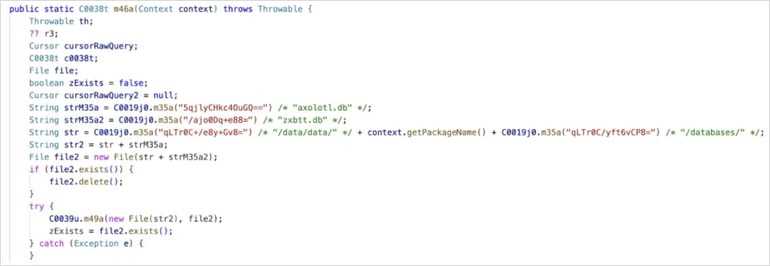
Citing the researchers, BleepingComputer reported that the malware can extract WhatsApp’s underlying data and use it to clone the WhatsApp session on the attacker’s device.
How to detect, prevent, and remediate this malware attack
After McAfee reported the incident to Google, the tech giant immediately took down the malicious websites. When contacted by BleepingComputer, a Google spokesperson confirmed that Android devices running updates from May 2021 onward are safe from this attack, as the vulnerabilities exploited by the malware have long-standing patches.
Except for the categories of these apps, neither Google, McAfee, nor BleepingComputer listed the 50 infected apps that were removed. However, to stay safe, always keep your devices updated, and when installing apps from the Google Play Store, choose well-known publishers.
Based on how the malware operates, affected users are likely to notice excessive battery drain from constant background activity, sudden phone reboots, and the mysterious disappearance and reinstallation of apps. If this is you:
- Disconnect your device from any network and take it to a professional for advanced cleanup.
- Additionally, the malware targets devices running outdated software, suggesting that older devices locked out of updates may be at greater risk.
McAfee also reported that the threat actors avoided infecting devices in Beijing and Shenzhen, which researchers suggest may indicate an attempt to avoid targeting local regions, though this has not been officially confirmed.
For more on Android’s latest protections, check out how Android 17 Beta 3 is boosting stability and security in this update.

