
Microsoft observed phishing-led exploitation of OAuth’s by-design redirection mechanisms. The activity targets government and public-sector organizations and uses silent OAuth authentication flows and intentionally invalid scopes to redirect victims to attacker-controlled infrastructure without stealing tokens. Microsoft Defender flagged malicious activity across email, identity, and endpoint signals. Microsoft Entra disabled the observed OAuth applications; however, related OAuth activity persists and requires ongoing monitoring.
Microsoft Defender researchers uncovered phishing campaigns that exploit legitimate OAuth protocol functionality to manipulate URL redirection and bypass conventional phishing defenses across email and browsers. During the investigation, several malicious OAuth applications were identified and removed to mitigate the threat.
OAuth includes a legitimate feature that allows identity providers to redirect users to a specific landing page under certain conditions, typically in error scenarios or other defined flows. Attackers can abuse this native functionality by crafting URLs with popular identity providers, such as Entra ID or Google Workspace, that use manipulated parameters or associated malicious applications to redirect users to attacker-controlled landing pages. This technique enables the creation of URLs that appear benign but ultimately lead to malicious destinations.
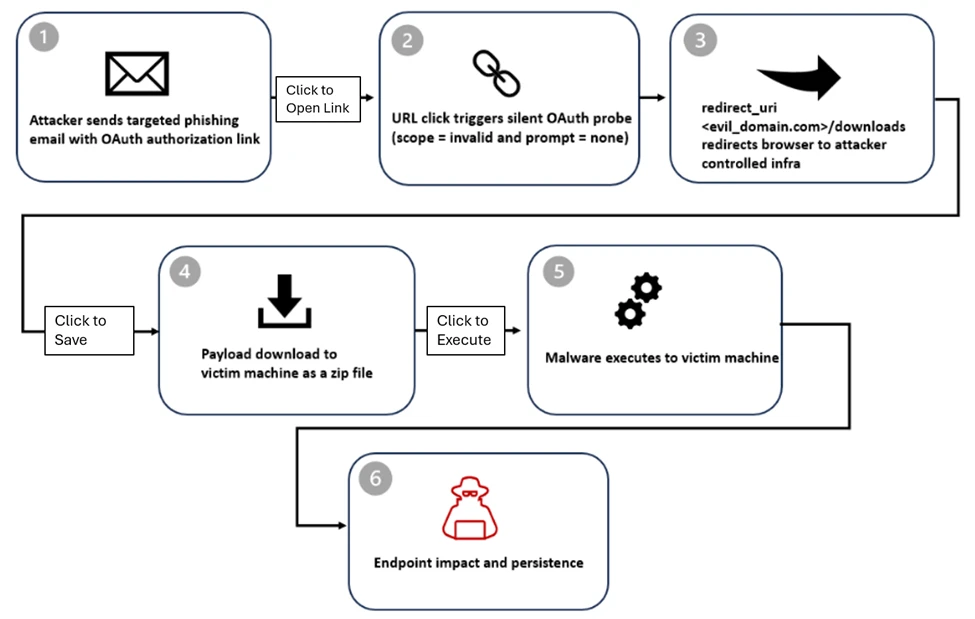
The attack begins with the creation of a malicious application in an actor-controlled tenant, configured with a redirect URI pointing to a malicious domain hosting malware. The attacker then distributes a phishing link prompting the target to authenticate to the malicious application.
Although the mechanics behind OAuth redirection abuse can be subtle, the operational use is straightforward. Threat actors embed crafted OAuth URLs into common phishing lures, relying on user familiarity with legitimate authentication flows to encourage interaction. To clarify the sequence, the attack is broken down into stages below, starting with delivery and the initial user interaction that triggers the redirection chain.
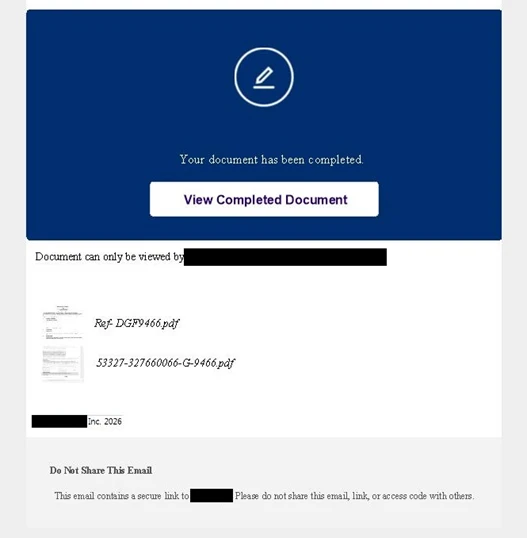
Several threat actors distributed phishing campaigns containing OAuth redirect URLs. The emails used e-signature requests, social security, financial, and political themes to entice recipients to engage and click the link. Indicators suggest these actors used free prebuilt mass-sending tools as well as custom solutions developed in Python and Node.js. In some cases, cloud email services and cloud-hosted virtual machines were used to distribute the messages.
Most URLs were embedded directly in the email body, but some actors placed the URL and accompanying lure inside a PDF attachment and sent the email with no body content. After the OAuth redirect, some campaigns routed users directly to a phishing page, while others introduced additional verification steps designed to bypass security controls.
We observed misuse of OAuth redirects in both phishing and malware distribution campaigns. To increase credibility, actors passed the target email address through the state parameter using various encoding techniques, allowing it to be automatically populated on the phishing page. The state parameter is intended to be randomly generated and used to correlate request and response values, but in these cases it was repurposed to carry encoded email addresses. Observed encoding methods included:
- Plaintext
- Hex string
- Base64
- Custom decoder schemes, for example mapping 11 = a, 12 = b
Once redirected away from the OAuth authentication page, users were typically sent to phishing frameworks such as EvilProxy, among others. These platforms function as attacker-in-the-middle toolkits designed to intercept credentials and session cookies. They often rely on proxy-based login interception and additional obfuscation layers such as CAPTCHA challenges or interstitial pages. At this stage, the attack resembles a conventional phishing attempt, with the added advantage of being delivered through a trusted OAuth identity provider redirect.
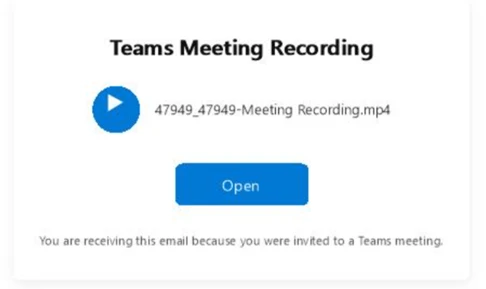
Several samples also included fake calendar invite (.ics) attachments or meeting-related messaging to reinforce legitimacy and encourage interaction. By combining trusted authentication URLs with collaboration-themed lures, attackers increased the likelihood of user engagement.
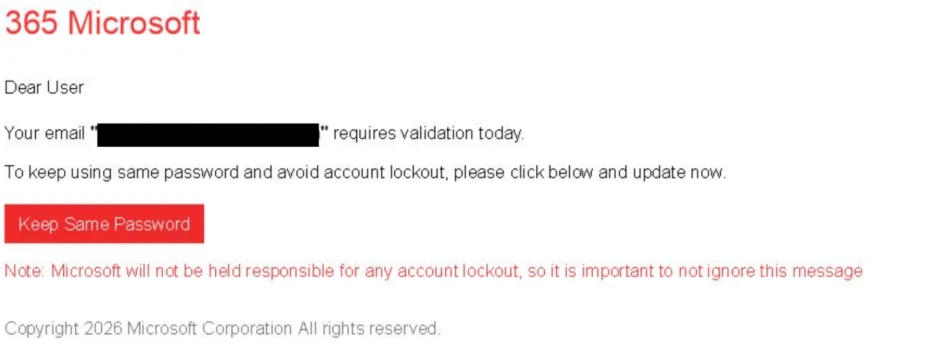
Examples of email lures observed in the phishing/malware campaign and related social engineering themes:
Document sharing and review
Social Security

Teams meeting
Password reset
Employee report lure
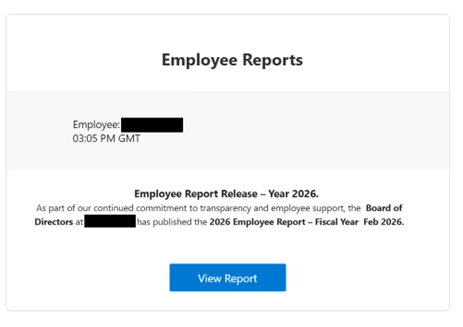
All of the lures described earlier share a common technique: abuse of OAuth redirection behavior. Attackers sent victims phishing links that, when clicked, triggered an OAuth authorization flow through a combination of crafted parameters. In this section, we outline patterns observed across Microsoft and Google OAuth providers. However, this redirection technique is not limited to those platforms and can be abused with other OAuth-compliant services.
Microsoft Entra ID example
https://login.microsoftonline.com/common/oauth2/v2.0/authorize<value> |
Error is triggered due to invalid scope |
| https://accounts.google.com/o/oauth2/v2/auth ?prompt=none &auto_signin=True &access_type=online &state=<email> &redirect_uri=<phishing_url> &response_type=code &client_id=<app_id>.apps.googleusercontent.com &scope=openid+https://www.googleapis.com/auth/userinfo.email |
Error is triggered due to requiring an interactive login, but prompt=none prevents that request |
Looking in details at the URL crafted for Entra ID, at first glance, this looks like a standard OAuth authorization request, but several parameters are intentionally misused. This example targets all tenants; attackers do not need to target all tenants in their URLs.
| Parameter | Purpose | Why attackers used it |
| /common/ | Targets all tenants | Broad targeting |
| response_type=code | Full OAuth flow | Triggers auth logic |
| prompt=none | Silent authentication | No UI, no user interaction |
| scope=<invalid_scope> | Guaranteed failure | Forces error path |
This technique abuses the OAuth 2.0 authorization endpoint by using parameters such as prompt=none and an intentionally invalid scope. Rather than attempting successful authentication, the request is designed to force the identity provider to evaluate session state and Conditional Access policies without presenting a user interface.
Setting an invalid scope is one method used to trigger an error and subsequent redirect, but it is not the only mechanism observed. Errors may also occur when:
- The user is not logged in
- The browser session cannot be retrieved
- The user is logged in, but the application lacks a service principal in the user’s tenant
By design, OAuth flows may redirect users following certain error conditions. Attackers exploit this behavior to silently probe authorization endpoints and infer the presence of active sessions or authentication enforcement. Although user interaction is still required to click the link, the redirect path leverages trusted identity provider domains to advance the attack.
When silent authentication fails, Microsoft Entra ID returns an OAuth error and redirects the browser to the attacker’s registered redirect URI, along with additional error parameters. The examples below show attacker-controlled phishing pages reached after the OAuth redirection.
| https://www.<attacker-domain>/download/XXXX ?error=interaction_required &error_description=Session+information+is+not+for+single+sign-on &state=<value> |
Example of URL after error redirection from Microsoft OAuth |
| https://<attacker-domain>/security/ ?state=<encoded user email> &error_subtype=access_denied &error=interaction_required |
Example of URL after error redirection from Google OAuth |
What this really means:
Interactive authentication is required: Microsoft Entra ID prompts the user to sign in or complete multifactor authentication.
Session information cannot be reused for silent single sign-on: A session may exist, but it cannot be leveraged silently.
From the attacker’s perspective, this information is useful. It confirms that the user account exists and that silent SSO is blocked, meaning interactive authentication is required.
The attacker does not obtain the user’s access token, as the sign-in fails with error code 65001, indicating the user has not granted the application permission to access the resource. However, the primary objective of this campaign is to redirect the target to a malicious landing page, where follow-on activity such as downloading a malicious file may occur. By hosting the payload on an application redirect URI under their control, attackers can quickly rotate or change redirected domains when security filters block them.
Among the threat actors and campaigns abusing OAuth redirection techniques with various landing pages, we identified a specific campaign that attempted to deliver a malicious payload. That activity is described in more detail below.
- After redirection, victims were sent to a
/download/XXXXpath, where a ZIP file was automatically downloaded to the target device. - Observed payloads included ZIP archives containing LNK shortcut files and HTML smuggling loaders.
At this stage, the activity transitions from identity reconnaissance to endpoint compromise.
Extraction of the ZIP archive confirmed PowerShell execution, DLL side-loading, and pre-ransom or hands-on-keyboard activity.
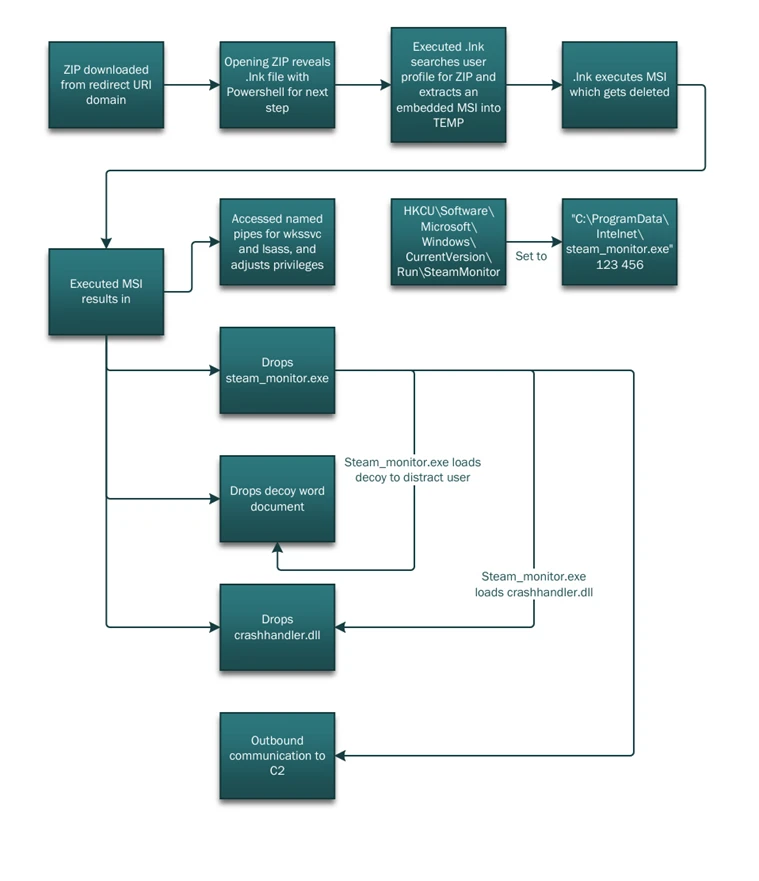
The ZIP file downloaded from the malicious redirect contained a malicious .LNK shortcut file that, when opened, executed a PowerShell command. The script initiated host reconnaissance by running discovery commands such as ipconfig /all and tasklist. Following this discovery phase, PowerShell used the tar utility to extract steam_monitor.exe, crashhandler.dll, and crashlog.dat.
PowerShell then launched the legitimate steam_monitor.exe, which was leveraged to side-load the malicious crashhandler.dll. That DLL decrypted crashlog.dat and executed the final payload in memory, ultimately establishing an outbound connection to an external C2 endpoint.
To reduce risk, organizations should closely govern OAuth applications by limiting user consent, regularly reviewing application permissions, and removing unused or overprivileged apps. Combined with identity protection, Conditional Access policies, and cross-domain detection across email, identity, and endpoint, these measures help prevent trusted authentication flows from being misused for phishing or malware delivery.
The activity described in this report highlights a class of identity-based threats that abuse OAuth’s standard, by-design behavior rather than exploiting software vulnerabilities or stealing credentials. OAuth specifications, including RFC 6749, define how authorization errors are handled through redirects, and RFC 9700 documents security lessons learned from years of real-world deployment. RFC 9700 Section 4.11.2 (“Authorization Server as Open Redirector”) notes that attackers can deliberately trigger OAuth errors, such as by using invalid parameters like scope or prompt=none, to force silent error redirects. Although this behavior is standards compliant, adversaries can abuse it to redirect users through trusted authorization endpoints to attacker-controlled destinations, enabling phishing or malware delivery without successful authentication.
These campaigns demonstrate that this abuse is operational, not theoretical. Malicious but standards-compliant applications can misuse legitimate error-handling flows to redirect users from trusted identity providers to attacker-controlled infrastructure. As organizations strengthen defenses against credential theft and MFA bypass, attackers increasingly target trust relationships and protocol behavior instead. These findings reinforce the need for cross-domain XDR detections, clearer governance around OAuth redirection behavior, and continued collaboration across the security community to reduce abuse while preserving the interoperability that OAuth enables.
Microsoft Defender XDR customers can run the following query to find related activity in their networks:
Identify URL click events associated with invalid OAuth scope parameter
UrlClickEvents
| where ActionType == "ClickAllowed" or IsClickedThrough == true
| where isnotempty(Url)
| where Url startswith "https://" or Url startswith "http://"
| where Url has "scope=invalid" or UrlChain has "scope=invalid"
Identify URL click launched browser with invalid OAuth scope parameter
DeviceEvents
| where ActionType == "BrowserLaunchedToOpenUrl"
| where isnotempty(RemoteUrl)
| where RemoteUrl startswith "https://" or RemoteUrl startswith "http://"
| where RemoteUrl has "scope=invalid"
Identify downloaded payload after OAuth redirect URL
DeviceFileEvents
| where FileOriginReferrerUrl has_all ("login.", ".com")
| where FileOriginUrl has "error=consent_required"
Identify execution of PowerShell command
DeviceProcessEvents
| where FileName in~ ("powershell.exe", "powershell_ise.exe")
| where ProcessCommandLine has_all (".zip", "Get-ChildItem", ".fullname", "::OpenRead", ".Length;", ".Read(", "byte[]", "Sleep", "TaR")
Identify usage of DLL side-loading
DeviceImageLoadEvents
| where InitiatingProcessFileName =~ "steam_monitor.exe"
| where FileName =~ "crashhandler.dll"
| extend path = tostring(parse_path(FolderPath).DirectoryPath)
| where path =~ InitiatingProcessFolderPath
| where not(path has_any (@"WindowsSystem32", @"WindowsSysWOW64", @"winsxs", @"program files"))
The following Microsoft Defender for Endpoint alerts may indicate threat activity related to this threat. Note, however, that these alerts can be also triggered by unrelated threat activity:
- Possible initial access from an emerging threat
- Suspicious connection blocked by network protection
- An executable file loaded an unexpected DLL file
- Hands-on-keyboard attack disruption via context signals
- Silent OAuth probe followed by malware delivery attempt
Microsoft Defender Antivirus detects components of this threat as the following:
- Trojan:Win32/Malgent
- Trojan:Win32/Korplug
- Trojan:Win32/Znyonm
- Trojan:Win32/GreedyRobin.B!dha
- Trojan:Win32/WinLNK
- Trojan:Win32/WinLNK
- Trojan:Win32/Sonbokli
• Email messages containing malicious file removed after delivery
• Email messages containing malicious URL removed after delivery
• Email messages from a campaign removed after delivery.
Block known IOCs (IPs, domains, file hashes) across security tools.
Microsoft Client Ids (associated with threat actor’s OAuth Apps):
| 9a36eaa2-cf9d-4e50-ad3e-58c9b5c04255 |
| 89430f84-6c29-43f8-9b23-62871a314417 |
| 440f4886-2c3a-4269-a78c-088b3b521e02 |
| c752e1ef-e475-43c0-9b97-9c9832dd3755 |
| 6755c710-194d-464f-9365-7d89d773b443 |
| 3cc07cb4-dba8-4051-82cd-93250a43b53b |
| 8c659c19-8a90-49b0-a9f1-15aeba3bb449 |
| bc618bf4-c6d1-4653-8c4d-c6036001b226 |
| bc618bf4-c6d1-4653-8c4d-c6036001b226 |
| 6efe57d9-b00a-4091-b861-a16b7368ab11 |
| f73c6332-4618-4b9d-bcd4-c77726581acd |
| 6fae87b3-3a0f-4519-8b56-006ba50f62c4 |
| 1b6f59dd-45da-4ff7-9b70-36fb780f855b |
| 00afba72-9008-454f-bbe6-d24e743fbe73 |
| 1b6f59dd-45da-4ff7-9b70-36fb780f855b |
| a68c61ee-6185-4b36-bc59-1dca946d95cb |
Initial Redirection URLs
| https[:]//dynamic-entry[.]powerappsportals[.]com/dynamics/ |
| https[:]//login-web-auth[.]github[.]io/red-auth/ |
| https[:]//westsecure[.]powerappsportals[.]com/security/ |
| https[:]//westsecure[.]powerappsportals[.]com/security/ |
| https[:]//gbm234[.]powerappsportals[.]com/auth/ |
| https[:]//email-services[.]powerappsportals[.]com/divisor/ |
| https[:]//memointernals[.]powerappsportals[.]com/auth/ |
| https[:]//calltask[.]im/cpcounting/via-secureplatform/quick/ |
| https[:]//ouviraparelhosauditivos[.]com[.]br/auth/entry[.]php |
| https[:]//abv-abc3[.]top/abv2/css/red[.]html |
| https[:]//calltask[.]im/cpcounting/via-secureplatform/quick/ |
| https[:]//weds101[.]siriusmarine-sg[.]com/minerwebmailsecure101/ |
| https[:]//mweb-ssm[.]surge[.]sh |
| https[:]//ssmapp[.]github[.]io/web |
| https[:]//ssmview-group[.]gitlab[.]io/ssmview |
Hunt for indicators in your environment:
- Auth URLs with prompt=none in emails with common phishing themes such as document sharing, password reset, email storage full, HR, etc.
- Unexpected emails with OAuth URLs with prompt=none
- Auth URLs with prompt=none that redirects to unexpected or unknown domain after initial redirection
- Auth URLs with prompt=none with an email encoded in the state param either in plain text or encoded
- Review and strengthen email security policies (if phishing campaign)
- Enable enhanced logging and monitoring
- Alert security teams and stakeholders.
This research is provided by Microsoft Defender Security Research with contributions from Jonathan Armer, Fernando Dantes, Sagar Patil, Bharat Vaghela, Krithika Ramakrishnan, Sean Reynolds, and Shivas Raina.
Review our documentation to learn more about our real-time protection capabilities and see how to enable them within your organization.
Explore how to build and customize agents with Copilot Studio Agent Builder
Microsoft 365 Copilot AI security documentation
How Microsoft discovers and mitigates evolving attacks against AI guardrails
Learn more about securing Copilot Studio agents with Microsoft Defender
Learn more about Protect your agents in real-time during runtime (Preview) – Microsoft Defender for Cloud Apps | Microsoft Learn

