
Since the escalation of conflict involving Israel, the US and Iran, Bitdefender Antispam Labs has detected a sustained increase in phishing and malware campaigns targeting Gulf countries.
Key takeaways
- Sustained spike in malicious emails targeting Gulf countries immediately after February 28, with activity increasing by ~130% on average compared to pre-war levels
- Peak activity increased about four-fold compared with pre-war phishing levels, with multiple consecutive high-volume days
- Campaigns rely heavily on business-themed lures: invoices, contracts, banking, and deliveries
- Attackers use multiple malware delivery techniques, including Java-based RATs and fileless PowerShell chains
- Evidence of multi-stage attacks designed for stealth and persistence
- Infrastructure and themes sometimes reference current geopolitical events
- No direct attribution to state-sponsored threat actors at this stage—activity may include opportunistic cybercriminal campaigns exploiting the situation
A sudden spike that didn’t go away
The data shows a clear inflection point starting Feb. 28.
Before that, phishing activity fluctuated. Afterward, the pattern changes:
- Activity quickly doubles
- Then stabilizes at significantly elevated levels
- Followed by repeated spikes well above baseline
After Feb. 28, phishing and malware emails targeting Gulf countries surged and stayed elevated. Within days, activity doubled, and at peak reached nearly four times the baseline levels, signaling a sustained and coordinated spike rather than a one-off campaign.
This clearly suggests that phishing and malware delivery campaigns are being deployed and adjusted in real time, with attackers capitalizing on heightened regional sensitivity and business disruptions.
The emails are tailored to match real-world workflows in the region. Across the samples provided by Bitdefender Antispam Lab research Viorel Zavoiu, we noticed several recurring themes:
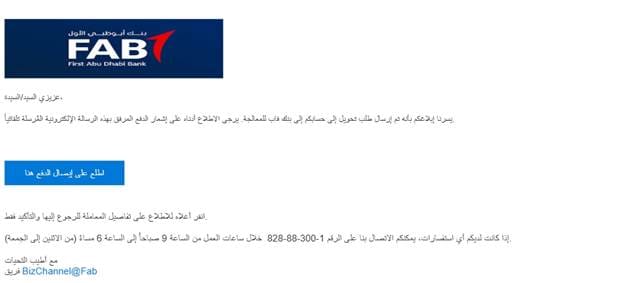
Banking and financial operations
Attackers impersonate bank representatives, referencing:
- Loan approvals
- Guarantees
- Financing arrangements
These emails often include realistic signatures and corporate formatting.
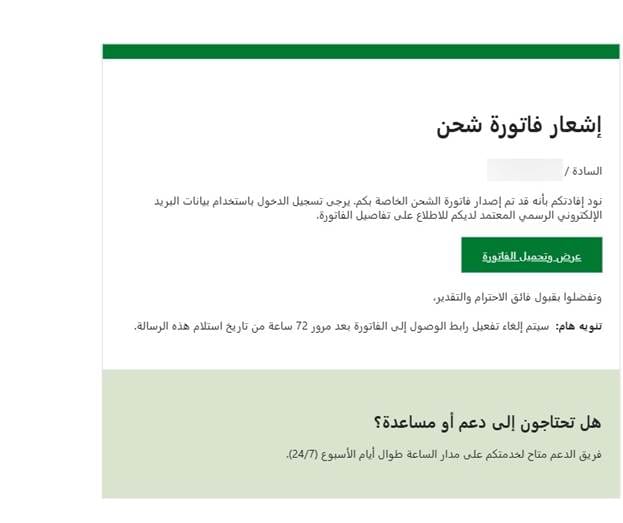
Shipping and delivery notifications
Victims are told:
- A shipment is pending
- Action is required to release or track it
The messages create a sense of urgency while appearing routine.
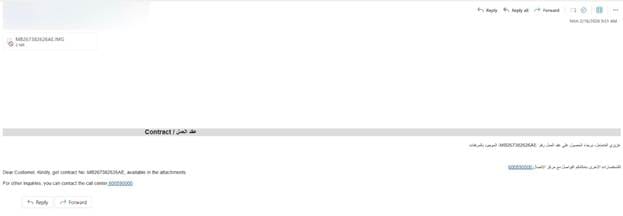
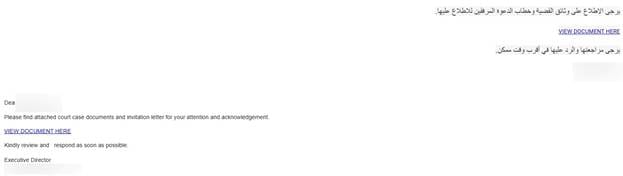
Contracts and government communication
Some emails mimic ministry, legal or official notices referencing contracts, case files or urgent documentation.
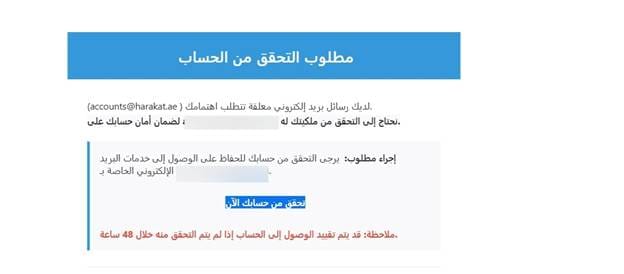
Account verification requests
In some analyzed samples, recipients are pressured with messages like:
- “Verify your account”
- “Access may be restricted within 48 hours”
Now for the really bad part: malicious attachments
Some of the analyzed phishing emails hide malicious payloads that give attackers access to users’ systems.
The fake invoice ploy → Remote Access Spyware
One campaign uses a simple but effective trick: a fake invoice email written in Arabic.
The email contains this text (translated from Arabic)
” Hello Sir/Madam, I was pleased to get in touch with you regarding our upcoming project. I am looking forward to starting the work! You will find the preliminary invoice for the project attached. Once the payment is confirmed, I will begin the first phase of work immediately. Please do not hesitate to ask any questions you may have! Sent from my iPhone”
According to Bitdefender researcher Mihnea George Bejinaru, the attachment is not a real invoice at all, but a Java-based executable (JAR) linked to the STRRAT malware family.
The attachment is also heavily obfuscated—a strong sign of malicious intent. Obfuscation means the malware authors intentionally made the code hard to read and analyze. In this case, the archive contains many dummy .class files with meaningless instructions, apparently added to confuse analysts and slow down detection. There is also a config.txt resource containing a base64-encoded blob that appears to hide configuration data. That hidden config likely stores important instructions such as command-and-control information, operational settings, or fallback infrastructure.
Another trick the malware uses is visual deception. When launched, it displays a GUI pretending to be “Allatori Obfuscator v9.4 DEMO.” That fake interface helps make the file seem like some legitimate Java utility or software tool instead of malware. This type of disguise is meant to dodge suspicion and buy time while the malicious code runs in the background.
One of the clearest forms of malicious behavior is persistence. The sample copies itself into multiple locations on the system, including startup folders, so it can launch again every time the computer reboots. That means that even if the user closes the program, the infection is not necessarily gone. The malware appears to place copies under roaming application data and Windows startup paths, which is a common persistence technique. There is also evidence that it may create a scheduled task named “Skype” that runs every 30 minutes. That is another tactic to ensure the malware survives reboots and keeps relaunching itself even if one persistence method fails.
The behavior also strongly suggests command-and-control communication. The malware connects to suspicious infrastructure, including domains that reference the current geopolitical conflict, with names such as usaisraeliranwar and iranwarusa. These domain names are notable because they appear to tie the campaign’s lure or operational theme to the Middle East conflict. Whether that theme is meant to reflect attacker intent, opportunistic branding, or social engineering context, it is clearly not random.
Once opened, it:
- Hides its code through heavy obfuscation
Making analysis and detection more difficult - Installs itself for persistence
Copies are placed in startup locations, so it runs on every reboot - Contacts command-and-control servers
Allowing attackers to send instructions remotely - Profiles the infected system
Collects system and environment data - Retrieves location data via external services
Helping attackers understand where the victim is - Steals sensitive information
Including browser credentials, email logins, and keystrokes - Enables remote control
Giving attackers the ability to execute commands on the system
Business Email → Multi-Stage Fileless Attack
Another campaign takes a stealthier approach under the guise of a professional business conversation. It tries to look like part of an ongoing professional conversation. The subject line references financing, bank guarantees, and project discussions. The sender impersonates a bank representative from Saudi Awwal Bank, complete with a realistic signature, job title, office location, and contact details.
Here’s a machine-translated version of the message:
“Dear [redacted]
As discussed, the request under process for obtain the approval. I suggest issuing the LG from your SAB account, and once the request is approved, we will shift the LG under the facility line and refund the margin of 80% to your account. Pls find the attached.”
The attachment is .rar archive containing an HTA file. This is already a huge red flag. An HTA (HTML Application) file is not just a document—it can run scripts directly on a Windows system with fewer restrictions than a normal web page. In simple terms, opening it is like running a program.
Inside this HTA file, the code is heavily obfuscated. Instead of readable commands, it contains thousands of lines filled with strange, repeated characters. This is a deliberate technique to hide the real behavior from security tools and analysts.
The script uses a trick where it inserts a junk delimiter string throughout the code, then removes it at runtime to reconstruct the actual command. This allows the malicious logic to stay hidden until the moment it is executed.
What happens when the file is executed?
When executed, it triggers a multi-stage attack:
- Runs silently in the background
The application is configured to stay hidden, with no window or taskbar presence, and to run in minimized mode. The user may not even realize anything is happening. - Reconstructs hidden commands at runtime
Using obfuscation techniques to evade detection - Launches PowerShell in hidden mode
A common method for executing malicious scripts - Decodes multiple layers of encoded payloads
The PowerShell command contains a large, encoded block of data. This encoding is used to: evade detection and hide the real intent of the script. - Downloads additional malware from remote infrastructure
Interestingly, the URL itself is also obfuscated using character replacement tricks, then reconstructed at runtime. The final destination is a remote file hosted online, which contains yet another encoded payload. This shows that the attack is multi-stage, meaning the initial file is just a loader. - Executes payloads directly in memory leaving minimal traces on disk
This type of attack is especially dangerous because it:
- Avoids traditional detection methods
- Leaves fewer forensic artifacts
- Can adapt dynamically depending on the environment
The use of business-themed lures (bank guarantees, financing, project approvals) strongly suggests the attackers are targeting companies, finance teams, project managers and SMEs in the Gulf region.
A Critical Clarification: Attribution
While the timing of these campaigns aligns with geopolitical events, Bitdefender has not attributed this activity to any specific state-sponsored threat actor.
At this stage, the observed activity may include:
- Opportunistic cybercriminal campaigns
- Financially motivated threat actors
- Actors leveraging current events for social engineering
Why the Gulf Region?
The targeting reflects strategic realities.
Gulf countries are:
- Major financial and energy hubs
- Highly connected to global business networks
- Active in large-scale projects and international trade
This makes them attractive targets for credential theft, financial fraud and initial access into corporate environments.
How to Stay Safe
These campaigns work because they blend into everyday workflows—so protection starts with slowing down and verifying what looks routine.
- Careful with unexpected attachments
Even if an email looks business-related (invoice, contract, shipment), treat attachments with suspicion, especially if you weren’t expecting them. When in doubt, confirm with the sender through a separate, trusted channel. - Don’t trust file types at face value
Not all threats come as obvious .exe files. In these campaigns, malware was hidden in formats like .eml, .jar, .rar, and .hta. If you’re not sure what a file does, don’t open it. - Avoid opening compressed archives from unknown sources
Files delivered in .zip or .rar archives are commonly used to bypass filters and hide malicious payloads. These should always raise an extra layer of caution. - Watch for urgency and pressure tactics
Messages that push you to act quickly (verify an account, release a payment, review a document “immediately”) are designed to override your judgment. Take a moment to verify before clicking anything. - Check links before clicking
Hover over buttons or links to inspect the actual destination. If the domain looks unfamiliar, misspelled, or unrelated to the supposed sender, don’t proceed. - Verify financial and legal requests independently
If an email involves money, contracts, or sensitive data, confirm it through official channels: call the company, use a known contact, or log in to your account directly instead of using email links. - Keep systems and software updated
Many attacks rely on outdated systems or known vulnerabilities. Regular updates reduce the risk of exploitation. - Use a reputable security solution (consumer or small business plans)
Modern threats, like those observed here, often use multi-stage delivery, obfuscation, and fileless techniques that are difficult to spot manually. A trusted security solution can:- Detect and block malicious attachments before they run
- Identify suspicious behavior (like hidden PowerShell execution)
- Prevent connections to known malicious infrastructure
- Stop credential theft and unauthorized access attempts

