
During tax season, threat actors reliably take advantage of the urgency and familiarity of time-sensitive emails, including refund notices, payroll forms, filing reminders, and requests from tax professionals, to trick targets into opening malicious attachments, scanning QR codes, or following multi-step link chains. Every year, there is an observable uptick in tax-themed campaigns as Tax Day (April 15) approaches in the United States, and this year is no different.
In recent months, Microsoft Threat Intelligence identified email campaigns using lures around W-2, tax forms, or similar themes, or posing as government tax agencies, tax services firms, and relevant financial institutions. Many campaigns target individuals for personal and financial data theft, but others specifically target accountants and other professionals who handle sensitive documents, have access to financial data, and are accustomed to receiving tax-related emails during this period.
Identified campaigns were designed to harvest credentials or deliver malware. Phishing-as-a-service (PhaaS) platforms continue to be prevalent, enabling highly convincing credential theft and multifactor authentication (MFA) bypass campaigns through tailored tax-themed social engineering lures, attachments, and phishing pages. In cases of malware delivery, we noted a continued trend of abusing legitimate remote monitoring and management tools (RMMs), which allow threat actors to maintain persistence on a compromised device or network, enable an alternative command-and-control method, or, in the case of hands-on-keyboard attacks, use as an interactive remote desktop session.
This blog details several of the campaigns observed by Microsoft Threat Intelligence in the past few months that leveraged the tax season for social engineering. By educating users about phishing lures, configuring essential email security settings, and defending against credential theft, individuals and organizations can defend against both this seasonal surge in phishing attacks and more broadly against many types of phishing attacks that we observe.
In early February 2026, we observed a campaign that was delivering the Energy365 PhaaS phishing kit and used tax and Certified Public Accountant (CPA) lures throughout the attack chain. This campaign stood out due to its highly specific lure customization, in contrast to other threat actors who use this popular phishing kit but employ generic lures. Other notable characteristics of this campaign include the involvement of multiple file formats such as Excel and OneNote, use of legitimate infrastructure such as OneDrive, and multiple rounds of user interaction, all attempts to complicate automated and reputation-based detection. While this specific campaign was not large, it represents the capabilities of Energy365, one of the leading phishing kits that enables hundreds of thousands of malicious emails observed by Microsoft daily.
Between February 5 and 6, several hundred emails with the subject ”See Tax file” targeted multiple industries including financial services, education, information technology (IT), insurance, and healthcare, primarily in the United States. The Excel attachment had the file name [Accountant’s name] CPA.xlsx, using the name of a real accountant (likely impersonated in this campaign without their knowledge). The attachment contained a clickable “REVIEW DOCUMENTS” button that linked to a OneNote file hosted on OneDrive.
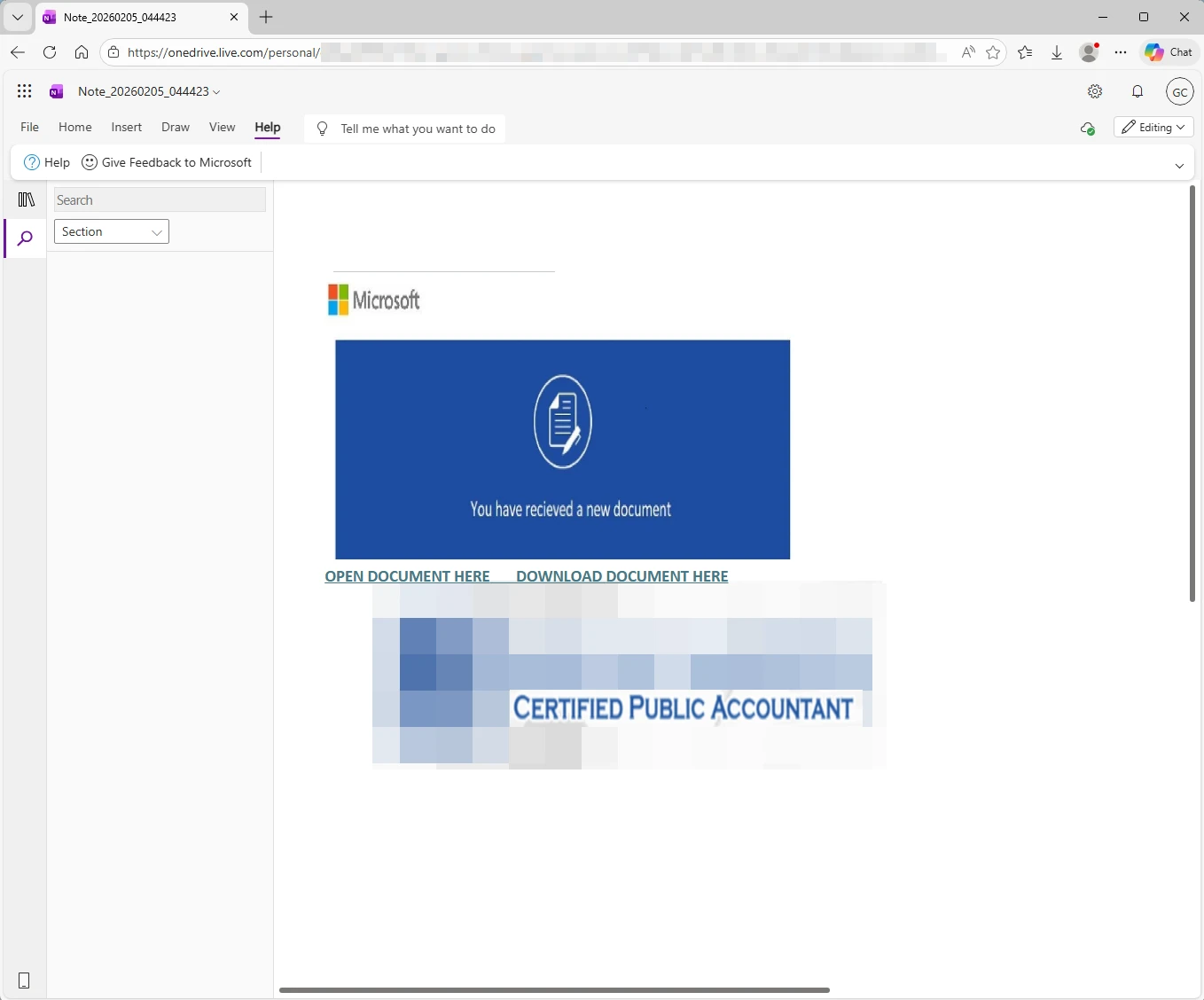
The OneNote file, which continued the ruse by using the same CPA’s name and logo, contained a link leading to a malicious landing page that hosted the Energy365 phishing kit and attempted to harvest credentials such as email and password.
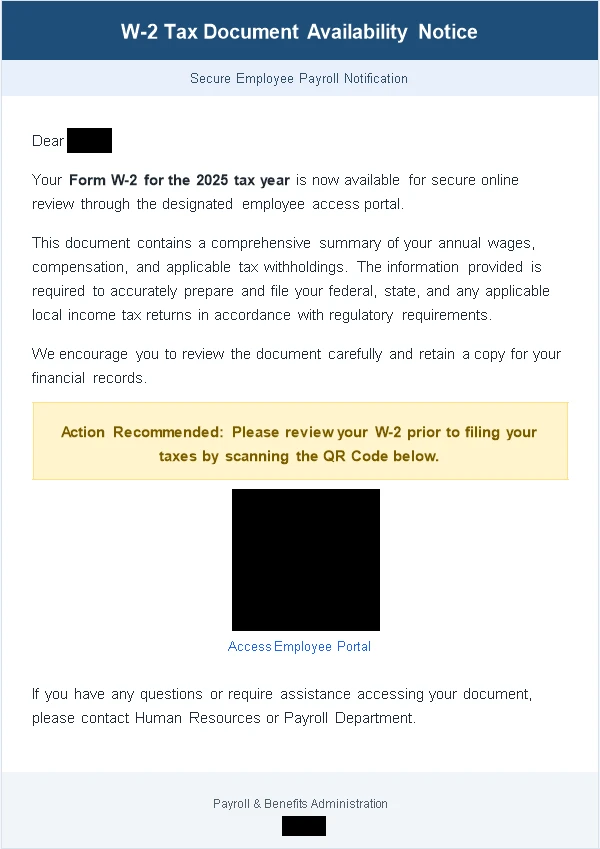
On February 10, 2026, Microsoft Threat Intelligence observed tax-themed phishing emails sent to approximately 100 organizations, in the manufacturing, retail, and healthcare industries primarily in the United States. The emails used the subject “2025 Employee Tax Docs” and contained an attachment named 2025_Employee_W-2 .docx. The attachment had content that mentioned various tax-related terms like Form W-2 and had a QR code pointing to a phishing page.
Each document was customized to contain the recipient’s name, and the URL hidden behind the QR code also contained the recipient’s email address. This means that each recipient received a unique attachment. The phishing page was built with the SneakyLog PhaaS platform and mimicked the Microsoft 365 sign-in page to steal credentials. SneakyLog, which is also known as Kratos, has been around since at least the beginning of 2025. This phishing kit is sold as a part of phishing-as-a-service and is capable of harvesting credentials and 2FA. While not as popular as other platforms like Energy365, SneakyLog has been consistently present in the threat landscape.
In January and February 2026, Microsoft Threat Intelligence observed sets of tax-themed domains registered, likely to be used in tax-themed phishing campaigns. These domains used keywords such as “tax” and “1099form” and also impersonated specific legitimate companies involved in tax filing, accounting, investing sectors. Brand abuse of legitimate accounting, tax preparation, finance, bookkeeping, and related companies continues to proliferate during tax season.
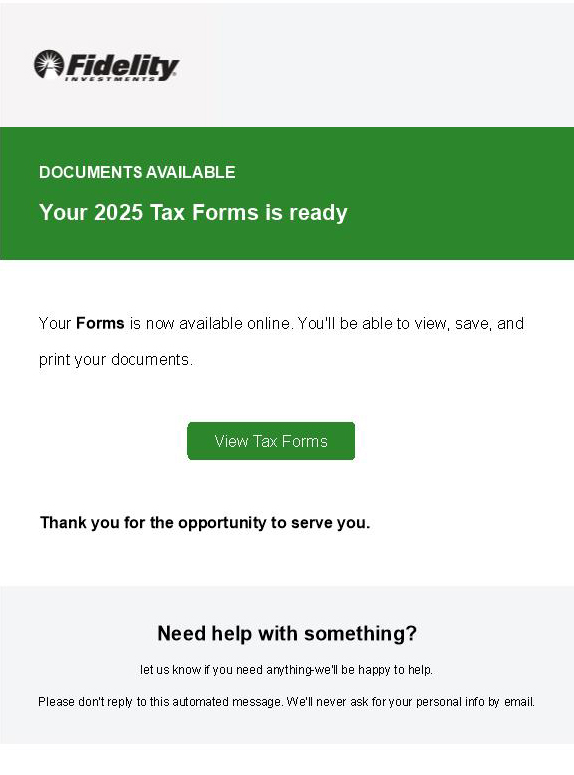
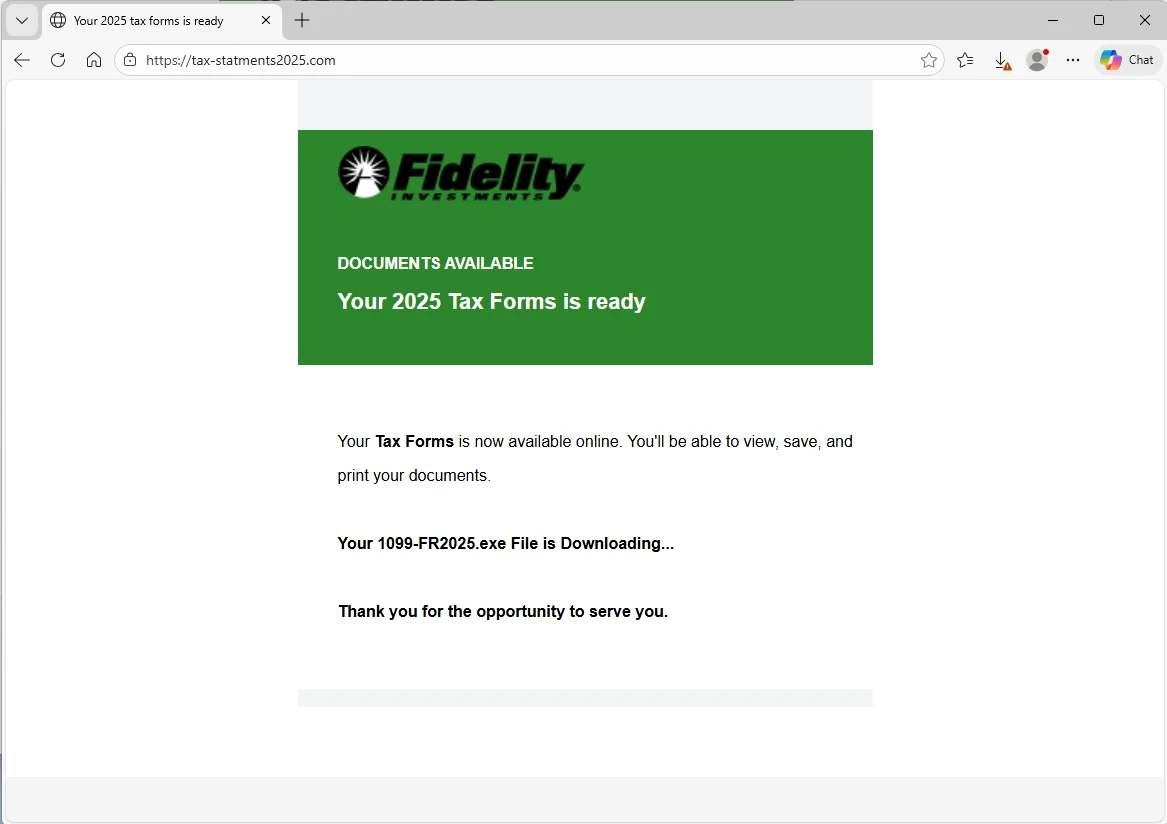
We observed one of these domains being used in a campaign between February 8 and February 10. Several hundred emails were sent to recipients in a wide range of industries primarily in the United States. The emails used subject lines like “Your Account Now Includes Updated Tax Forms [RF] 1234” or “Your Form 1099-R is ready – [RF] 12123123”. The email body said “2025 Tax Forms is ready” and contained a clickable “View Tax Forms” button that linked to the URL taxationstatments2025[.]com. If clicked, this domain redirected to tax-statments2025[.]com, which in turn served a malware executable named 1099-FR2025.exe.
The payload delivered in this campaign is the remote management and monitoring (RMM) tool ScreenConnect, signed by ConnectWise. The specific code signing certificate has since been revoked by the issuer due to high abuse. ScreenConnect is a legitimate tool, but threat actors have learned to abuse RMM functionality and essentially turn legitimate tools into remote access trojans (RATs), helping them take control of compromised devices.
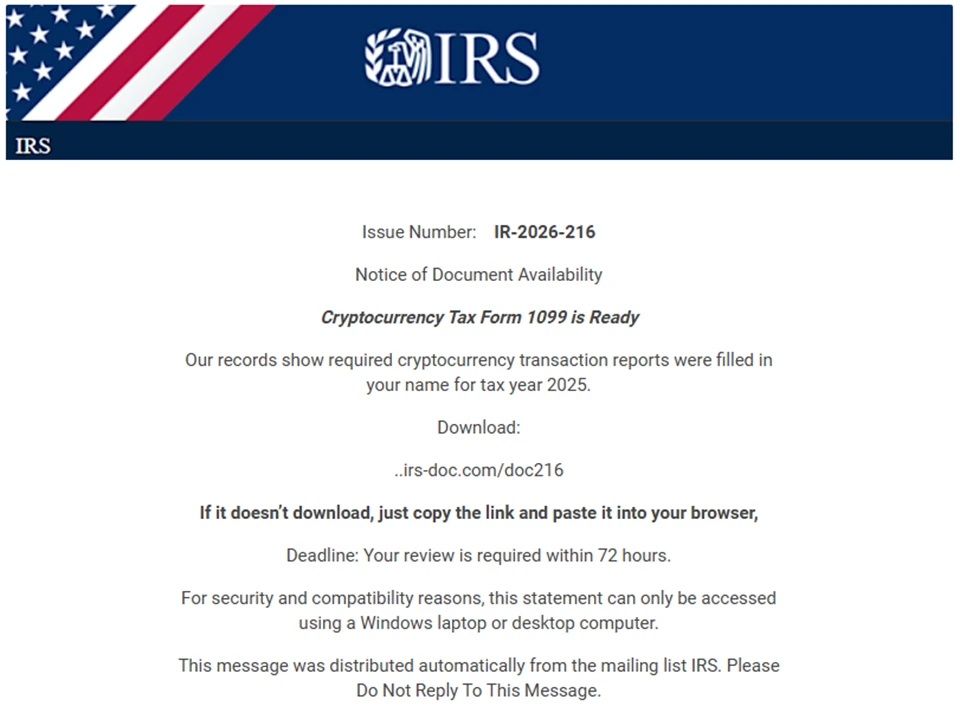
Another notable campaign combined the impersonation of the US Internal Revenue Service (IRS) with a cryptocurrency lure. Notably, this campaign attempted to evade detection by not including a clickable link, but instead asked recipients to copy and paste a URL, which was in the email body, into the browser.
This campaign was sent on February 23 and 27, and it consisted of several thousands of emails sent to recipients exclusively in the United States. The emails targeted many industries, with the bulk of email sent to higher education. The emails used the subject “IR-2026-216” and abused online platform Eventbrite to masquerade as coming from the IRS:
- “IRS US”<noreply@campaign[.]eventbrite[.]com>
- “IRS GOV”<noreply@campaign[.]eventbrite[.]com>
- “Service”<noreply@campaign[.]eventbrite[.]com>
- “IRS TAX”<noreply@campaign[.]eventbrite[.]com>
- “.IRS.GOV”<noreply@campaign[.]eventbrite[.]com>
The email body said “Cryptocurrency Tax Form 1099 is Ready” and contained a non-clickable URL with the domain irs-doc[.]com or gov-irs216[.]net. If pasted in the browser, the URL led to the download of IRS-doc.msi, which was either the RMM tool ScreenConnect or SimpleHelp, depending on the day of the campaign. SimpleHelp is another legitimate remote monitoring and management tool abused by threat actors. While not as popular as ScreenConnect, threat actors have been increasingly adopting SimpleHelp due to the recent crackdown on abuse of ScreenConnect by ConnectWise.
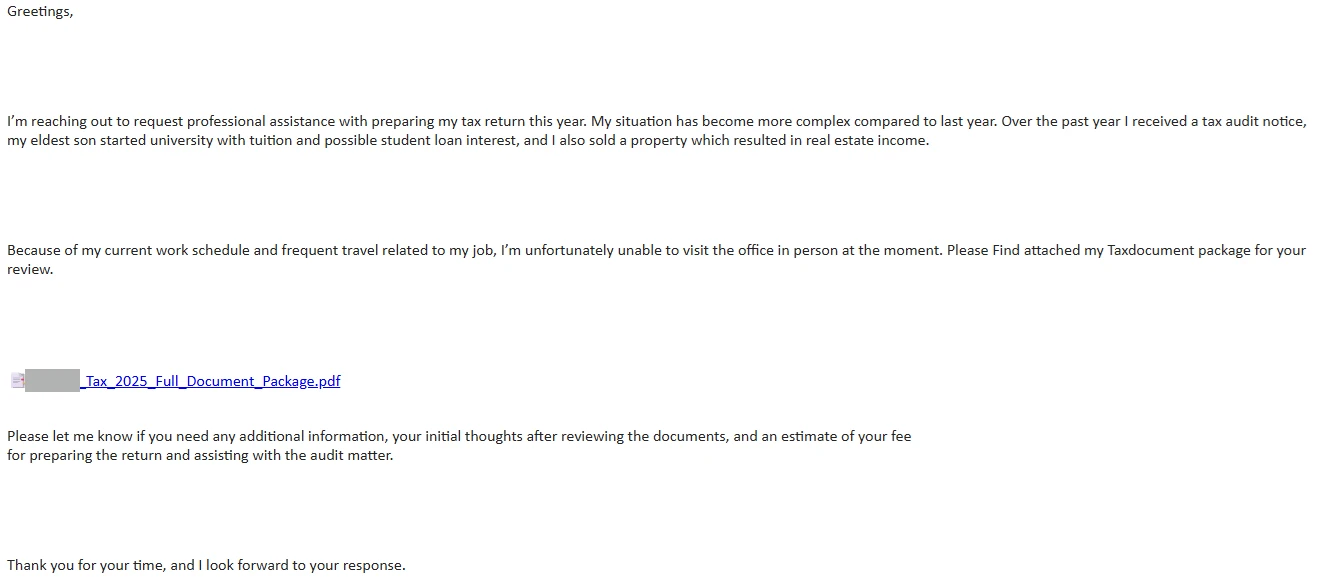
Like in previous tax seasons, Microsoft Threat Intelligence observed email campaigns specifically targeting accountants and related organizations. A variant of this campaign is a well-known and documented technique that uses benign conversation starters. The threat actor reaches out asking for assistance in filing taxes, asking for a quote, and typically providing a backstory. If the actor receives a reply, they send a malicious link that leads to the installation of various RATs. However, Microsoft Threat Intelligence also observed campaigns targeting CPAs that contain a similar backstory but include the malicious link in the first email.
One such campaign was sent on March 9 and consisted of approximately 1,000 emails sent to users exclusively in the United States. The emails targeted multiple accounting companies but also included a few related industries such as financial services, legal, and insurance. The emails used the subject “REQUEST FOR PROFESSIONAL TAX FILLING”.
The email provided a backstory that included a description of a complex tax return situation involving tax audit, university tuition, loan interest, and real estate income. The sender also attempted to explain their inability to physically visit the office due to travel. Finally, the sender asked for a price quote. We observed variations of the backstory on different days, including switching CPAs due to fee increases.
The link in email used the free site hosting service carrd[.]co. The site contained a simple “VIEW DOCUMENTS” button that linked to a URL shortener service, which redirected users to private-adobe-client[.]im. This uncomplicated redirection chain served to hinder automated detection by using legitimate sites with good reputation and involving user interaction. The final landing page served an executable related to the Datto. Datto is yet another legitimate remote monitoring and management tool, abused by threat actors.
On February 10, 2026, Microsoft Threat Intelligence observed a large-scale phishing campaign sent to more than 29,000 users across 10,000 organizations, almost exclusively focused on targets in the United States (95% of targets). The campaign did not concentrate on any single sector but instead included a wide set of industries, with financial services (19%), technology and software (18%), and retail and consumer goods (15%) being the most commonly targeted.
While the campaign did not seem to have been targeting a specific industry, an analysis of intended recipients indicated that the campaign was targeting specific roles, particularly accountants and tax preparers. Messages in the campaign were sent in two waves over a nine‑hour window between 10:35 UTC and 19:51 UTC.
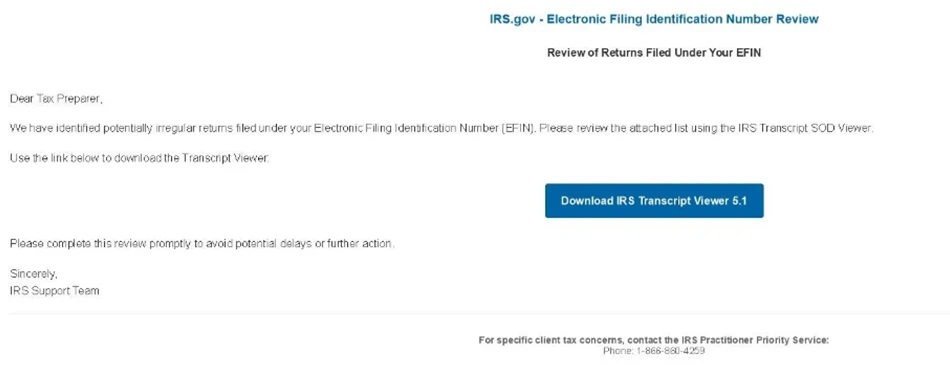
The emails impersonated the IRS, claiming that potentially irregular tax returns had been filed under the recipient’s Electronic Filing Identification Number (EFIN). Recipients were instructed to review these returns by downloading a purportedly legitimate “IRS Transcript Viewer.”
The emails were sent through Amazon Simple Email Service (SES) from one of two sender addresses on edud[.]site, a domain registered in August 2025. To enhance credibility, the sender display name rotated among the following 14 IRS‑themed identities:
- IRS e-File Services
- IRS EFIN Team
- IRS EFIN Compliance
- IRS e-Services
- IRS E-File Operations
- IRS Filing Review
- IRS Filing Support
- IRS EFIN Support
- IRS e-Services Team
- IRS e-File Support
- IRS EFIN Review
- IRS e-File Compliance
- IRS e-Services Support
- IRS Practitioner e-Services
Similarly, the subject lines used in the campaign also rotated, presumably to try and circumvent detection systems that rely on static text signatures. The most common among the 49 email subjects we observed in this campaign include:
- IRS Request Transcript Review
- IRS Notice Firm Return Review
- CPA Compliance Review
- IRS Support Firm Filing Review
- Review Requested Compliance
The emails contained a “Download IRS Transcript View 5.1” button, which purported to lead to a legitimate IRS application that could be used to review the transcript referenced in the email. Instead, the link pointed to an Amazon SES click‑tracking URL (awstrack[.]me), which then redirected to smartvault[.]im, a malicious look‑alike domain mimicking SmartVault, a well‑known tax and document‑management service used by accounting professionals. To evade automated analysis, the phishing site used Cloudflare for bot detection and blocking. Only visitors who resembled human users would be able to reach the final phishing payload, while traffic from crawlers and sandboxes would result in a block page.
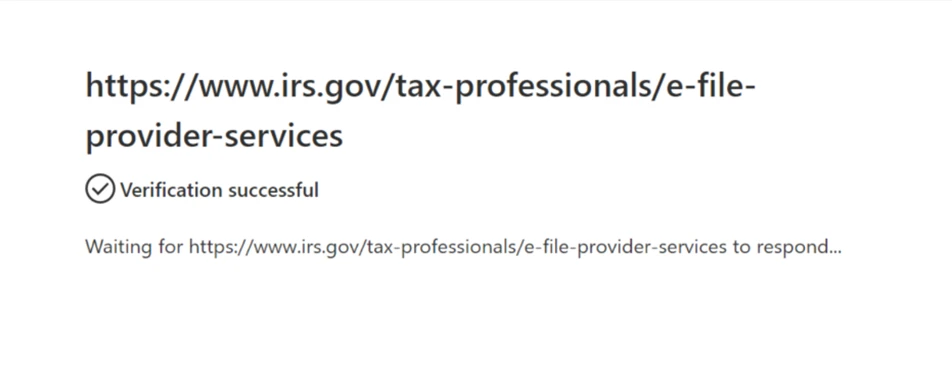
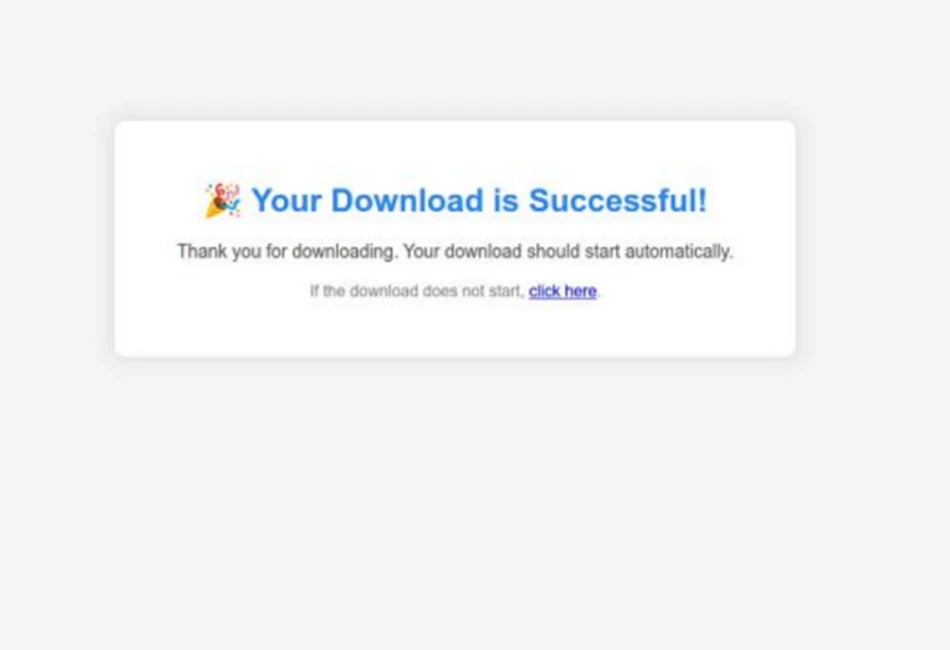
Users who passed the bot check would be shown a fake “verification” animation that indicated the IRS website was conducting an automated check to verify the connection with IRS provider services. After this animation, a user would be shown a page indicating that the supposed transcript viewer application would start downloading automatically before being redirected to the legitimate IRS provider services webpage. The downloaded file, named TranscriptViewer5.1.exe, was not a legitimate IRS tool but a maliciously repackaged ScreenConnect remote access tool (RAT). Upon execution, this payload could grant attackers remote control of the victim system, enabling data theft, credential harvesting, and further post‑exploitation activity.
To defend against social engineering campaigns that leverage the surge in email activity during Tax Season, Microsoft recommends the following mitigation measures:
- Configure automatic attack disruption in Microsoft Defender XDR. Automatic attack disruption is designed to contain attacks in progress, limit the impact on an organization’s assets, and provide more time for security teams to remediate the attack fully.
- Enforce multifactor authentication (MFA) on all accounts, remove users excluded from MFA, and strictly require MFA from all devices in all locations at all times.
- Use the Microsoft Authenticator app for passkeys and MFA, and complement MFA with conditional access policies, where sign-in requests are evaluated using additional identity-driven signals.
- Conditional access policies can also be scoped to strengthen privileged accounts with phishing resistant MFA.
- Enable Zero-hour auto purge (ZAP) in Office 365 to quarantine sent mail in response to newly acquired threat intelligence and retroactively neutralize malicious phishing, spam, or malware messages that have already been delivered to mailboxes.
- Configure Microsoft Defender for Office 365 Safe Links to recheck links on click. Safe Links provides URL scanning and rewriting of inbound email messages in mail flow and time-of-click verification of URLs and links in email messages, other Microsoft Office applications such as Teams, and other locations such as SharePoint Online. Safe Links scanning occurs in addition to the regular anti-spam and anti-malware protection in inbound email messages in Microsoft Exchange Online Protection (EOP). Safe Links scanning can help protect your organization from malicious links that are used in phishing and other attacks.
- Invest in advanced anti-phishing solutions that monitor and scan incoming emails and visited websites. For example, organizations can leverage web browsers like Microsoft Edge that automatically identify and block malicious websites, including those used in this phishing campaign, and solutions that detect and block malicious emails, links, and files.
- Encourage users to use Microsoft Edge and other web browsers that support Microsoft Defender SmartScreen, which identifies and blocks malicious websites, including phishing sites, scam sites, and sites that host malware.
- Enable network protection to prevent applications or users from accessing malicious domains and other malicious content on the internet.
Microsoft Defender customers can refer to the list of applicable detections below. Microsoft Defender XDR coordinates detection, prevention, investigation, and response across endpoints, identities, email, apps to provide integrated protection against attacks like the threat discussed in this blog.
| Tactic | Observed activity | Microsoft Defender coverage |
| Initial access | Phishing emails | Microsoft Defender for Office 365 – A potentially malicious URL click was detected – Email messages containing malicious URL removed after delivery – Email messages removed after delivery – A user clicked through to a potentially malicious URL – Suspicious email sending patterns detected Email reported by user as malware or phish |
| Execution | Delivery of RMM tools for post-compromise activity | Microsoft Defender for Endpoint – Suspicious installation of remote management software – Remote monitoring and management software suspicious activity – Suspicious location of remote management software – Suspicious usage of remote management software – Suspicious command execution via ScreenConnect |
Microsoft Security Copilot is embedded in Microsoft Defender and provides security teams with AI-powered capabilities to summarize incidents, analyze files and scripts, summarize identities, use guided responses, and generate device summaries, hunting queries, and incident reports.
Customers can also deploy AI agents, including the following Microsoft Security Copilot agents, to perform security tasks efficiently:
Security Copilot is also available as a standalone experience where customers can perform specific security-related tasks, such as incident investigation, user analysis, and vulnerability impact assessment. In addition, Security Copilot offers developer scenarios that allow customers to build, test, publish, and integrate AI agents and plugins to meet unique security needs.
Microsoft Defender XDR customers can use the following threat analytics reports in the Defender portal (requires license for at least one Defender XDR product) to get the most up-to-date information about the threat actor, malicious activity, and techniques discussed in this blog. These reports provide the intelligence, protection information, and recommended actions to prevent, mitigate, or respond to associated threats found in customer environments:
Microsoft Security Copilot customers can also use the Microsoft Security Copilot integration in Microsoft Defender Threat Intelligence, either in the Security Copilot standalone portal or in the embedded experience in the Microsoft Defender portal to get more information about this threat actor.
Microsoft Defender XDR customers can run the following advanced hunting queries to find related activity in their networks:
Find email messages related to known domains
The following query checks domains in Defender XDR email data:
EmailUrlInfo
| where UrlDomain has_any ("taxationstatments2025.com", "irs-doc.com", "gov-irs216.net", "private-adobe-client.im", "edud.site", "smartvault.im")
Detect file hash indicators in email data
The following query checks hashes related to identified phishing activity in Defender XDR data:
let File_Hashes_SHA256 = dynamic([
"45b6b4db1be6698c29ffde9daeb8ffaa344b687d3badded2f8c68c922cdce6e0", "d422f6f5310af1e72f6113a2a592916f58e3871c58d0e46f058d4b669a3a0fd8"]);
DeviceFileEvents
| where SHA256 has_any (File_Hashes_SHA256)
Microsoft Sentinel customers can use the TI Mapping analytics (a series of analytics all prefixed with ‘TI map’) to automatically match the indicators mentioned in this blog post with data in their workspace. If the TI Map analytics are not currently deployed, customers can install the Threat Intelligence solution from the Microsoft Sentinel Content Hub to have the analytics rule deployed in their Sentinel workspace.
The following queries use Sentinel Advanced Security Information Model (ASIM) functions to hunt threats across both Microsoft first-party and third-party data sources. ASIM also supports deploying parsers to specific workspaces from GitHub, using an ARM template or manually.
Detect network IP and domain indicators of compromise using ASIM
The following query checks IP addresses and domain IOCs across data sources supported by ASIM network session parser:
//IP list and domain list- _Im_NetworkSession
let lookback = 30d;
let ioc_ip_addr = dynamic([]);
let ioc_domains = dynamic(["taxationstatments2025.com", "irs-doc.com", "gov-irs216.net", "private-adobe-client.im"]);
_Im_NetworkSession(starttime=todatetime(ago(lookback)), endtime=now())
| where DstIpAddr in (ioc_ip_addr) or DstDomain has_any (ioc_domains)
| summarize imNWS_mintime=min(TimeGenerated), imNWS_maxtime=max(TimeGenerated),
  EventCount=count() by SrcIpAddr, DstIpAddr, DstDomain, Dvc, EventProduct, EventVendor
Detect Web Sessions IP and file hash indicators of compromise using ASIM
The following query checks IP addresses, domains, and file hash IOCs across data sources supported by ASIM web session parser:
//IP list - _Im_WebSession
let lookback = 30d;
let ioc_ip_addr = dynamic([]);
let ioc_sha_hashes =dynamic(["45b6b4db1be6698c29ffde9daeb8ffaa344b687d3badded2f8c68c922cdce6e0"]);
_Im_WebSession(starttime=todatetime(ago(lookback)), endtime=now())
| where DstIpAddr in (ioc_ip_addr) or FileSHA256 in (ioc_sha_hashes)
| summarize imWS_mintime=min(TimeGenerated), imWS_maxtime=max(TimeGenerated),
  EventCount=count() by SrcIpAddr, DstIpAddr, Url, Dvc, EventProduct, EventVendor
Detect domain and URL indicators of compromise using ASIM
The following query checks domain and URL IOCs across data sources supported by ASIM web session parser:
// file hash list - imFileEvent
// Domain list - _Im_WebSession
let ioc_domains = dynamic(["taxationstatments2025.com", "irs-doc.com", "gov-irs216.net", "private-adobe-client.im"]);
_Im_WebSession (url_has_any = ioc_domains)
Detect files hashes indicators of compromise using ASIM
The following query checks IP addresses and file hash IOCs across data sources supported by ASIM file event parser:
// file hash list - imFileEvent
let ioc_sha_hashes = dynamic(["45b6b4db1be6698c29ffde9daeb8ffaa344b687d3badded2f8c68c922cdce6e0"]);
imFileEvent
| where SrcFileSHA256 in (ioc_sha_hashes) or
TargetFileSHA256 in (ioc_sha_hashes)
| extend AccountName = tostring(split(User, @'')[1]),
  AccountNTDomain = tostring(split(User, @'')[0])
| extend AlgorithmType = "SHA256"
| Indicator | Type | Description | First seen | Last seen |
| 45b6b4db1be6698c29ffde9daeb8ffaa344b687d3badded2f8c68c922cdce6e0 | SHA-256 | Excel attachment in Energy365 PhaaS campaign | 2026-02-05 | 2026-02-06 |
| taxationstatments2025[.]com | Domain | Fidelity-themed ScreenConnect campaign | 2026-02-08 | 2026-02-10 |
| irs-doc[.]com | Domain | IRS / Cryptocurrency-themed SimpleHelp campaign | 2026-02-23 | 2026-02-27 |
| gov-irs216[.]net | Domain | IRS / Cryptocurrency-themed SimpleHelp campaign | 2026-02-23 | 2026-02-27 |
| private-adobe-client[.]im | Domain | CPA-targeted campaign delivering Datto | 2026-03-05 | 2026-03-09 |
| d422f6f5310af1e72f6113a2a592916f58e3871c58d0e46f058d4b669a3a0fd8 | SHA-256 | EXE dropped in IRS ScreenConnect campaign | 2026-02-10 | 2026-10 |
| edud[.]site | Domain | Domain hosting email addresses used to send phishing emails in IRS ScreenConnect campaign | 2026-02-10 | 2026-02-10 |
| smartvault[.]im | Domain | Domain hosting malicious content in IRS ScreenConnect campaign | 2026-02-10 | 2026-02-10 |
For the latest security research from the Microsoft Threat Intelligence community, check out the Microsoft Threat Intelligence Blog.
To get notified about new publications and to join discussions on social media, follow us on LinkedIn, X (formerly Twitter), and Bluesky.
To hear stories and insights from the Microsoft Threat Intelligence community about the ever-evolving threat landscape, listen to the Microsoft Threuat Intelligence podcast.

