
The holiday season is a historically dangerous time for ransomware and cybersecurity concerns. According to the 2025 Ransomware Holiday Risk Report by Semperis, 52% of ransomware attacks happen during the holidays or on a weekend. Why? Because cybercriminals deliberately time their attacks to when we may be distracted by the celebrations of the season, holiday shopping and travel to be with loved ones.
At Comprehensive Wealth Management, we are vigilant about cybersecurity and believe that it is a process we follow every day. Fortunately, there are easy habits you can adopt today to build your very own cybersecurity process.
- Implement multi-factor authentication on your accounts (including email, smartphone apps and social media sites)
Multifactor authentication requires the user to provide two or more verification factors to gain access to a website, app, or software. MFA can be a confirming text message or email, a code sent to an authentication app, a fingerprint or facial recognition, or a FIDO passkey. The most secure method is the FIDO passkey option. Barring access to either a passkey, an authentication app or biometrics, a text message is preferable to an emailed code as emails can be easily compromised.
The Cybersecurity & Infrastructure Security Agency (CISA) recommends adding MFA across all your accounts, including email, smartphone apps, social media sites, and gaming and entertainment services. Not sure how to set up MFA? Ask for help from a tech-savvy family member, friend or trusted neighbor.
- Think before you click
According to CISA, more than 90% of successful cyberattacks begin with a phishing email Rather than clicking on a link in an email, the best practice is to navigate directly to the website the email wants you to access. This way you can avoid any potential malicious software that can be installed by clicking a seemingly legitimate link. You can also hover over a link within an email, and your computer will show you the path embedded within the link – allowing you to verify it is legitimate before clicking.
- Keep your software up to date
Be sure to check your devices (smartphones, tablets, computers) for updates as well as applications and web browsers (think Chrome, Mozilla, Edge). When available, turn on automatic updates so you don’t have to think about it. Companies like Apple and Microsoft will push out updates as a matter of course to fix bugs or flaws in their operating systems. Keeping your software up to date can deter bad actors from exploiting flaws in the system.
- Use strong passwords
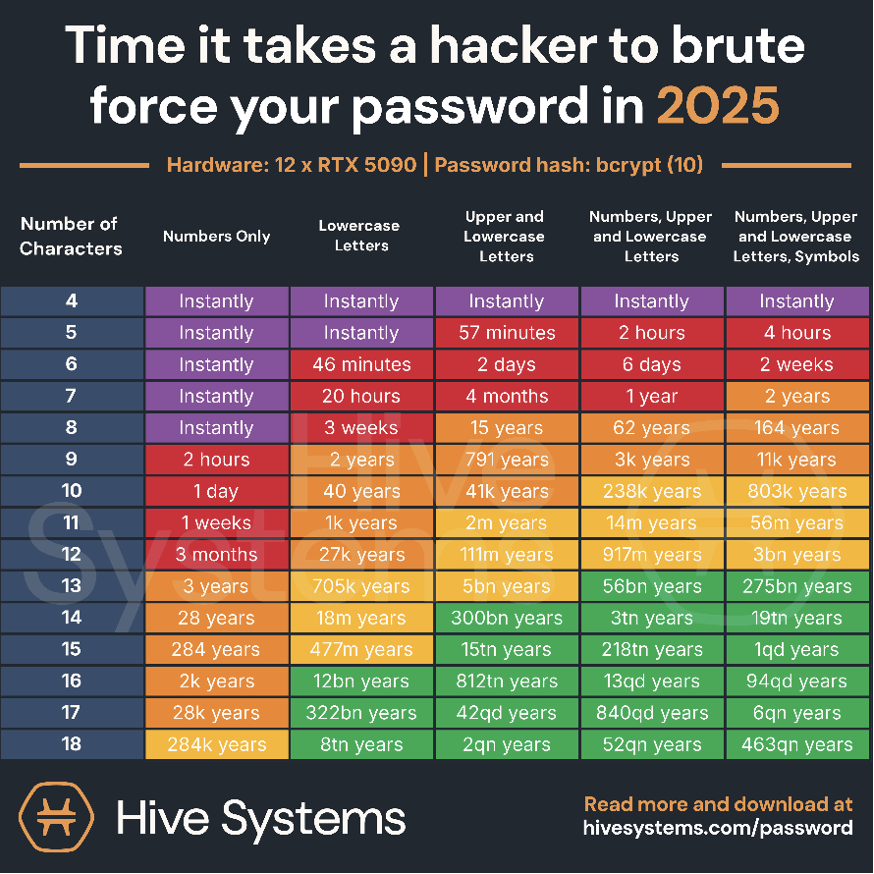
Gone are the days of a password with a 6-character minimum saved in a password protected spreadsheet and reused multiple times across different platforms. Depending on the length and complexity of your password it can take a hacker anywhere from seconds to 26 trillion years to crack your password (see chart below). The best course of action is to use a password manager to generate and store unique passwords.
- Make yourself aware of these common phishing scams
Threat actors, scammers and hackers search out the weakest link in the line of cyber defenses. Often, the weakest link is you. Here are some common email, phone, and text messaging scams that bad actors employ to catch you unawares and undermine your defenses.
- Tech Support – Someone claiming to be from Microsoft calls or emails you to offer tech support. Companies will never cold call you to offer help. Do not provide information to the person on the other end, especially username or password information. Never download software from someone calling you out of the blue urging you to download it. When in doubt, don’t answer the phone or just hang up.
- Browser Pop-Ups – At some point in your online life it’s possible you will navigate to a website that displays a pop-up alerting you that your computer is infected and to call a number to resolve the issue. Simply close out of the window by hitting the “x” button and navigate away from the website. Do not click on the pop-up and do not engage with the message.
- Billing – You may receive an email or phone call alerting you that a subscription has been renewed and you need to call or click to cancel. Another variation is a notification that your payment processing had an error and you need to click a link to update your method of payment. In this instance, if it is a service you know you are subscribed to, your best option is to navigate to the webpage directly and log in to make changes. If it is a subscription or service you don’t recognize, just delete the email. One way to determine if it’s a legitimate email is to pay attention to the email address it comes from.
- Fright – Another tactic bad actors use is attempting to convince you that your computer has been taken over and that you need to engage with them to get it back. Don’t believe it. Your best course of action is to immediately delete the email or text message. Do not engage or click on any links. Instead, turn off and unplug your computer and immediately contact IT support. (Geek Squad is a potential IT resource for home computer/network users.)
- Billing and Shipping –You may receive a text or email message that says “There’s a delivery issue, click here to correct.” Your best course of action is to login to the website you are expecting a delivery from and check the status of your order there. USPS knows your address and does not need to confirm it. Remember, scammers try to catch you when your defenses are low, so this scam is particularly prevalent during the holiday season when many people shop online.
- Secure file shares – Scammers will send you an email that says “We’ve shared an important file with you, click here to login and download.” This one can be tricky as many companies move to online services such as DocuSign or DropBox for sharing files. As best practice, if you are not expecting a shared document do not click. If you receive a DocuSign form and are not expecting one do not click. If you recognize the sender, reach out to them to verify that this is a legitimate file share.
- Free Gift! – As the saying goes, “Beware of Greeks bearing gifts!” If it seems too good to be true, it probably is. Your cell phone or cable provider is not likely to send you an e-card or gift card simply because you paid your bill. Once again, do not click the link and delete the text message or email.
- Long Lost Friend – Beware of outreach from unidentified phone numbers. The scammer could be trying to confirm your identity or that your number is in service. In this situation it is best to ignore the text message and delete.
Cybersecurity is about preparedness and consistency. By adopting a few disciplined habits and remaining alert to common scams, you can reduce the likelihood of becoming a target, even during high-risk periods like the holidays. At Comprehensive Wealth Management, we know that protecting your financial life goes beyond investment management; it includes safeguarding the information and systems that support it. A little vigilance today can help ensure a safer, more secure holiday season – and peace of mind well into the year ahead.
Wishing you and your loved ones a happy and cybersafe holiday season!

Comprehensive Wealth Management, LLC (CWM) is an SEC registered Investment Advisor and Pacific Northwest wealth management firm that partners with clients to articulate and help achieve their financial goals as prudently as possible. Our high-touch, client-focused investment planning and implementation makes us the first call for executives, business owners, and other thoughtful investors to help strengthen their financial health holistically and intentionally, managing risk while pursuing long-term gains.
Keep in mind that investing involves risk. The value of your investment will fluctuate over time, and you may gain or lose money. Diversification and asset allocation do not ensure a profit or guarantee against loss. Past performance is no guarantee of future results. This communication is informational only and is not a solicitation for investment advice.

