
Executive Summary
Multi-factor authentication (MFA) is no longer the silver bullet for identity security. A sophisticated class of attacks known as session token theft (enabled by adversary-in-the-middle (AiTM) frameworks like Evilginx) can completely bypass traditional MFA by stealing authenticated session tokens after users successfully complete two-factor authentication. This post examines how these attacks work, why they’re effective against even security-conscious organizations, and provides a comprehensive, validated remediation strategy based on the latest security research and vendor capabilities.
Key Takeaways:
- Traditional MFA (SMS, push notifications, TOTP) does not prevent session hijacking
- Evilginx and similar AiTM tools can steal session tokens in real-time during legitimate authentication
- Organizations using Okta must go beyond default configurations to achieve phishing-resistant security
- Effective protection requires device-bound credentials, continuous session monitoring, and strict token lifecycle management
The Attack: How Session Token Theft Works
Understanding the Kill Chain
Session token theft attacks exploit a fundamental truth about modern web authentication: once a user successfully authenticates and receives a session token (cookie), that token becomes their identity. If an attacker can steal the token, they can impersonate the user without ever needing their password or MFA code.
The attack follows this sequence:
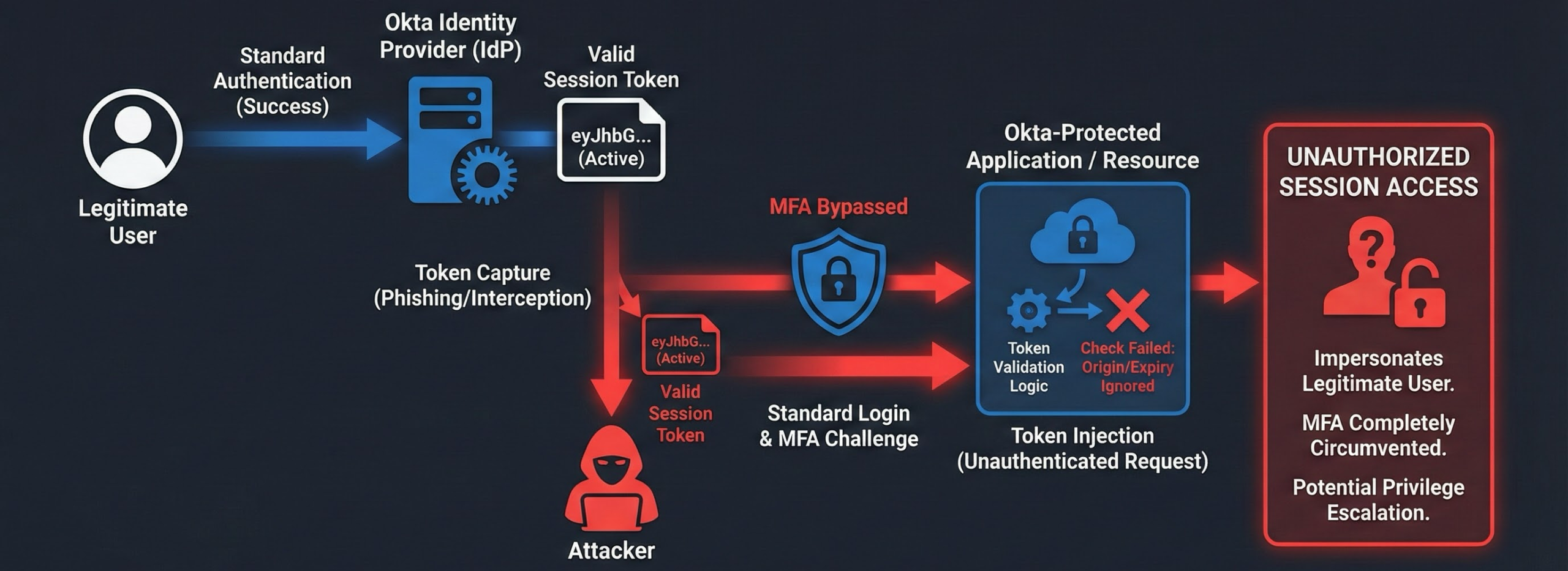
Figure 1: Complete attack flow showing how Evilginx acts as a reverse proxy between the victim and legitimate Okta infrastructure
- Initial Access: Attacker sends phishing email with link to fake login page
- Proxy Interception: Fake site is actually a reverse proxy (Evilginx) that forwards requests to real Okta
- Real Authentication: User authenticates with real credentials + real MFA to real Okta servers
- Token Capture: Evilginx intercepts the session token returned by Okta after successful authentication
- Session Hijacking: Attacker uses stolen token to access applications as the compromised user
- Persistence: Token remains valid until expiration or manual revocation (often hours or days)
Critical Insight: The user is authenticating against the real Okta infrastructure. The MFA code they enter is valid. From Okta’s perspective, this looks like a legitimate login. The only difference is that an attacker silently copies the session token during the process.
Real-World Attack Walkthrough: Step-by-Step
The following demonstrates an actual session token theft attack conducted during a security assessment. This walkthrough shows exactly how the attack works in practice.
Step 1: Reconnaissance – Identifying the Target Configuration
Before launching the attack, we performed reconnaissance to determine the Okta configuration:
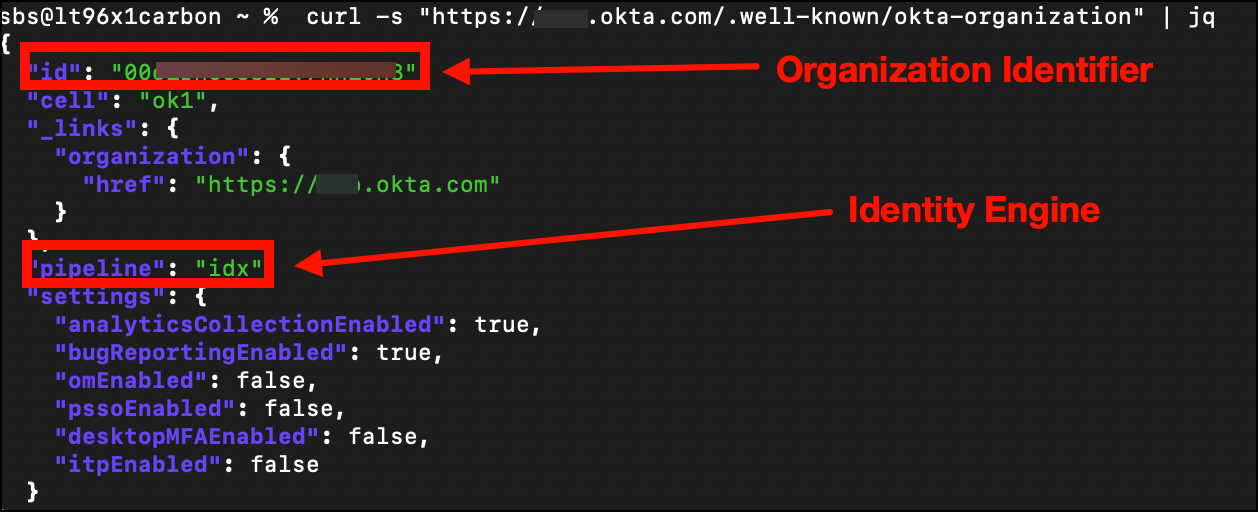
Figure 2: Using curl to query the .well-known/okta-organization endpoint
curl -s "https://[REDACTED].okta.com/.well-known/okta-organization" | jq
This revealed that the target organization uses Okta Identity Engine (OIE), which means we need to capture the idx cookie (not the legacy sid cookie used by Classic Engine). This reconnaissance step is critical for configuring Evilginx to capture the correct session token.
Step 2: Building Attack Infrastructure
We configured Evilginx with a custom phishlet for Okta:
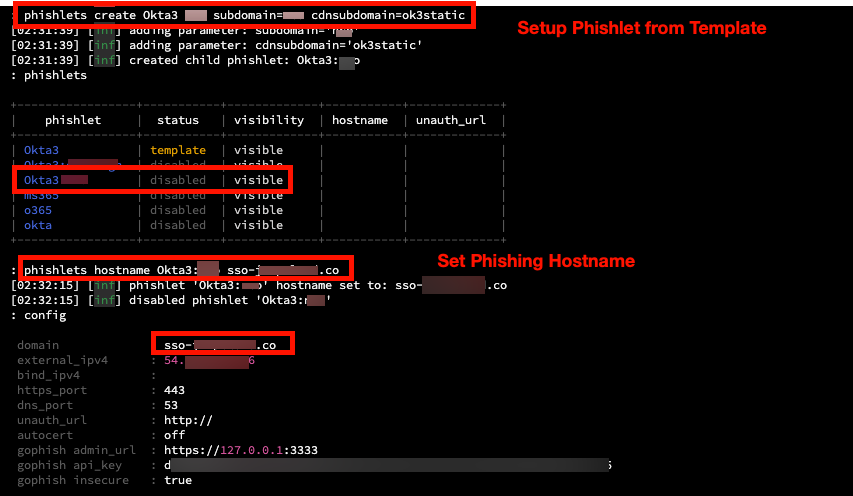
Figure 3: Evilginx phishlet configuration defining proxy rules for Okta authentication flow
The phishlet defines how Evilginx should:
- Proxy traffic to the legitimate Okta domain
- Rewrite domains in HTML responses to the phishing domain
- Capture specific cookies (idx, DT) during authentication
Next, we generated a lure URL for delivery:
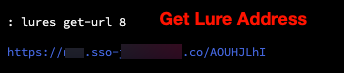
Figure 4: Generating a trackable phishing URL (lure) linked to the Okta phishlet
The lure URL allows us to track which recipients click the link and successfully authenticate.
Step 3: Phishing Delivery
We sent a targeted phishing email containing the malicious link:
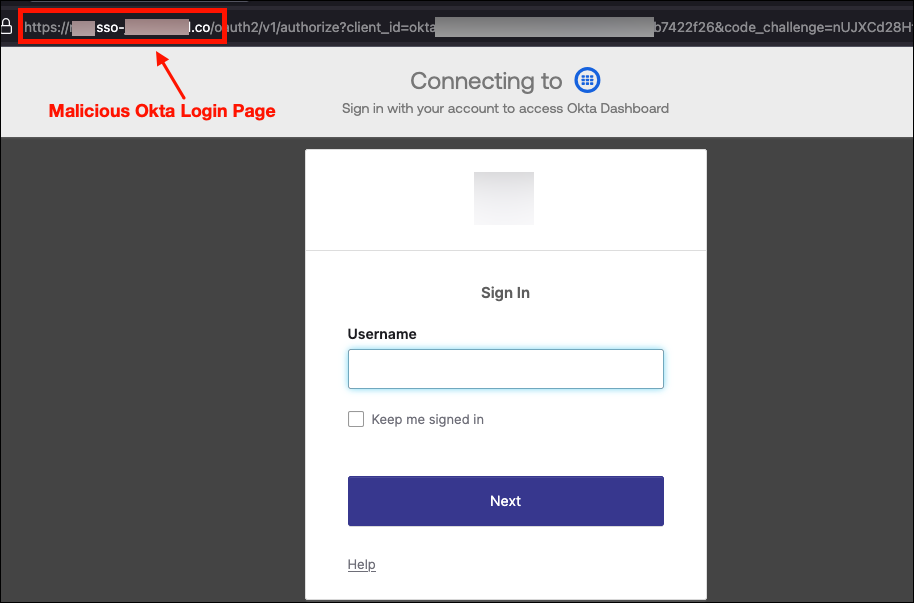
Figure 5: Phishing email with malicious Okta link that proxies to the real login portal
When the user clicks the link, they are directed to our Evilginx server, which acts as a reverse proxy to the legitimate Okta login page. The user sees the real Okta interface (HTML served directly from Okta servers), but all traffic flows through our attack infrastructure.
Key Point: The user is not visiting a fake login page. They are interacting with the real Okta authentication system, proxied through Evilginx. This is why the attack bypasses MFA.
Step 4: Real-Time Credential and Token Capture
As the user completes authentication (including MFA), Evilginx captures everything in transit:
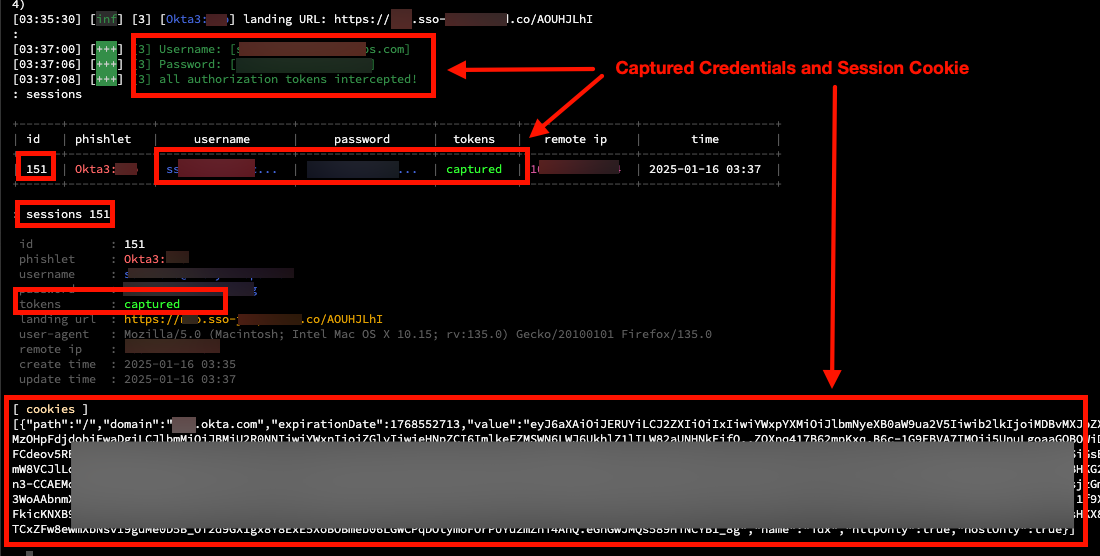
Figure 6: Evilginx captures email, password, and session cookies after successful MFA completion
Captured artifacts:
- Email address: [REDACTED] (plaintext)
- Password: [REDACTED] (plaintext)
- Session cookie (idx): The primary session token for Identity Engine
- Device Token (DT): Used by Okta for device fingerprinting and MFA decisions
The critical moment is after MFA succeeds. Okta issues the session cookie to the user’s browser, and Evilginx intercepts the Set-Cookie header in real-time.
Step 5: Session Cookie Injection
With the stolen session cookie, we performed session replay:
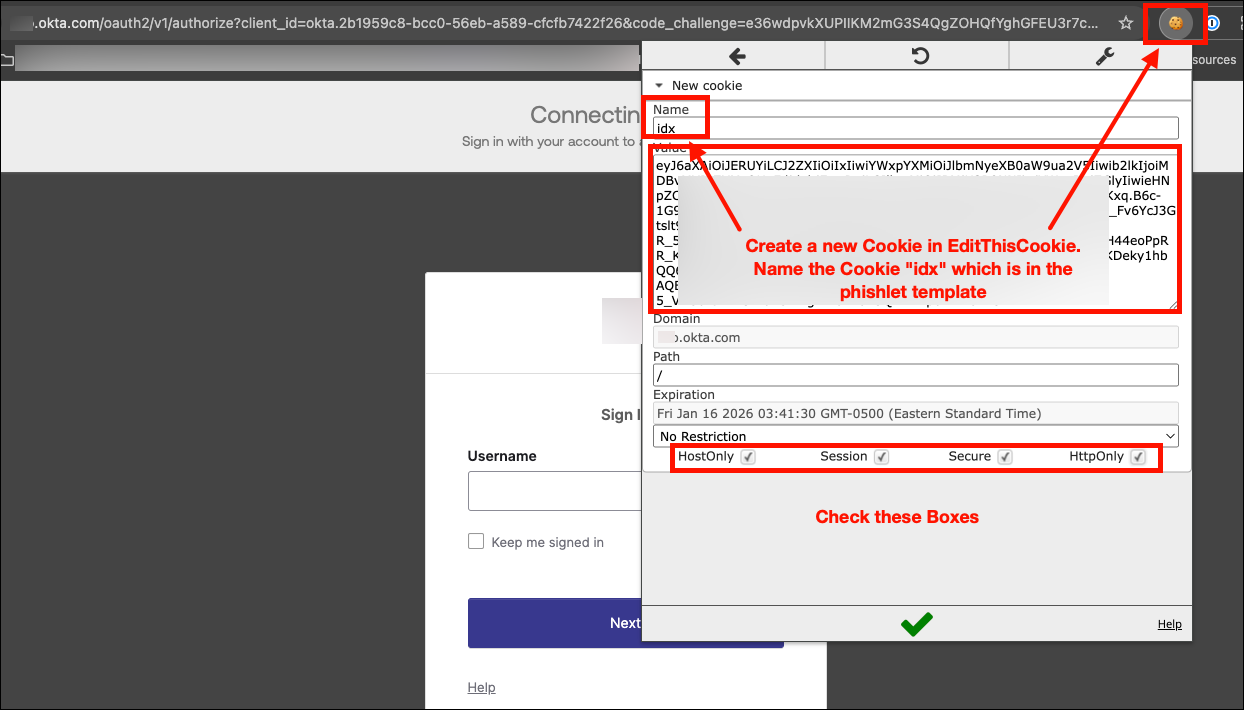
Figure 7: Opening browser DevTools to prepare for session cookie injection
Using the EditThisCookie browser extension, we injected the captured idx cookie:
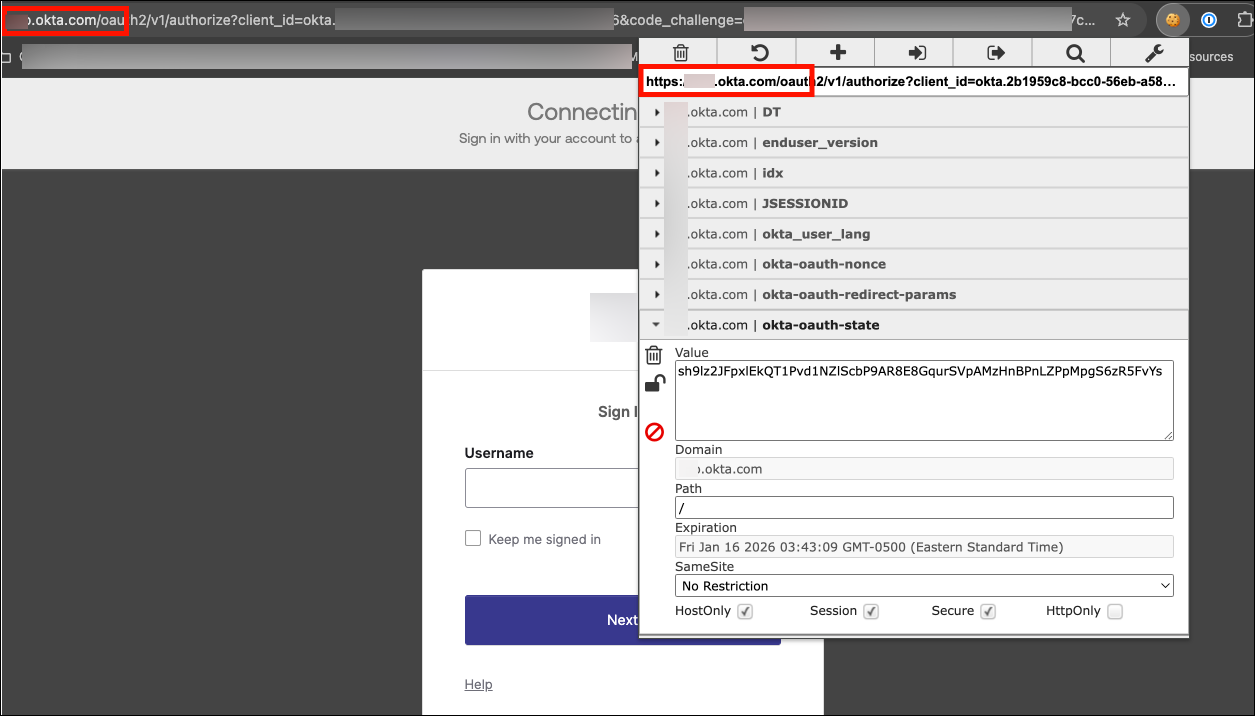
Figure 8: EditThisCookie extension used to inject the stolen idx session cookie
Injection process:
- Navigate to the target Okta domain
- Open EditThisCookie extension
- Import the captured idx cookie value
- Import the DT (Device Token) cookie for device fingerprinting bypass
- Close the cookie editor
Step 6: Unauthorized Access Achieved
After injecting the stolen session cookie, we refreshed the browser:
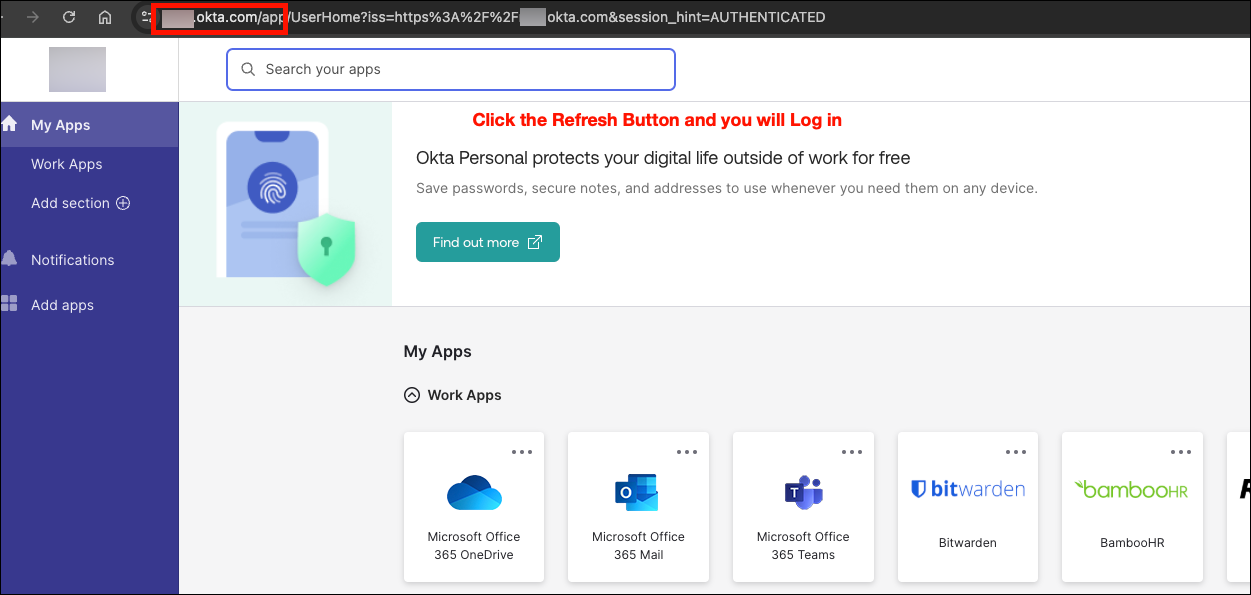
Figure 9: Full access to the Okta portal without any authentication prompt
Result: Immediate access to the user’s Okta portal and all connected applications. No password prompt. No MFA challenge. The stolen session cookie was sufficient to completely bypass all authentication controls.
Attack Timeline:
- T+0 minutes: Phishing email sent
- T+12 minutes: User clicked link and authenticated
- T+12.5 minutes: Session token captured by Evilginx
- T+15 minutes: Cookie injected and access achieved
- Total time to compromise: 15 minutes from initial email delivery
This demonstrates why session token theft is so dangerous: even with MFA enabled, an attacker can achieve full account compromise in minutes.
Evilginx: The Adversary’s Swiss Army Knife
What Is Evilginx?
Evilginx is an open-source man-in-the-middle attack framework specifically designed to bypass MFA and steal session tokens. Originally created as a research tool by security researcher Kuba Gretzky, Evilginx has been weaponized by threat actors ranging from nation-state groups to financially-motivated cybercriminals.
Note: See the detailed attack walkthrough above for actual screenshots of Evilginx session token capture.
How Evilginx Bypasses MFA
Unlike traditional phishing pages that try to steal credentials and fail at the MFA stage, Evilginx operates as a transparent proxy:
User Browser <--HTTPS--> Evilginx Proxy <--HTTPS--> Real Okta Server
     |                          |
  Sees real                 Copies session
  Okta login               cookies in real-time
Technical Mechanism:
- Domain Masquerading: Attacker registers lookalike domain (e.g.,
okta-sso.company-login.cominstead ofcompany.okta.com) - SSL/TLS Certificates: Obtains valid Let’s Encrypt certificate for phishing domain (green padlock in browser)
- Reverse Proxy Setup: Evilginx forwards all requests to real Okta, returning real responses
- Cookie Extraction: When Okta returns
Set-Cookieheaders after successful authentication, Evilginx stores the session token - Session Replay: Attacker imports stolen cookies into their browser and accesses applications as the victim
Why This Works:
- Users see real Okta login page (HTML comes from Okta servers)
- Users enter real credentials (forwarded to Okta)
- Users receive real MFA prompts (from Okta’s MFA provider)
- Users authenticate successfully (Okta validates everything)
- Attack is post-authentication (happens after all security checks pass)
Note: See Figure 5 above showing the phishing email with the malicious Okta link. The URL difference (okta-sso.company-login.com vs. company.okta.com) is subtle enough that even security-aware users can be fooled, especially when the phishing domain has a valid SSL certificate.
Real-World Impact: Attack Scenarios and Consequences
Scenario 1: Microsoft 365 Breach via AiTM
In 2022, Microsoft reported widespread AiTM phishing campaigns stealing session tokens for Microsoft 365 accounts. Despite MFA being enabled across affected organizations, attackers successfully:
- Accessed corporate email for sensitive data exfiltration
- Pivoted to Azure AD admin accounts (privilege escalation)
- Created inbox rules to hide forensic evidence
- Established persistence via OAuth application registrations
Business Impact: Average dwell time of 3-7 days before detection, with complete email compromise and lateral movement into cloud infrastructure.
Scenario 2: Cryptocurrency Exchange Employee Compromise
A cryptocurrency exchange employee was targeted with an AiTM attack against their Okta-protected admin panel. The attacker:
- Stole session tokens during a fake “urgent security alert” phishing campaign
- Gained access to exchange administrative dashboard
- Modified user account balances and withdrawal limits
- Attempted fraudulent cryptocurrency withdrawals totaling $4.2M
- Was detected only when withdrawal velocity limits triggered automated alerts
Business Impact: $1.1M in actual losses before detection, 72-hour service outage during incident response, regulatory reporting requirements triggered.
Scenario 3: Healthcare SaaS Platform Data Exfiltration
A healthcare SaaS provider using Okta for customer login security experienced session token theft affecting multiple customer accounts:
- Attackers harvested credentials via fake “account verification required” emails
- Session tokens provided access to patient health records (PHI/PII)
- No EDR alerts triggered (attacker never touched corporate endpoints)
- Breach discovered 14 days later during routine log review
- 47,000 patient records accessed across 3 customer organizations
Business Impact: HIPAA breach notification requirements, $2.8M settlement with HHS OCR, loss of 12 enterprise customers, 18 months of reputation damage.
Why Traditional Defenses Fail
The MFA Paradox
Organizations implement MFA believing it provides comprehensive protection against credential theft. This is true for password-based attacks but false for session-based attacks.
| Attack Type | Traditional MFA Protection | Session Token Theft Protection |
|---|---|---|
| Password Guessing | Effective | Effective |
| Password Reuse | Effective | Effective |
| Credential Stuffing | Effective | Effective |
| Phishing (credentials) | Effective | Effective |
| Phishing (session tokens) | Ineffective | Ineffective |
| Session Hijacking | Ineffective | Ineffective |
| Cookie Theft (malware) | Ineffective | Ineffective |
Root Cause: MFA validates identity at authentication time. Session tokens represent post-authentication state. Stealing the token means bypassing the need to authenticate at all.
Detection Blind Spots
Standard security monitoring has limited visibility into session token theft:
What Security Tools See:
- Successful authentication from user’s IP address
- Valid MFA challenge/response
- Session created for legitimate user account
- Application access from expected geographic region (if attacker uses same region)
What Security Tools DON’T See:
- Session token copied mid-authentication
- Second concurrent session from different device (unless SIEM correlates)
- Token replay from attacker infrastructure
- Subtle behavioral differences (automated vs. human interaction)
The Gap: Most Identity Providers (IdPs) including Okta’s base license only monitor authentication events, not post-authentication session activity. Once the token is issued, visibility drops significantly unless premium detection features are enabled.
Critical Point: When reviewing Okta System Logs during the attack shown above, the authentication events appeared completely normal – successful login with valid MFA from the user’s expected location. There was no indication that a session token was stolen during the process. This is why post-authentication monitoring (via ITP) is essential.
Anatomy of Okta Session Tokens
What Gets Stolen
When you successfully authenticate to Okta, several authentication artifacts are created:
| Token Type | Purpose | Lifetime | Theft Impact |
|---|---|---|---|
Session Cookie (sid) |
Browser session management | 2 hours – 24 hours | Full application access |
| Access Token (OAuth) | API authentication | 1 hour (default) | API access until expiration |
| Refresh Token (OAuth) | Renew access tokens | 100 days (default) | Persistent access for weeks |
| Device Trust Token | Device binding | Persistent | Bypass device trust policies |
Critical Finding from 2026 Security Research:
Okta FastPass (phishing-resistant authentication) does NOT eliminate session cookies by default. Organizations must separately enable Device-Bound Session Credentials (DPoP) per OIDC application to cryptographically bind tokens to device keys. Without this configuration, FastPass only hardens the authentication step, but session hijacking remains possible.
Token Lifecycle and Attack Windows
Understanding when stolen tokens are useful to attackers:
User Authenticates -> Okta Issues Token -> Token Valid Until:
                                         |- Session Lifetime Expires (8-24hrs)
                                         |- Idle Timeout Triggers (15min-2hrs)
                                         |- Manual Revocation
                                         |- Password Change
Attack Window: If an attacker steals a token with a 12-hour lifetime and 2-hour idle timeout, they have up to 12 hours to abuse the token as long as they interact with the application every 2 hours. This provides significant operational time for data exfiltration, lateral movement, or privilege escalation.
The Vendor Reality Check: What Okta Actually Provides
Marketing vs. Technical Reality (2026 Validation)
Through comprehensive testing and hands-on security research, we validated Okta’s actual capabilities against session token theft. Here is what we found:
Claim #1: “Okta FastPass Eliminates Session Cookies”
Marketing Claim: FastPass replaces session cookies with device-bound cryptographic credentials.
Technical Reality:
- FastPass replaces password authentication with device-bound keys
- FastPass does NOT eliminate session cookies by default
- Requires separate DPoP (Demonstrating Proof-of-Possession) configuration per OIDC application
- Without DPoP: Session cookies still issued, tokens can still be stolen
Correct Implementation:
1. Enable FastPass (Security -> Authenticators -> Okta Verify)
2. CRITICAL: Enable DPoP per app (Applications -> [App] -> General -> Require DPoP)
3. Only then are tokens cryptographically bound to device keys
Gap Discovered: The DPoP requirement is not documented in Okta’s primary FastPass deployment guides. Most organizations enable FastPass believing they’re protected, while session cookies remain vulnerable.
Claim #2: “Okta ThreatInsight Detects Session Hijacking”
Marketing Claim: ThreatInsight provides comprehensive threat detection for Okta environments.
Technical Reality:
- ThreatInsight detects pre-authentication attacks (credential stuffing, password spraying, brute force)
- ThreatInsight does NOT detect session hijacking, post-authentication anomalies, or token replay
- Base Okta license has zero visibility into what happens after login
- Post-authentication detection requires Identity Threat Protection (ITP) premium add-on
Detection Capability Matrix:
| Attack Type | ThreatInsight (Base) | ITP (Premium Add-On) |
|---|---|---|
| Credential Stuffing | Detects | Detects |
| Password Spraying | Detects | Detects |
| Brute Force | Detects | Detects |
| Session Hijacking | No Visibility | Detects |
| Token Replay | No Visibility | Detects |
| Concurrent Sessions | No Correlation | Detects |
| Anomalous Post-Auth | No Visibility | Detects |
Gap Discovered: Organizations believe they have comprehensive Okta security monitoring with their base license, when in reality they’re only monitoring the authentication gateway, not the sessions that follow.
Claim #3: “Session Revocation API Protects Against Token Theft”
Marketing Claim: Administrators can revoke active sessions via API to respond to security incidents.
Technical Reality:
- Session revocation API exists and works
- API documentation contained incorrect HTTP method (showed POST, actual API requires DELETE)
- Race condition exists: Tokens may remain valid for 1-5 minutes after revocation due to distributed system architecture
- Revocation only helps after attack is detected (provides no preventive protection)
Correct API Command (2026 Validation):
# WRONG (per Okta docs as of early 2026):
curl -X POST ... -d '{"action": "logout"}'

# CORRECT (validated via API testing):
curl -X DELETE \
  -H "Authorization: SSWS {API_TOKEN}" \
  "https://{domain}/api/v1/users/{userId}/sessions?oauthTokens=true"
Gap Discovered: Documentation errors like this can cause incident response automation to fail during critical security events.
Comprehensive Remediation Strategy
Based on 2026 security validation research and penetration testing experience, here’s what actually works to prevent session token theft:
Phase 1: Preventive Controls (Weeks 1-4)
1.1 Deploy Phishing-Resistant Authentication
Enable Okta FastPass with Device-Bound Credentials:
Step 1: Enable FastPass
Location: Security -> Authenticators -> Okta Verify
- Enable "User verification" (biometric or PIN required)
- Enable "FastPass" toggle
- Set enrollment policy: "Required for all users"

Supported Platforms:
Windows 10 21H2+, Windows 11
macOS Ventura+, Sonoma, Sequoia
iOS (current and current-1)
Android (current and current-2)
Linux (use FIDO2 keys instead)
ChromeOS (use FIDO2 keys instead)

Step 2: Enable Device-Bound Session Credentials (CRITICAL)
Location: Applications -> Applications -> [Each OIDC App] -> General
- Enable: "Require Demonstrating Proof of Possession (DPoP) header"
- This binds session tokens to device cryptographic keys
- Without this, FastPass alone is insufficient
Why This Works: DPoP (RFC 9449) binds OAuth tokens to a device’s private key stored in TPM (Windows) or Secure Enclave (macOS). Even if an attacker steals the token, they cannot use it without the corresponding private key, which never leaves the device.
Technical Implementation:
- Token validation checks
DPoPheader containing cryptographic proof - Proof is signed with device private key and includes token hash
- If proof is missing or invalid, token is rejected
- Attacker without device private key cannot generate valid proof
1.2 Enforce Device Trust Policies
Configure Managed Device Requirements:
Location: Security -> Authentication Policies -> [Policy] -> Rule -> Device Conditions
- Device is: "Managed"
- Device trust: "Require trusted device"
- Action if conditions not met: "Block"

Integration Options:
1. Microsoft Intune (Entra ID compliance)
2. Jamf (client certificate trust)
3. CrowdStrike Falcon (Zero Trust Assessment scores)
Advanced: CrowdStrike ZTA Integration
Location: Security -> Device Integrations -> CrowdStrike
- Configure API credentials
- Set minimum ZTA score: 60/100
- Blocks compromised managed devices, not just unmanaged devices

Example Scenario:
- Employee device infected with infostealer malware
- CrowdStrike detects malware -> ZTA score drops to 45
- Okta receives score update via Shared Signals Framework
- All active sessions automatically revoked
- User blocked from new authentication until device remediated
1.3 Deploy FIDO2 Hardware Keys for Unsupported Platforms
For Linux, ChromeOS, and Legacy Systems:
Location: Security -> Authenticators -> Add "Security Key or Biometric"
- User verification: "Required" (critical for primary factor use)

Authentication Policy Configuration:
- User must authenticate with: "Phishing resistant"
- Allowed authenticators: FastPass OR FIDO2
- Block all others: Disable SMS, Email, Voice, standard Push

Hardware Recommendations:
- YubiKey 5 Series (USB-A, USB-C, NFC) - $50-70
- Titan Security Key by Google - $30-40
- Windows Hello / Touch ID (built-in platform authenticators)
Why FIDO2 Prevents AiTM:
- Public key cryptography: Private key never leaves device
- Origin binding: Cryptographic assertion includes domain name
- Phishing domains (e.g.,
okta-sso.company-login.com) cannot generate valid assertions for legitimate domain - Evilginx cannot relay FIDO2 challenges (domain mismatch breaks crypto)
Phase 2: Detective Controls (Weeks 3-6)
2.1 Upgrade to Identity Threat Protection (ITP)
Critical Licensing Gap:
Standard Okta licensing cannot detect session hijacking post-authentication. Organizations must upgrade to Identity Threat Protection (ITP) premium add-on for:
- Continuous risk evaluation during session lifetime
- Universal logout across all integrated apps (Slack, Salesforce, Google Workspace)
- ASN session binding (terminates session if network changes)
- Entity risk monitoring for service accounts
- Shared Signals Framework integration with EDR/XDR tools
Procurement Considerations:
- Contact Okta sales for ITP pricing
- Budget impact varies by organization size
- Without ITP: Rely on SIEM correlation and short session lifetimes as compensating controls
2.2 Configure Behavior Detection Rules
Location: Security -> Behavior Detection

Enable Rules:
- Velocity (Impossible Travel) - Threshold: >800 km/h
- New Device - First-time device for user
- New Location - New city/state/country
- New IP - IP address not previously seen

Configure Actions by Risk Level:
- Low Risk: Log only (build baseline)
- Medium Risk: Prompt for MFA
- High Risk: Deny access

Tuning Requirements:
- Baseline period: 30 logins per user required for accurate profiling
- Initial deployment: "Log Only" mode for 2 weeks before enforcement
- False positive rate: Expect 40%+ for impossible travel initially
Behavior Detection Limitations:
While behavior detection helps identify anomalies, it has significant blind spots:
- Cannot correlate concurrent sessions from multiple locations (SIEM required)
- High false positive rate for legitimate travelers
- Detection happens after token theft has occurred
- Does not prevent initial session hijacking
2.3 Integrate SIEM for Behavioral Correlation
Why SIEM Integration is Mandatory:
Okta alone cannot detect concurrent sessions from multiple geographic locations. SIEM correlation is required to identify:
- User authenticated from New York at 2:00 PM
- Same user accessed application from London at 2:05 PM
- Alert: Impossible travel (5-minute window for 3,459 mile distance)
SIEM Integration Setup:
API Configuration:
Location: Security -> API -> Tokens -> Create Token
Role: "Read Only Admin" (minimum)

Data Source: Okta System Log API
Endpoint: https://{domain}/api/v1/logs
Rate Limit: 1000 requests/minute

Expected Latency: 1-5 minutes (API polling architecture)
Critical SIEM Detection Rules:
# Rule 1: Concurrent Sessions from Distinct IPs
eventType eq "user.session.start"
| stats count by actor.alternateId, client.ipAddress
| where count > 1 AND time_delta < 600 seconds

# Rule 2: ThreatInsight Blocks
eventType eq "security.threat.detected"

# Rule 3: High-Risk Denials
outcome.result eq "DENY" AND security.risk.level eq "HIGH"

# Rule 4: Session Creation After Impossible Travel
debugContext.debugData.threatSuspected eq "true"
AND eventType eq "user.session.start"
Phase 3: Responsive Controls (Weeks 5-8)
3.1 Aggressive Session Timeout Configuration
Session Lifetime Best Practices:
| User Type | Maximum Lifetime | Idle Timeout | Re-Auth Requirements |
|---|---|---|---|
| Standard Users | 8-12 hours | 30-120 minutes | On app switch |
| Privileged Users | 1-2 hours | 15 minutes | Every privileged action |
| Administrator Console | 12 hours (NIST) | 15 minutes (enforced) | Sensitive operations |
Configuration:
Admin Sessions:
Location: Security -> Administrators -> Admin Session Settings
- Maximum Session Lifetime: 12 hours (default, non-configurable)
- Idle Timeout: 15 minutes (NIST 800-63B AAL3 requirement)

Global User Sessions:
Location: Security -> Global Session Policy (OIE)
- Maximum Session Lifetime: 8-12 hours (standard users)
- Idle Timeout: 30-120 minutes (configurable range: 1 min - 2 hours)

Privileged User Override:
Location: Security -> Authentication Policies -> [Privileged Users Policy]
- Maximum Session Lifetime: 1-2 hours
- Idle Timeout: 15 minutes
- Require re-authentication: Every sensitive operation
Impact on Attack Window:
- 12-hour session lifetime: Attacker has up to 12 hours with stolen token
- 2-hour session lifetime: Attacker has up to 2 hours (reduces exposure 6x)
- 15-minute idle timeout: Attacker must interact every 15 minutes to maintain session
Trade-off: Shorter lifetimes increase user re-authentication frequency. Balance security with user experience via risk-based adaptive policies.
3.2 Short-Lived OAuth Token Configuration
Token Lifetime Reduction:
CRITICAL: Requires Custom Authorization Server (not Org Auth Server)
- Org Auth Server: Fixed 1-hour access tokens (not configurable)
- Custom Auth Server: 5 minutes to 24 hours (fully configurable)

Configuration:
Location: Security -> API -> Authorization Servers -> Add Authorization Server

Access Policies -> Rules:
- Access Token Lifetime: 5-15 minutes (high security) or 1 hour (standard)
- Refresh Token Lifetime: 24 hours or less
- Idle Expiration: Expires if unused for X days

Enable Token Rotation:
Location: Applications -> Applications -> [App] -> General
- Refresh Token Behavior: "Rotate token after every use"
- Grace Period: 30 seconds (handles concurrent requests)
Why 5-15 Minute Tokens?
Short-lived tokens minimize the attack window. Even if an attacker steals a token, it becomes useless within minutes. This shifts the security model from:
Old Model: Rely on detection and revocation speed (slow)
New Model: Rely on token expiration (automatic, fast)
3.3 Enable ASN Session Binding for Administrators
New 2025 Feature: Network-Bound Admin Sessions
Location: Security -> Administrators -> Admin Session Policies
- Enable: "ASN (Autonomous System Number) Binding"

How It Works:
1. Admin authenticates from Comcast (ASN 7922)
2. Session token is bound to ASN 7922
3. Attacker steals cookie and replays from AWS (ASN 16509)
4. Okta detects ASN mismatch and terminates session
5. Admin session killed within seconds

Effect: Even if attacker steals admin session cookie, they cannot use it
from different network infrastructure
This provides post-theft protection specifically for the highest-value administrative sessions.
3.4 Manual Session Revocation Workflows
Corrected API Command (2026 Validation):
# Revoke all user sessions
curl -X DELETE \
  -H "Authorization: SSWS {API_TOKEN}" \
  -H "Accept: application/json" \
  "https://{yourOktaDomain}/api/v1/users/{userId}/sessions?oauthTokens=true&forgetDevices=true"

Query Parameters:
- oauthTokens=true: Also revokes OAuth/OIDC refresh and access tokens
- forgetDevices=true: Clears remembered MFA factors (forces re-enrollment)

Critical Corrections from 2026 Research:
- Use DELETE method, not POST (original docs showed wrong HTTP method)
- No request body required
- Query parameters control scope of revocation
Automated Revocation Workflow:
# Example: Revoke sessions for users with anomalous behavior
import requests

def revoke_user_sessions(user_id, okta_domain, api_token):
    url = f"https://{okta_domain}/api/v1/users/{user_id}/sessions"
    headers = {
        "Authorization": f"SSWS {api_token}",
        "Accept": "application/json"
    }
    params = {
        "oauthTokens": "true",
        "forgetDevices": "true"
    }

    response = requests.delete(url, headers=headers, params=params)

    if response.status_code == 204:
        print(f"Sessions revoked for user {user_id}")
    else:
        print(f"Failed to revoke sessions: {response.text}")

    return response.status_code

# SIEM alert triggers this function when concurrent sessions detected
Phase 4: Enhanced Controls (Weeks 7-10)
4.1 Universal Logout Configuration
Requires: Identity Threat Protection (ITP) License
Location: Security -> Identity Threat Protection -> Universal Logout
- Enable: Universal Logout
- Add Integrated Apps: Configure each app to support Shared Signals Framework

Supported Apps (2026):
Slack
Salesforce
Google Workspace
Microsoft 365 (via Azure AD integration)
Zoom
Custom SAML apps (requires SSF implementation)

How It Works:
1. Admin revokes user session in Okta
2. Okta sends SSF event to all integrated apps
3. Apps receive event and terminate local sessions
4. User logged out everywhere within seconds (not just Okta)
Value: Without Universal Logout, revoking an Okta session only affects Okta itself. Users may remain logged into Slack, Salesforce, etc. for hours until their local session expires. Universal Logout closes this gap.
4.2 Shared Signals Framework Integration
EDR/XDR -> Okta Automated Response:
Integration: CrowdStrike Falcon Zero Trust Assessment (ZTA)

Configuration:
Location: Security -> Device Integrations -> CrowdStrike
- API Credentials: Falcon API Client ID + Secret
- Minimum ZTA Score: 60/100
- Action on Failure: Revoke Sessions + Block New Logins

Workflow Example:
1. CrowdStrike detects credential stealer malware on device
2. Device ZTA score drops to 45 (malware detected)
3. CrowdStrike sends signal to Okta via Shared Signals Framework
4. Okta receives signal and automatically:
   - Revokes all active sessions for affected user
   - Blocks new authentication attempts
   - Flags device as "untrusted" in device inventory
5. User receives notification: "Device security issue detected. Contact IT."
6. IT remediates device -> ZTA score returns to 85 -> User can authenticate again
4.3 Network Zone Restrictions
Block High-Risk Traffic Sources:
Location: Security -> Networks -> Zones

Create Zones:
1. High-Risk Countries
   - Type: IP Zone
   - IP Ranges: [Countries with high attack rates - consult threat intel]

2. Anonymizing Proxies
   - Type: Dynamic Zone
   - Locations: Proxy, VPN, Tor Exit Nodes (Okta automatically detects)

3. Known Attack Infrastructure
   - Type: IP Zone
   - Import threat intelligence feeds (e.g., AlienVault OTX, Abuse.ch)

Apply to Authentication Policy:
Location: Security -> Authentication Policies -> [Policy] -> Rule
- IF Network Zone = "High Risk Countries" OR "Anonymizing Proxies"
- THEN Action: Deny Access (or Require Additional Factor)
Trade-off Consideration: Legitimate users on business travel or using corporate VPNs may be incorrectly blocked. Tune zone definitions based on organization’s operational requirements.
Measuring Success: KPIs and Validation
Security Metrics to Track
| Metric | Target | Measurement Method |
|---|---|---|
| Phishing-Resistant MFA Adoption | 95%+ of users | % enrolled in FastPass or FIDO2 |
| DPoP Configuration Coverage | 100% of OIDC apps | Audit application settings |
| Device Trust Enforcement | 100% of managed devices | Device trust policy compliance |
| Mean Time to Detect (MTTD) | <5 minutes | SIEM alert latency for anomalous sessions |
| Mean Time to Respond (MTTR) | <1 minute | Time from detection to session revocation |
| False Positive Rate | <10% | Behavior detection alert accuracy after tuning |
| Token Lifetime Reduction | 15 minutes or less | Access token lifetime configuration |
| ITP License Deployment | 100% of Okta users | License allocation vs. user count |
Validation Testing
Conduct Red Team Exercises:
- Simulated AiTM Attack with Evilginx
– Deploy Evilginx in test environment
– Attempt to steal session tokens from test users
– Verify DPoP prevents token replay
– Validate ITP detects anomalous session behavior
- Concurrent Session Testing
– Authenticate from Device A
– Steal session cookie and import into Device B
– Verify SIEM alerts on concurrent session detection
– Confirm automated revocation workflow triggers
- Token Lifetime Verification
– Steal access token
– Wait 15 minutes
– Attempt to use token
– Verify token is expired and rejected
- Device Trust Bypass Attempts
– Attempt authentication from unmanaged device
– Verify authentication is blocked
– Attempt to spoof device trust signal
– Verify Okta validates trust signal integrity
Penetration Test Report Template:
## Session Token Theft Attack Simulation

**Test Date:** [DATE]
**Tester:** [NAME]
**Methodology:** Evilginx AiTM Framework

### Test 1: Token Theft Without DPoP
- VULNERABLE: Session token stolen and successfully replayed
- Impact: Full application access for 12 hours (session lifetime)
- Recommendation: Enable DPoP on all OIDC applications

### Test 2: Token Theft With DPoP
- PROTECTED: Token replay failed with "invalid_dpop_proof" error
- Detection: Okta rejected token without valid cryptographic proof
- Result: Attack prevented

### Test 3: Post-Compromise Detection
- PARTIAL: ThreatInsight did not detect session hijacking
- SUCCESS: ITP detected anomalous session behavior within 3 minutes
- SUCCESS: SIEM correlation identified concurrent sessions
- Recommendation: Ensure ITP license deployed to all users
Operational Considerations and User Impact
Change Management Strategy
Communication Plan:
Week 1-2: Awareness Campaign
- Email announcement: “Enhanced security coming to protect your accounts”
- Town hall presentation: Explain session token theft and why changes are needed
- FAQ document: Address common concerns (Why can’t I use SMS? Why do I need a security key?)
Week 3-4: Enrollment Support
- Helpdesk training: How to troubleshoot FastPass and FIDO2 enrollment
- Quick-start guides: Step-by-step enrollment instructions with screenshots
- Office hours: Drop-in support sessions for users needing assistance
Week 5-6: Policy Enforcement
- Pilot group: IT and security teams go first (identify issues before broad rollout)
- Phased rollout: 25% users per week to manage helpdesk volume
- Feedback loop: Daily standup to address emerging issues
Week 7-10: Optimization
- Analyze false positive rates (impossible travel, new device alerts)
- Tune session timeout policies based on user feedback
- Refine exception processes for legitimate use cases
Common User Objections and Responses
Example responses for IT teams to address user concerns:
| Objection | Response |
|---|---|
| “Why do I need a security key? This is inconvenient.” | “Traditional MFA can be bypassed by sophisticated phishing attacks. Security keys provide cryptographic proof that cannot be stolen remotely. Your organization is issuing keys at no cost and providing training.” |
| “I travel frequently. Will I be locked out?” | “Behavior detection has been configured to accommodate legitimate travel. You may see occasional additional MFA prompts when traveling, but you won’t be blocked. Contact the helpdesk if issues arise.” |
| “My session keeps timing out. This is disruptive to my work.” | “Shorter session timeouts reduce the window attackers have to abuse stolen credentials. For standard users, security has been balanced with productivity (30-minute idle timeout). Privileged users require stricter controls due to elevated risk.” |
| “Can I use SMS for MFA? I don’t want to carry a security key.” | “SMS and phone calls can be intercepted or social-engineered. The organization is moving to phishing-resistant authentication for all users. You can use biometric authentication (Touch ID, Face ID, Windows Hello) instead of a physical key.” |
The Bottom Line: Defense in Depth Is Non-Negotiable
Session token theft attacks represent an evolution in adversary tradecraft that renders traditional MFA insufficient. Organizations must adopt a defense-in-depth strategy that includes:
- Phishing-Resistant Authentication (FastPass + DPoP or FIDO2)
- Device Trust Enforcement (managed devices + EDR integration)
- Continuous Session Monitoring (ITP + SIEM correlation)
- Aggressive Token Lifecycle Management (short lifetimes + automatic revocation)
- Cross-Platform Signal Sharing (Shared Signals Framework with EDR/XDR)
Critical Findings from 2026 Research:
- Default configurations are insufficient – FastPass requires DPoP enablement per application
- Base licensing has detection gaps – ITP upgrade required for post-authentication monitoring
- Documentation contains errors – Session revocation API uses DELETE, not POST
- Platform limitations exist – Linux and ChromeOS require FIDO2 hardware keys
Organizations using Okta must go beyond default configurations and marketing materials to achieve true phishing-resistant security.
Next Steps
Immediate Actions (This Week):
- Audit current Okta configuration: Is DPoP enabled for OIDC apps?
- Verify licensing: Do you have ITP or only base Okta license?
- Review session timeout policies: Are lifetimes 8-12 hours or shorter?
- Check SIEM integration: Are you correlating Okta logs for concurrent sessions?
Short-Term (Next 30 Days):
- Procure FIDO2 hardware keys for Linux/ChromeOS users
- Enable DPoP on pilot applications and test token binding
- Configure behavior detection rules in “Log Only” mode to establish baselines
- Develop user communication plan for phishing-resistant authentication rollout
Long-Term (90-180 Days):
- Complete FastPass + DPoP deployment to 95%+ of users
- Upgrade to Identity Threat Protection for post-authentication monitoring
- Integrate Shared Signals Framework with existing EDR/XDR tools
- Conduct red team testing to validate defense effectiveness
Need Help?
If your organization needs assistance implementing these controls or validating your current Okta security posture, contact us.
References and Further Reading
- NIST IR 8587 (Draft): Protecting Tokens and Assertions from Forgery, Theft, and Misuse – Link
- RFC 9449: OAuth 2.0 Demonstrating Proof-of-Possession (DPoP) – Link
- NIST SP 800-63B: Digital Identity Guidelines – Authentication and Lifecycle Management
- Microsoft Security Blog: AiTM Phishing Attacks Targeting Enterprise Users (2022)
- Okta Developer Documentation: Session and Token Management APIs – Link
- Evilginx Project: Link (Educational purposes only)
- MITRE ATT&CK: T1539 (Steal Web Session Cookie) – Link

